
Agent-based modeling (ABM) in Python
Verified details
These details have been verified by PyPIProject links
Owner
GitHub Statistics
Maintainers


Project description
For GSoC, checkout our Google Summer of Code 2026 guide
Mesa: Agent-based modeling in Python
| CI/CD |   |
| Package |    |
| Meta |     |
| Chat |  |
| Cite |  |
Mesa allows users to quickly create agent-based models using built-in core components (such as spatial grids and agent schedulers) or customized implementations; visualize them using a browser-based interface; and analyze their results using Python's data analysis tools. Its goal is to be the Python-based alternative to NetLogo, Repast, or MASON.
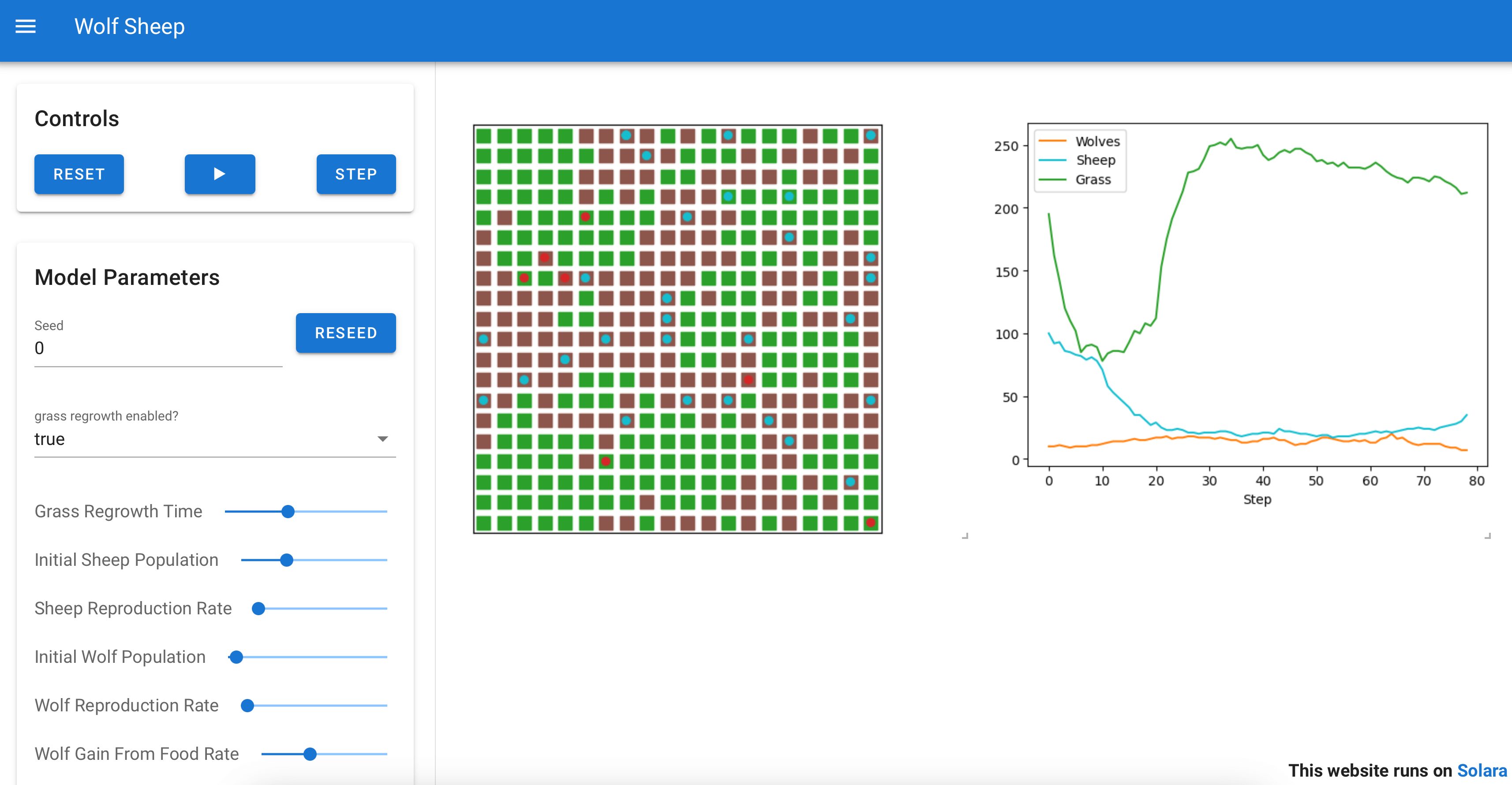
Above: A Mesa implementation of the WolfSheep model, this can be displayed in browser windows or Jupyter. An online demo is available here.
Features
- Modular components
- Browser-based visualization
- Built-in tools for analysis
- Example model library
Using Mesa
To install our latest stable release, run:
pip install -U mesa
Starting with Mesa 3.0, we don't install all our dependencies anymore by default.
# You can customize the additional dependencies you need, if you want. Available are:
pip install -U "mesa[network,viz]"

# This is equivalent to our recommended dependencies:
pip install -U "mesa[rec]"

# To install all, including developer, dependencies:
pip install -U "mesa[all]"
You can also use pip to install the latest GitHub version:
pip install -U -e git+https://github.com/mesa/mesa@main#egg=mesa
Or any other (development) branch on this repo or your own fork:
pip install -U -e git+https://github.com/YOUR_FORK/mesa@YOUR_BRANCH#egg=mesa
Resources
For resources or help on using Mesa, check out the following:
- Getting Started (A collection of tutorials that will walk you through a basic model.)
- GSoC at Mesa — Candidates Guide (For candidates interested in participating in the Google Summer of Code at Mesa)
- Mesa Examples (A repository of seminal ABMs that are part of the Mesa[rec] install and use the most current Mesa release)
- Docs (Mesa's documentation, API and useful snippets)
- Development version docs (the latest version docs if you're using a pre-release Mesa version)
- Discussions (GitHub threaded discussions about Mesa)
- Matrix Chat (Chat Forum via Matrix to talk about Mesa)
Running Mesa in Docker
You can run Mesa in a Docker container in a few ways.
If you are a Mesa developer, first install Docker Compose and then, in the folder containing the Mesa Git repository, you run:
$ docker compose up
# If you want to make it run in the background, you instead run
$ docker compose up -d
This runs the Schelling model, as an example.
With the docker-compose.yml file in this Git repository, the docker compose up command does two important things:
- It mounts the mesa root directory (relative to the docker-compose.yml file) into /opt/mesa and runs pip install -e on that directory so your changes to mesa should be reflected in the running container.
- It binds the docker container's port 8765 to your host system's port 8765 so you can interact with the running model as usual by visiting localhost:8765 on your browser
If you are a model developer that wants to run Mesa on a model, you need to:
- make sure that your model folder is inside the folder containing the docker-compose.yml file
- change the
MODEL_DIRvariable in docker-compose.yml to point to the path of your model - make sure that the model folder contains an app.py file
Then, you just need to run docker compose up -d to have it
accessible from localhost:8765.
Contributing to Mesa
Want to join the Mesa team or just curious about what is happening with Mesa? You can...
- Join our Matrix chat room in which questions, issues, and ideas can be (informally) discussed.
- Come to a monthly dev session (you can find dev session times, agendas and notes on Mesa discussions).
- Just check out the code on GitHub.
If you run into an issue, please file a ticket for us to discuss. If possible, follow up with a pull request.
If you would like to add a feature, please reach out via ticket or join a dev session (see Mesa discussions). A feature is most likely to be added if you build it!
Don't forget to checkout the Contributors guide.
Citing Mesa
To cite Mesa in your publication, you can refer to our peer-reviewed article in the Journal of Open Source Software (JOSS):
- ter Hoeven, E., Kwakkel, J., Hess, V., Pike, T., Wang, B., rht, & Kazil, J. (2025). Mesa 3: Agent-based modeling with Python in 2025. Journal of Open Source Software, 10(107), 7668. https://doi.org/10.21105/joss.07668
Our CITATION.cff can be used to generate APA, BibTeX and other citation formats.
Project details
Verified details
These details have been verified by PyPIProject links
Owner
GitHub Statistics
Maintainers
Release history Release notifications | RSS feed


Download files
Download the file for your platform. If you're not sure which to choose, learn more about installing packages.
Source Distribution
Built Distribution
Filter files by name, interpreter, ABI, and platform.
If you're not sure about the file name format, learn more about wheel file names.
Copy a direct link to the current filters
File details
Details for the file mesa-3.5.0.tar.gz.
File metadata
- Download URL: mesa-3.5.0.tar.gz
- Upload date:
- Size: 665.0 kB
- Tags: Source
- Uploaded using Trusted Publishing? Yes
- Uploaded via: twine/6.1.0 CPython/3.13.7
File hashes
| Algorithm | Hash digest | |
|---|---|---|
| SHA256 |
5373672a91e818a0f91a63bf7e51bd35ea3f59ac9d8b43efe49e8469c38bb7a1
|
|
| MD5 |
014f6f62445404a9afdf3b919d61f707
|
|
| BLAKE2b-256 |
33b7d6e9ccf9c186cbc5c2467f3d1678353e4b8d4b0a30f1626810e7401ebdf4
|
Provenance
The following attestation bundles were made for mesa-3.5.0.tar.gz:
Publisher:
release.yml on mesa/mesa
-
Statement:
-
Statement type:
https://in-toto.io/Statement/v1 -
Predicate type:
https://docs.pypi.org/attestations/publish/v1 -
Subject name:
mesa-3.5.0.tar.gz -
Subject digest:
5373672a91e818a0f91a63bf7e51bd35ea3f59ac9d8b43efe49e8469c38bb7a1 - Sigstore transparency entry: 953573793
- Sigstore integration time:
-
Permalink:
mesa/mesa@69ad0dacb46c66eca62f05f4eeadf4f9898b1ddd -
Branch / Tag:
refs/tags/v3.5.0 - Owner: https://github.com/mesa
-
Access:
public
-
Token Issuer:
https://token.actions.githubusercontent.com -
Runner Environment:
github-hosted -
Publication workflow:
release.yml@69ad0dacb46c66eca62f05f4eeadf4f9898b1ddd -
Trigger Event:
push
-
Statement type:
File details
Details for the file mesa-3.5.0-py3-none-any.whl.
File metadata
- Download URL: mesa-3.5.0-py3-none-any.whl
- Upload date:
- Size: 272.3 kB
- Tags: Python 3
- Uploaded using Trusted Publishing? Yes
- Uploaded via: twine/6.1.0 CPython/3.13.7
File hashes
| Algorithm | Hash digest | |
|---|---|---|
| SHA256 |
9e1694d106febed0bb782925ef4540df0c8b22a330b1ddfc2e397962910cc7ce
|
|
| MD5 |
8db0bf43993e5bb27922bb2d34fae85c
|
|
| BLAKE2b-256 |
faacf53ac70dc149279b8275e1340ee100d32b3f6f7115023780f291d3fd0955
|
Provenance
The following attestation bundles were made for mesa-3.5.0-py3-none-any.whl:
Publisher:
release.yml on mesa/mesa
-
Statement:
-
Statement type:
https://in-toto.io/Statement/v1 -
Predicate type:
https://docs.pypi.org/attestations/publish/v1 -
Subject name:
mesa-3.5.0-py3-none-any.whl -
Subject digest:
9e1694d106febed0bb782925ef4540df0c8b22a330b1ddfc2e397962910cc7ce - Sigstore transparency entry: 953573794
- Sigstore integration time:
-
Permalink:
mesa/mesa@69ad0dacb46c66eca62f05f4eeadf4f9898b1ddd -
Branch / Tag:
refs/tags/v3.5.0 - Owner: https://github.com/mesa
-
Access:
public
-
Token Issuer:
https://token.actions.githubusercontent.com -
Runner Environment:
github-hosted -
Publication workflow:
release.yml@69ad0dacb46c66eca62f05f4eeadf4f9898b1ddd -
Trigger Event:
push
-
Statement type:






