
CLANA is a toolkit for classifier analysis.

Project description






clana
clana is a toolkit for classifier analysis. One key contribution of clana is
Confusion Matrix Ordering (CMO) as explained in chapter 5 of Analysis and Optimization of Convolutional Neural Network Architectures. It is a technique
that can be applied to any multi-class classifier and helps to understand which
groups of classes are most similar.
Installation
The recommended way to install clana is:
$ pip install clana --user
If you want the latest version:
$ git clone https://github.com/MartinThoma/clana.git; cd clana
$ pip install -e . --user
Usage
$ clana --help
Usage: clana [OPTIONS] COMMAND [ARGS]...

  Clana is a toolkit for classifier analysis.

  See https://arxiv.org/abs/1707.09725, Chapter 4.

Options:
  --version  Show the version and exit.
  --help     Show this message and exit.

Commands:
  distribution   Get the distribution of classes in a dataset.
  get-cm         Generate a confusion matrix from predictions and ground...
  get-cm-simple  Generate a confusion matrix.
  visualize      Optimize and visualize a confusion matrix.
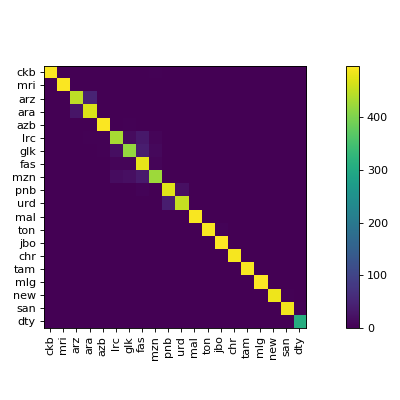
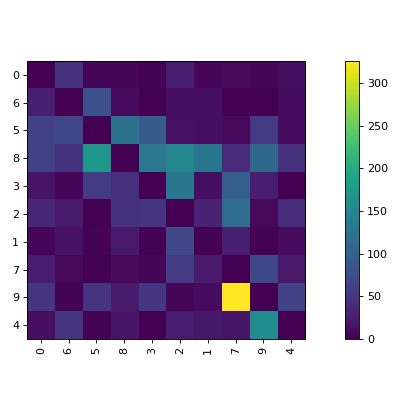
The visualize command gives you images like this:
MNIST example
$ cd docs/
$ python mnist_example.py  # creates `train-pred.csv` and `test-pred.csv`
$ clana get-cm --gt gt-train.csv  --predictions train-pred.csv --n 10
2019-09-14 09:47:30,655 - root - INFO - cm was written to 'cm.json'
$ clana visualize --cm cm.json --zero_diagonal
Score: 13475
2019-09-14 09:49:41,593 - root - INFO - n=10
2019-09-14 09:49:41,593 - root - INFO - ## Starting Score: 13475.00
2019-09-14 09:49:41,594 - root - INFO - Current: 13060.00 (best: 13060.00, hot_prob_thresh=100.0000%, step=0, swap=False)
[...]
2019-09-14 09:49:41,606 - root - INFO - Current: 9339.00 (best: 9339.00, hot_prob_thresh=100.0000%, step=238, swap=False)
Score: 9339
Perm: [0, 6, 5, 8, 3, 2, 1, 7, 9, 4]
2019-09-14 09:49:41,639 - root - INFO - Classes: [0, 6, 5, 8, 3, 2, 1, 7, 9, 4]
Accuracy: 93.99%
2019-09-14 09:49:41,725 - root - INFO - Save figure at '/home/moose/confusion_matrix.tmp.pdf'
2019-09-14 09:49:41,876 - root - INFO - Found threshold for local connection: 398
2019-09-14 09:49:41,876 - root - INFO - Found 9 clusters
2019-09-14 09:49:41,877 - root - INFO - silhouette_score=-0.012313948323292875
    1: [0]
    1: [6]
    1: [5]
    1: [8]
    1: [3]
    1: [2]
    1: [1]
    2: [7, 9]
    1: [4]
This gives
Label Manipulation
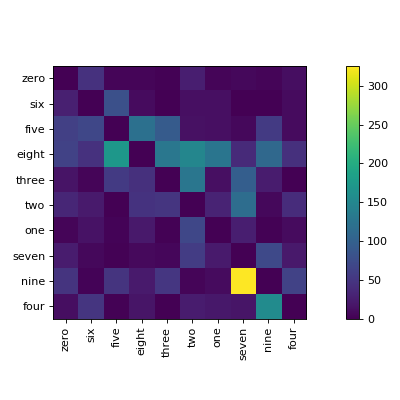
Prepare a labels.csv which has to have a header row:
$ clana visualize --cm cm.json --zero_diagonal --labels mnist/labels.csv
Data distribution
$ clana distribution --gt gt.csv --labels labels.csv [--out out/] [--long]
prints one line per label, e.g.
60% cat (56789 elements)
20% dog (12345 elements)
 5% mouse (1337 elements)
 1% tux (314 elements)
If --out is specified, it creates a horizontal bar chart. The first bar is
the most common class, the second bar is the second most common class, ...
It uses the short labels, except --long is added to the command.
Metrics
$ clana metrics --gt gt.csv --preds preds.csv
gives the following metrics by
- Line 1: Accuracy
- Line 2: Precision
- Line 3: Recall
- Line 4: F1-Score
- Line 5: Mean accuracy
Visualizations
See visualizations
Usage as a library
>>> import numpy as np
>>> arr = np.array([[9, 4, 7, 3, 8, 5, 2, 8, 7, 6],
                    [4, 9, 2, 8, 5, 8, 7, 3, 6, 7],
                    [7, 2, 9, 1, 6, 3, 0, 8, 5, 4],
                    [3, 8, 1, 9, 4, 7, 8, 2, 5, 6],
                    [8, 5, 6, 4, 9, 6, 3, 7, 8, 7],
                    [5, 8, 3, 7, 6, 9, 6, 4, 7, 8],
                    [2, 7, 0, 8, 3, 6, 9, 1, 4, 5],
                    [8, 3, 8, 2, 7, 4, 1, 9, 6, 5],
                    [7, 6, 5, 5, 8, 7, 4, 6, 9, 8],
                    [6, 7, 4, 6, 7, 8, 5, 5, 8, 9]])
>>> from clana.optimize import simulated_annealing
>>> result = simulated_annealing(arr)
>>> result.cm
array([[9, 8, 7, 6, 5, 4, 3, 2, 1, 0],
       [8, 9, 8, 7, 6, 5, 4, 3, 2, 1],
       [7, 8, 9, 8, 7, 6, 5, 4, 3, 2],
       [6, 7, 8, 9, 8, 7, 6, 5, 4, 3],
       [5, 6, 7, 8, 9, 8, 7, 6, 5, 4],
       [4, 5, 6, 7, 8, 9, 8, 7, 6, 5],
       [3, 4, 5, 6, 7, 8, 9, 8, 7, 6],
       [2, 3, 4, 5, 6, 7, 8, 9, 8, 7],
       [1, 2, 3, 4, 5, 6, 7, 8, 9, 8],
       [0, 1, 2, 3, 4, 5, 6, 7, 8, 9]])
>>> result.perm
array([2, 7, 0, 4, 8, 9, 5, 1, 3, 6])
You can visualize the result.cm and use the result.perm to get your labels
in the same order:
# Just some example labels
# ['0', '1', '2', '3', '4', '5', '6', '7', '8', '9', '10']
>>> labels = [str(el) for el in range(11)]
>>> np.array(labels)[result.perm]
array(['2', '7', '0', '4', '8', '9', '5', '1', '3', '6'], dtype='<U2')
Release history Release notifications | RSS feed


Download files
Download the file for your platform. If you're not sure which to choose, learn more about installing packages.
Source Distribution
Built Distribution
Filter files by name, interpreter, ABI, and platform.
If you're not sure about the file name format, learn more about wheel file names.
Copy a direct link to the current filters
File details
Details for the file clana-0.4.0.tar.gz.
File metadata
- Download URL: clana-0.4.0.tar.gz
- Upload date:
- Size: 22.0 kB
- Tags: Source
- Uploaded using Trusted Publishing? No
- Uploaded via: twine/3.2.0 pkginfo/1.5.0.1 requests/2.24.0 setuptools/41.2.0 requests-toolbelt/0.9.1 tqdm/4.47.0 CPython/3.8.3
File hashes
| Algorithm | Hash digest | |
|---|---|---|
| SHA256 |
6a0f933cd4a4c60cf5023b7a5135bc2690e55090e2d952f16806aa0b3e891742
|
|
| MD5 |
590c0ef5b3c2bac72dc0d145c931a12c
|
|
| BLAKE2b-256 |
d8f78a9bb28d8c67b0b11895646ba435063bb82debb0e86112b7c677ce75c4bc
|
File details
Details for the file clana-0.4.0-py3-none-any.whl.
File metadata
- Download URL: clana-0.4.0-py3-none-any.whl
- Upload date:
- Size: 23.7 kB
- Tags: Python 3
- Uploaded using Trusted Publishing? No
- Uploaded via: twine/3.2.0 pkginfo/1.5.0.1 requests/2.24.0 setuptools/41.2.0 requests-toolbelt/0.9.1 tqdm/4.47.0 CPython/3.8.3
File hashes
| Algorithm | Hash digest | |
|---|---|---|
| SHA256 |
b55bf9dbd095c12233b6f0d06fd2e33dde57fdce001fa471fba67ec7f6d36636
|
|
| MD5 |
9f429ca23c8843dc8897c8d22f949536
|
|
| BLAKE2b-256 |
c7fa75393e740d2c9b5ebaec3f5b0e5a017c75030d90aa8bf1644cecb7501a02
|






