
encrypt text in emojis

Project description
EmojiCrypt_pip
EmojiCrypt is an open source project that allows you to encrypt and decrypt messages using emojis. It is a fun and creative way to communicate with your friends, family or colleagues.
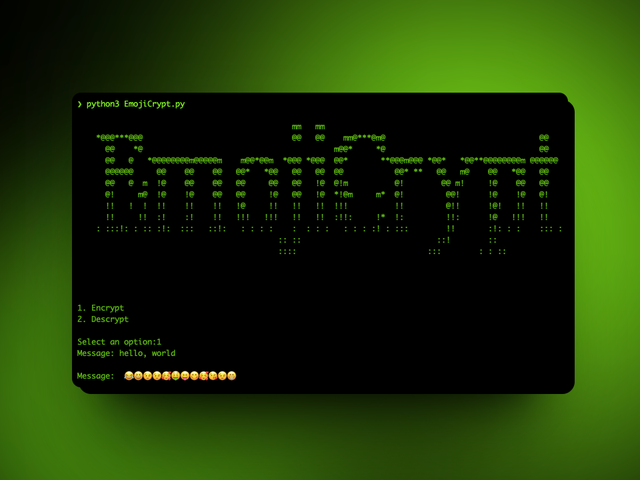
How it works
EmojiCrypt uses a simple algorithm to convert each letter and symbol of your message into a corresponding emoji, according to a numerical key that you choose. For example, if your key is 3, the letter “a” becomes the emoji 😁, the letter “b” becomes the emoji 🤣, and so on. To decrypt the message, you just have to do the reverse process, using the same key.
How to install it
To install EmojiCrypt, you need to have Python 3 installed on your computer. You also need to install the colorama module, which you can do with the following command: pip install -r requeriments.txt or pip3 install -r requeriments.txt
Then, you just have to clone this repository in your preferred directory: git clone https://github.com/your-username/EmojiCrypt.git
cd EmojiCrypt
How to use it
To use EmojiCrypt to crypt, you just have to run the crypt.py file with Python: python crypt.py or python3 crypt.py
EmojiCrypt is an open source project and contributions from anyone interested in improving the code, documentation or functionality are welcome. If you want to contribute, you can do the following: Create an issue reporting a bug, suggesting an improvement or requesting a new feature. Fork the repository and create a branch with your changes. Then, make a pull request explaining what you have done and why. Share the project with your friends, social networks or developer communities.
License
EmojiCrypt is licensed under the GNU GENERAL PUBLIC LICENSE Version 3, which you can consult in the LICENSE file of this repository.


Download files
Download the file for your platform. If you're not sure which to choose, learn more about installing packages.
Source Distribution
Built Distribution
Filter files by name, interpreter, ABI, and platform.
If you're not sure about the file name format, learn more about wheel file names.
Copy a direct link to the current filters
File details
Details for the file EmojiCrypt_pip-0.1.tar.gz.
File metadata
- Download URL: EmojiCrypt_pip-0.1.tar.gz
- Upload date:
- Size: 16.6 kB
- Tags: Source
- Uploaded using Trusted Publishing? No
- Uploaded via: twine/4.0.2 CPython/3.9.18
File hashes
| Algorithm | Hash digest | |
|---|---|---|
| SHA256 |
ba245595afeb07ad994ef497d26e42dea2d286ea7d88d5126930df1c792254c3
|
|
| MD5 |
e3044d94340396f6899d4b2ed4f49a18
|
|
| BLAKE2b-256 |
4693c33d53f967e680a30aefe4db6533a5a47eb25e8adca703cb43f0d6e92b21
|
File details
Details for the file EmojiCrypt_pip-0.1-py3-none-any.whl.
File metadata
- Download URL: EmojiCrypt_pip-0.1-py3-none-any.whl
- Upload date:
- Size: 15.5 kB
- Tags: Python 3
- Uploaded using Trusted Publishing? No
- Uploaded via: twine/4.0.2 CPython/3.9.18
File hashes
| Algorithm | Hash digest | |
|---|---|---|
| SHA256 |
f3bac55ece551d2ca1cc6533ad52c3826befa7a98d66d848f2558209fd0f71e2
|
|
| MD5 |
0b9f805c231ce362514762829bbd90c0
|
|
| BLAKE2b-256 |
13db3c480c730280e8fd8debb8c7c94c6b8ff9b4ea8522fbba95555b1039b1cc
|






