
The Alpha Qt version of PySimpleGUI, the GUI SDK Launched in 2018 Actively developed and supported. Super-simple to create custom GUI's. Now supports both tkinter an Qt


Project description



PySimpleGUIQt
"Qt without the ugly"
The Alpha Release Version 0.12.0
Announcements of Latest Developments
----- ## Getting Started with PySimpleGUIQt
Welcome to the Alpha Release of PySimpleGUI for Qt!
You can use the exact same code that you are running on the older, tkinter, version of PySimpleGUI.
PySimpleGUIQt uses PySide2 OR PyQt5 for access to Qt.
Porting your PySimpleGUI code to PySimpleGUIQt
To "port" your code from the tkinter implementation. Follow these steps:
- Change
import PySimpleGUItoPySimpleGUIQt
That's it! OK, maybe I should have said step instead of steps.
Differences between PySimpleGUI and PySimpleGUIQt
Sizes
While you can use "Character-based" sizes like you did in tkinter, it's best to use pixel based sizes as that is what Qt uses. PySimpleGUIQt does some very rough / basic conversions from the character sizes to pixel sizes. It's enough that your elements will at least be visible. But the conversion is likely to not be ideal.
Fonts
Fonts should be in the format (font family, size). You can use the older string based too, but it will not work with setting like bold and italics. PySimpleGUIQt converts from the string 'Courier 20' to the tuple ('Courier', 20) for you.
Installing PySimpleGUIQt for Python 3
pip install --upgrade PySimpleGUIQt
On Linux systems you need to run pip3.
pip3 install --upgrade PySimpleGUIQt
Installing PySide2 or PyQt5 for Python 3
It is recommended that you use PySide2, however, if that cannot be found, then PyQt5 will be attempted. To install either of these:
pip install PySide2
or
pip install PyQt5
Testing your installation
Once you have installed, or copied the .py file to your app folder, you can test the installation using python. At the command prompt start up Python.
python3 >>> import PySimpleGUIQt >>> PySimpleGUIQt.main()
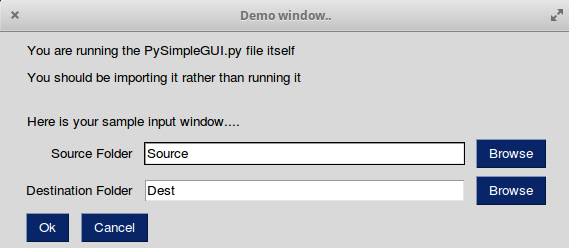
You will see a sample window in the center of your screen. If it's not installed correctly you are likely to get an error message during one of those commands
Here is the window you should see:
Prerequisites Python 3
PySide2 or PyQt5
Using - Python 3
To use in your code, simply import....
import PySimpleGUIQt as sg
Then use the exact same code as any other PySimpleGUI program that runs on tkinter.
Status
FEATURE COMPLETE!
All of the major features are DONE. They may not have all of their options working, but they can be added to your windows. It's been an amazing week to get here.
I hope you enjoy this ALPHA release! Please post a screenshot on the GitHub site. There is an Issue where users have been posting their applications. It's a place for you to show-off and a place for others to learn from your designs. Your window does not have to be complex.... all GUIs, no matter how simple, are something we can learn from.
Functioning features
Features are being added daily to this Qt port of PySimpleGUI.
These Elements are "complete" (a relative term... more are more complete than others):
- Text
- Input single line
- Input multiline
- Output multiline (new)
- Dial (new)
- Output - reroute stdout
- Spinner
- Sliders
- Buttons - RButtons, CButtons, Short-cut Buttons
- Checkbox
- Radio Buttons
- Listbox
- ComboBox
- Labeled Frames
- Columns - enables you to make pretty much any layout!
- Alpha channel for windows
- No Title Bar setting
- Enter submits for multiline
- Fonts
- Colors for text and background
- Timeouts for Read calls
- Change Submits parametes for most Elements
- Table
- Basic display
- Read selected rows
- change_submits events
- Updates
- Image as a background (new feature)
- Graph - Draw line, draw circle, draw text
- Image Element
- Tree Element
- Tabs
- Menus
Missing Features
Notable MISSING features at the moment include:
- Graphs Element Methods - erasing, draw arc, etc
Release Notes:
0.12.0 - 20-Nov-2018
Correctly restore stdout when OutputElement is deleted
Added Finalize ability
Better multiwindow handling... maybe it's finally fixed!
Radio button default value
Dial element default value
Show expanded option for trees
Titles for popups
Design
Author
Mike B.
Demo Code Contributors
License
GNU Lesser General Public License (LGPL 3) +
Acknowledgments
Release history Release notifications | RSS feed


Download files
Download the file for your platform. If you're not sure which to choose, learn more about installing packages.
Source Distribution
Built Distribution
Filter files by name, interpreter, ABI, and platform.
If you're not sure about the file name format, learn more about wheel file names.
Copy a direct link to the current filters
File details
Details for the file PySimpleGUIQt-0.12.0.tar.gz.
File metadata
- Download URL: PySimpleGUIQt-0.12.0.tar.gz
- Upload date:
- Size: 47.0 kB
- Tags: Source
- Uploaded using Trusted Publishing? No
- Uploaded via: twine/1.11.0 pkginfo/1.4.2 requests/2.18.4 setuptools/40.5.0 requests-toolbelt/0.8.0 tqdm/4.19.2 CPython/3.6.2
File hashes
| Algorithm | Hash digest | |
|---|---|---|
| SHA256 |
1e637cd477a24600f5b8b8b2c34b7dd9f47892cdad3162469f83685fe105c1c8
|
|
| MD5 |
bbd6ed6786a9e9d47a4d2ea1b0851dec
|
|
| BLAKE2b-256 |
59d43153568e9af6995ac843563db18605928aa9032a2763cbe0d5eda28f6abb
|
File details
Details for the file PySimpleGUIQt-0.12.0-py3-none-any.whl.
File metadata
- Download URL: PySimpleGUIQt-0.12.0-py3-none-any.whl
- Upload date:
- Size: 45.2 kB
- Tags: Python 3
- Uploaded using Trusted Publishing? No
- Uploaded via: twine/1.11.0 pkginfo/1.4.2 requests/2.18.4 setuptools/40.5.0 requests-toolbelt/0.8.0 tqdm/4.19.2 CPython/3.6.2
File hashes
| Algorithm | Hash digest | |
|---|---|---|
| SHA256 |
9ed2cffc1f18bf63ed4835c1d8ccb0c7d8c4ee47a597b5a26a29c4b0baf7171e
|
|
| MD5 |
700a7b0d2d77df3b60e1ca32269742f6
|
|
| BLAKE2b-256 |
15a0faa9904ab0b0b17f798b792f2d659983c18a84d15f2bf7912ecb2b054213
|






