
No project description provided

Project description
Description
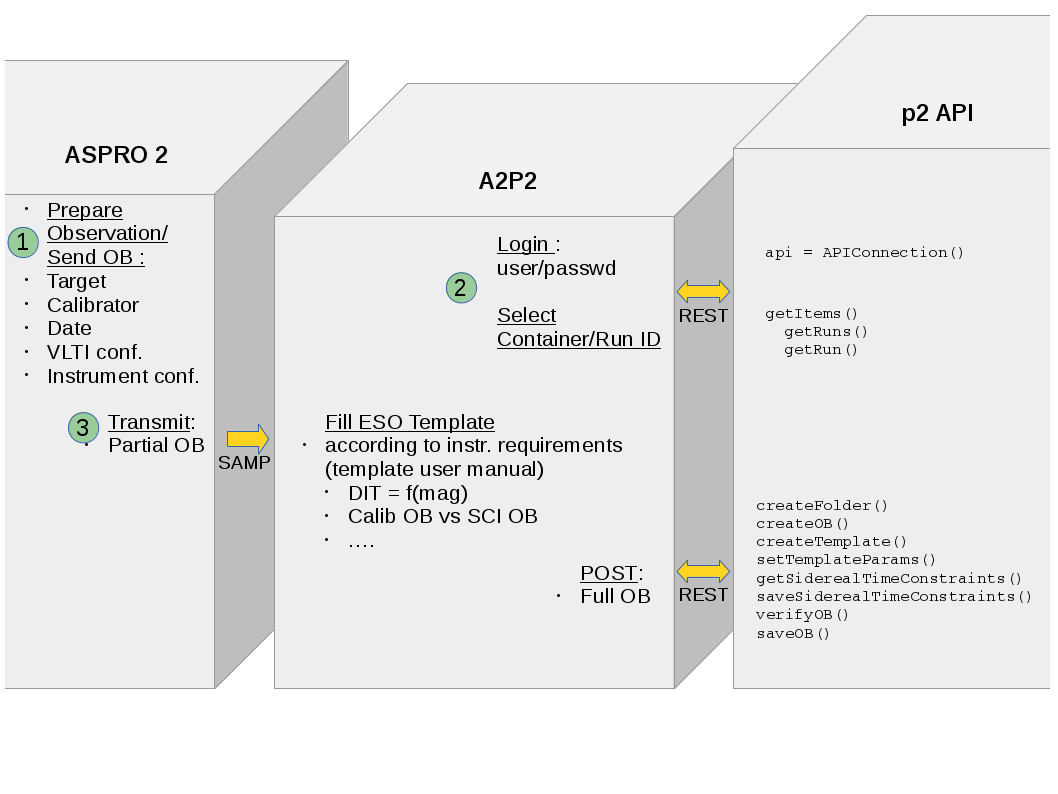
Prepare your observations within Aspro2 ( V0.9.9.3+ ) and run a2p2 to submit your OB.
Once setup ready, select your target and use Interop Menu
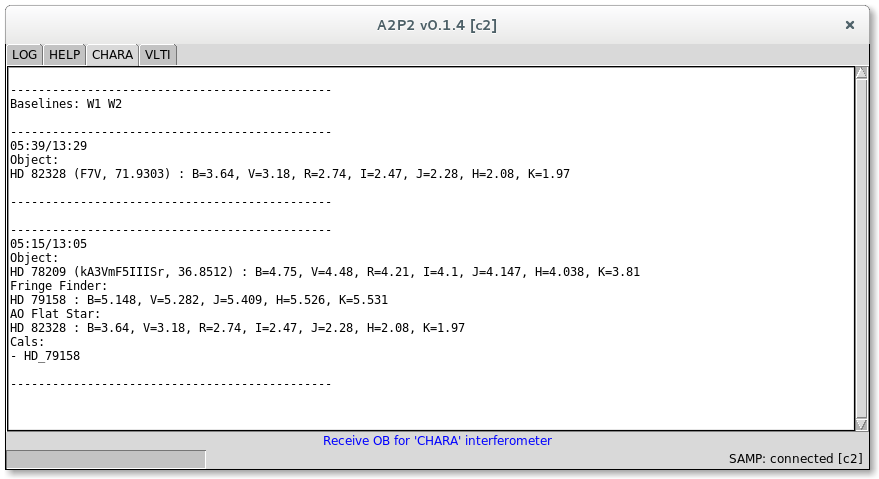
CHARA OB are only displayed in the GUI for the first implementations.
ESO OB are ready to be submitted through P2. You can use the demo account for tests or have to provide your credential for real cases.
Installation
The package is uploaded to PyPI, so you can install the package (and/or upgrade it) using pip:
pip install --upgrade [--user] a2p2
You can also build and install from sources using git:
git clone https://github.com/JMMC-OpenDev/a2p2.git
pip install [--user] ./a2p2
Prerequisites
Some basic tests have been operated on windows, Linux and Mac OS.
a2p2 should launch the program. You may have to run python a2p2 on windows.
You may have to install some package to run tk GUI (python-tk on linux).
Usage
a2p2 [-h] [-u USERNAME] [-v]
- optional arguments:
- -h, --help
show this help message and exit
- -u USERNAME, --username USERNAME
use another user login in history’s comments.
- -v, --verbose
Verbose
A GUI is provided using tkinter.
- Once Aspro2 is running and a2p2 is connected to an OB submission service (using P2API) :
select your target
enter the Aspro2’s menu Interop/Send Obs. block(s) to A2p2
After few seconds, you shoud get a report of your new submission.
Each facilities get it’s own code directory to manage specific GUI and specific OB processing. You can get associated inline help in the HELP tab.
Please fill an issue for any question, remark or enhancement request.
License
A2P2 is released under GPL license. Please have a look in the LICENSE file for any detail and feel free to fill issues.
Screenshot
Interaction diagram
Release history Release notifications | RSS feed


Download files
Download the file for your platform. If you're not sure which to choose, learn more about installing packages.
Source Distribution
Built Distribution
Filter files by name, interpreter, ABI, and platform.
If you're not sure about the file name format, learn more about wheel file names.
Copy a direct link to the current filters
File details
Details for the file a2p2-0.2.8.tar.gz.
File metadata
- Download URL: a2p2-0.2.8.tar.gz
- Upload date:
- Size: 37.6 kB
- Tags: Source
- Uploaded using Trusted Publishing? No
- Uploaded via: twine/1.15.0 pkginfo/1.5.0.1 requests/2.22.0 setuptools/45.1.0 requests-toolbelt/0.9.1 tqdm/4.42.0 CPython/3.5.3
File hashes
| Algorithm | Hash digest | |
|---|---|---|
| SHA256 |
ecf86e5d45773c3f1665db91c0c7393b0d7bee3ae0822edffc432066c8e00444
|
|
| MD5 |
4f67a7f9f644d877005a67ad3a08aa75
|
|
| BLAKE2b-256 |
45dd1199319c797208aead409dddb79c25455f6f4de01616a0d5720ec9d1f2c7
|
File details
Details for the file a2p2-0.2.8-py3-none-any.whl.
File metadata
- Download URL: a2p2-0.2.8-py3-none-any.whl
- Upload date:
- Size: 65.3 kB
- Tags: Python 3
- Uploaded using Trusted Publishing? No
- Uploaded via: twine/1.15.0 pkginfo/1.5.0.1 requests/2.22.0 setuptools/45.1.0 requests-toolbelt/0.9.1 tqdm/4.42.0 CPython/3.5.3
File hashes
| Algorithm | Hash digest | |
|---|---|---|
| SHA256 |
f062ed677ab21fea0f1582f49da963d7435bf09648da4ccb18146ddc15073a68
|
|
| MD5 |
73353e2a464e8a5732ecb3f65a54d1c7
|
|
| BLAKE2b-256 |
1259214095f570736979eaadca24ecbc93a75c15d52bd79e62fd22a6ce5d8758
|






