
Fleet finder plugin for Alliance Auth

Project description
AA Fleet Finder













Control access to your fleets through Alliance Auth.
Installation
[!NOTE]
AA Fleet Finder >= 2.0.0 needs at least Alliance Auth v4.0.0!
Please make sure to update your Alliance Auth instance before you install this module or update to the latest version, otherwise an update to Alliance Auth will be pulled in unsupervised.
The last version compatible with Alliance Auth v3 is
1.5.2.
Step 1: Install the Package
Make sure you're in the virtual environment (venv) of your Alliance Auth installation Then install the latest release directly from PyPi.
pip install aa-fleetfinder
Step 2: Configure Alliance Auth
This is fairly simple, just add the following to the INSTALLED_APPS of your local.py
Configure your AA settings (local.py) as follows:
- Add
"fleetfinder",toINSTALLED_APPS
Step 3: Add the Scheduled Task
To set up the scheduled task, add the following code to your local.py:
# AA Fleetfinder - https://github.com/ppfeufer/aa-fleetfinder
if "fleetfinder" in INSTALLED_APPS:
    CELERYBEAT_SCHEDULE["fleetfinder_check_fleet_adverts"] = {
        "task": "fleetfinder.tasks.check_fleet_adverts",
        "schedule": crontab(minute="*/1"),
    }
Step 4: Finalizing the Installation
Run static files collection and migrations
python manage.py collectstatic
python manage.py migrate
Step 4: Setup Permissions
Now it's time to set up access permissions for your new Fleetfinder module.
| ID | Description | Notes |
|---|---|---|
access_fleetfinder |
Can access the Fleetfinder module | Your line members should have this permission, together with everyone you want to have access to he module. |
manage_fleets |
Can manage fleets | Everyone with this permission can open and edit fleets |
Changelog
See CHANGELOG.md
Translation Status
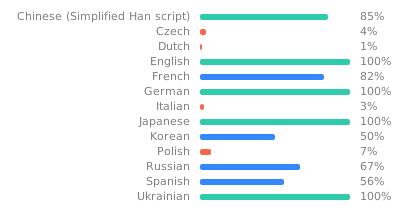
Do you want to help translate this app into your language or improve the existing translation? - Join our team of translators!
Contributing
You want to contribute to this project? That's cool!
Please make sure to read the Contribution Guidelines.
(I promise, it's not much, just some basics)
Release history Release notifications | RSS feed


Download files
Download the file for your platform. If you're not sure which to choose, learn more about installing packages.
Source Distribution
Built Distribution
Filter files by name, interpreter, ABI, and platform.
If you're not sure about the file name format, learn more about wheel file names.
Copy a direct link to the current filters
File details
Details for the file aa_fleetfinder-2.0.0.tar.gz.
File metadata
- Download URL: aa_fleetfinder-2.0.0.tar.gz
- Upload date:
- Size: 67.3 kB
- Tags: Source
- Uploaded using Trusted Publishing? No
- Uploaded via: twine/5.0.0 CPython/3.12.2
File hashes
| Algorithm | Hash digest | |
|---|---|---|
| SHA256 |
8e399dfc889e181cb46fe386047282f9478d30bee5e89a518d24587ad721a47a
|
|
| MD5 |
b9c97dddb123fb7b0e0b9bc7ec70252a
|
|
| BLAKE2b-256 |
9b03d97d471ee216ef21101249b151a4eeb4350961bad2ca4c68fa6a0483914f
|
File details
Details for the file aa_fleetfinder-2.0.0-py3-none-any.whl.
File metadata
- Download URL: aa_fleetfinder-2.0.0-py3-none-any.whl
- Upload date:
- Size: 103.6 kB
- Tags: Python 3
- Uploaded using Trusted Publishing? No
- Uploaded via: twine/5.0.0 CPython/3.12.2
File hashes
| Algorithm | Hash digest | |
|---|---|---|
| SHA256 |
f5d6d4441995788b28e2f27a2e44bf4fcd65dc9cd16d989361c7968e9ae96127
|
|
| MD5 |
61e7392866bc6410ba248b310d788817
|
|
| BLAKE2b-256 |
1965b2733ab3ab48cc1597cb6f8d7d19d99dc120ed20398ba5579d9c19d697c4
|






