
An app that helps keep track of installed packages

Project description
Package Monitor
An app for keeping track of installed packages and outstanding updates with Alliance Auth.









Contents
Overview
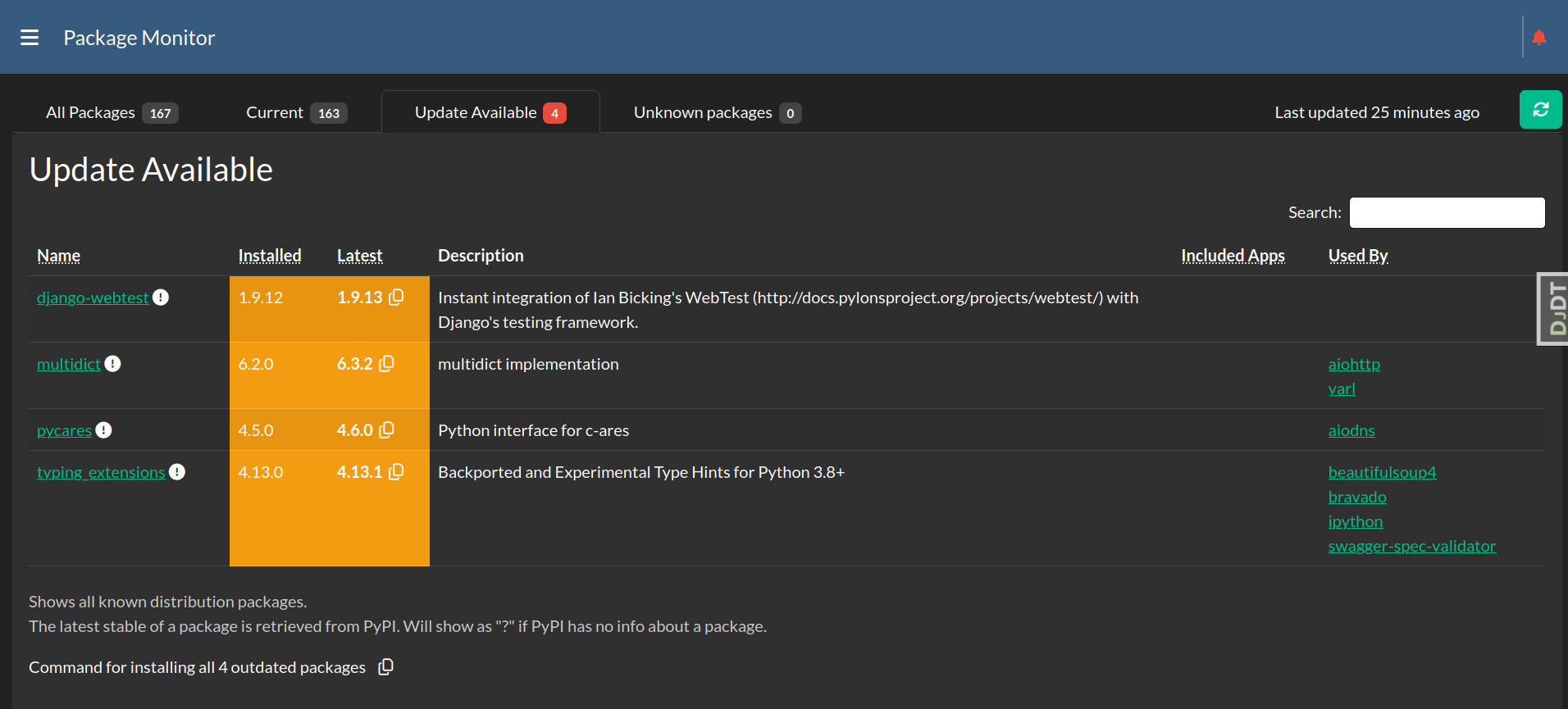
Package Monitor is an app for Alliance Auth that helps you keep your installation up-to-date. It shows you all installed distributions packages and will automatically notify you, when there are updates available.
Features:
- Shows list of installed distributions packages with related Django apps (if any)
- Identifies new valid releases for installed packages on PyPI
- Notifies user which installed packages are outdated and should be updated
- Shows the number of outdated packages as badge in the sidebar
- Takes into account the requirements of all installed packages and the current Python version when recommending updates
- Option to add distribution pages to the monitor which are not related to Django apps
- Option to show all known distribution packages (as opposed to only the ones that belong to installed Django apps)
- Copy the respective command for a package update to your clipboard directly from the package list
- Can automatically notify admins when there is an update available for a currently installed package
- Key features are also available as CLI tool for easier server maintainance and scripting
- Supported languages: English :us:, German :de: and Russian :ru:
Hint: Update notifications are sent as AA notifications to all admins. We recommend using Discord Notify to automatically forward those notifications to Discord as DMs.
Screenshots
Installation
Step 1 - Check Preconditions
Please make sure you meet all preconditions before proceeding:
- Package Monitor is a plugin for Alliance Auth. If you don't have Alliance Auth running already, please install it first before proceeding. (see the official AA installation guide for details)
Step 2 - Install app
Make sure you are in the virtual environment (venv) of your Alliance Auth installation. Then install the newest release from PYPI:
pip install aa-package-monitor
Step 3 - Configure settings
Add 'package_monitor' to INSTALLED_APPS.
Add the following lines to your local.py to enable regular checking for updates:
CELERYBEAT_SCHEDULE['package_monitor_update_distributions'] = {
    'task': 'package_monitor.tasks.update_distributions',
    'schedule': crontab(minute='*/60'),
}
Finally, please also take a moment to consider how often you want to receive update notifications. The default is immediate, but you can also chose to receive notifications after a timeout, e.g. only once per 24 hours or once per week. If you choose a timeout you can also choose to get repeated notifications about the same updates, like a reminder. For more details please see the Settings.
Step 4 - Finalize installation
Run migrations & copy static files
python manage.py migrate
python manage.py collectstatic
Restart your supervisor services for Auth
Step 5 - Initial data load
Last, but not least perform an initial data load of all distribution packages by running the following command:
python manage.py packagemonitorcli refresh
Updating
pip install -U aa-package-monitor

python manage.py collectstatic

python manage.py migrate
Finally restart your AA supervisor services.
User Guide
This section explains how to use the app.
Terminology
To avoid any confusion here are our definitions of some important terms:
- App: A Django application. An app is always part of a distribution package
- Distribution package A Python package that can be installed via pip or setuptools. Distribution packages can contain several apps.
- Requirement: A requirement is a condition that distribution packages can define to specify dependencies to environments or other distribution packages with specific versions. For example the distribution package django-eveuniverse can have the requirement
"django-esi>=2.0", which means is requires the package django-esi in at leasts version 2.0
Operation modes
You can run Package Monitor in one of two modes:
- Keep everything updated
- Keep apps and selected distribution packages updated
Keep everything updated
In this mode Package Monitor will monitor all installed distribution packages. In this mode you will be informed you about updates to any of your distribution packages.
This is the default operation mode.
Keep apps and selected distribution packages updated
With this mode Package Monitor will monitor only those distribution packages that contain actually installed Django apps. In this mode you will be informed if there is an update to any of your apps. Note that in mode A other installed distributions packages will not be shown.
To activate this mode set PACKAGE_MONITOR_SHOW_ALL_PACKAGES to False in your local settings.
You can also add some additional distributions to be monitored. For example you might want to add celery.
See also Settings for an overview of all settings.
Latest version
Package Monitor will automatically determine a latest version for a distribution package from PyPI. Note that this can differ from the latest version shown on PyPI, because of additional considerations:
First, Package Monitor will take into account all requirements of all installed distribution packages. For example if the Alliance Auth has the requirement "Django<3", then it will only show Django 2.x as latest, since Django 3.x would not fullfil the requirement set by Alliance Auth.
Second, Package Monitor will in general ignore pre-releases and consider stable releases for updates only. The only exception is if the current package also is a pre release. For example you may have Black installed as beta release, therefore the app will also suggest newer beta releases.
Settings
Here is a list of available settings for this app. They can be configured by adding them to your AA settings file (local.py).
Note that all settings are optional and the app will use the documented default settings if they are not used.
| Name | Description | Default |
|---|---|---|
| Name | Description | Default |
| -- | -- | -- |
PACKAGE_MONITOR_CUSTOM_REQUIREMENTS |
List of custom requirements that all potential updates are checked against. Example: ["gunicorn<20"] | [] |
PACKAGE_MONITOR_EXCLUDE_PACKAGES |
Names of distribution packages to be excluded. | [] |
PACKAGE_MONITOR_INCLUDE_PACKAGES |
Names of additional distribution packages to be monitored. | [] |
PACKAGE_MONITOR_NOTIFICATIONS_ENABLED |
Whether to notify when an update is available for a currently installed distribution package. | False |
PACKAGE_MONITOR_NOTIFICATIONS_MAX_DELAY |
Maximum delay in seconds between the scheduled event for firing a notification and the time the notification is issued. This value should be synchronized with the timing of the recurring task. | 5400 |
PACKAGE_MONITOR_NOTIFICATIONS_REPEAT |
Whether to repeat notifying about the same updates. | False |
PACKAGE_MONITOR_NOTIFICATIONS_SCHEDULE |
When to send notifications about updates. If not set, update notifications can be send every time the regular task runs. The schedule can be defined in natural language. Examples: "every day at 10:00", "every saturday at 18:00", "every first saturday every month at 15:00". For more information about the syntax please see: recurrent package | `` |
PACKAGE_MONITOR_PROTECTED_PACKAGES |
Names of protected packages. Updates can include requirements for updating other packages, which can potentially break the current AA installation. For example: You have Django 4.2 installed and an update to a package requires Django 5 or higher. Then installing that package may break your installation. When enabled Package Monitor will not show updates, which would cause an indirect update of a protected package. And empty list disables this feature. | ['allianceauth', 'django'] |
PACKAGE_MONITOR_SHOW_ALL_PACKAGES |
Whether to show all distribution packages, as opposed to only showing packages that contain Django apps. | True |
PACKAGE_MONITOR_SHOW_EDITABLE_PACKAGES |
Whether to show distribution packages installed as editable. Since version information about editable packages is often outdated, this type of packages are not shown by default. | False |
Permissions
This is an overview of all permissions used by this app. Note that all permissions are in the "general" section.
| Name | Purpose | Code |
|---|---|---|
| Can access this app and view | User can access the app and also request updates to the list of distribution packages | general.basic_access |
CLI Tool
Package Monitor also comes with a CLI tool which provides all key features trough a CLI interface. You can refresh packages, check which packages are outdated and generate the parameters for installing all outdated packages.
For example for directly installing all outdated packages you can run:
pip install $(python manage.py packagemonitorcli install)
Here is an overview of all commands:
dump: Dump a list of all installed distribution packages and current import paths to stdoutinstall: Print parameters for installing outdated packages for usage withpip install.outdated: Show outdated distribution packagesrefresh: Refresh list of distribution packagesversion: Show version of package_manager app
For more information please run:
python manage.py packagemonitorcli -h
Release history Release notifications | RSS feed


Download files
Download the file for your platform. If you're not sure which to choose, learn more about installing packages.
Source Distribution
Built Distribution
Filter files by name, interpreter, ABI, and platform.
If you're not sure about the file name format, learn more about wheel file names.
Copy a direct link to the current filters
File details
Details for the file aa_package_monitor-2.3.0.tar.gz.
File metadata
- Download URL: aa_package_monitor-2.3.0.tar.gz
- Upload date:
- Size: 89.6 kB
- Tags: Source
- Uploaded using Trusted Publishing? No
- Uploaded via: twine/6.2.0 CPython/3.10.19
File hashes
| Algorithm | Hash digest | |
|---|---|---|
| SHA256 |
500f261f93451a8905216f9caeafe5ebfd110e1daf5b1775e27ff32f2b920662
|
|
| MD5 |
33878bcdcaa49cef4bc6203a53b89a3f
|
|
| BLAKE2b-256 |
a9b77403de176ecd3c34f897660530e49c613ecff82a2ebdb1f73da3c84a4cd3
|
File details
Details for the file aa_package_monitor-2.3.0-py3-none-any.whl.
File metadata
- Download URL: aa_package_monitor-2.3.0-py3-none-any.whl
- Upload date:
- Size: 115.8 kB
- Tags: Python 3
- Uploaded using Trusted Publishing? No
- Uploaded via: twine/6.2.0 CPython/3.10.19
File hashes
| Algorithm | Hash digest | |
|---|---|---|
| SHA256 |
a6554e4acf2c0c96559173589de323c5c19316393d45ce6afa15aee0afb3e975
|
|
| MD5 |
dbea1bddc4ba4c907fc194695e5b76c1
|
|
| BLAKE2b-256 |
b19199211095fbcca4b7c0c99bdc1fde97a339312f0e19afb5f481b346abe686
|






