
chatgpt for academic

Project description
ChatGPT Academic Optimizer







A simple web interface for academic research and experimentation using GPT-3.5.
This is the forked version from the project
If you like this project, please give it a star. If you have come up with more useful academic shortcuts, feel free to open an issue or pull request.
Features
- Automatic paper abstract generation based on a provided LaTeX file
- Automatic code summarization and documentation generation
- C++ project header file analysis
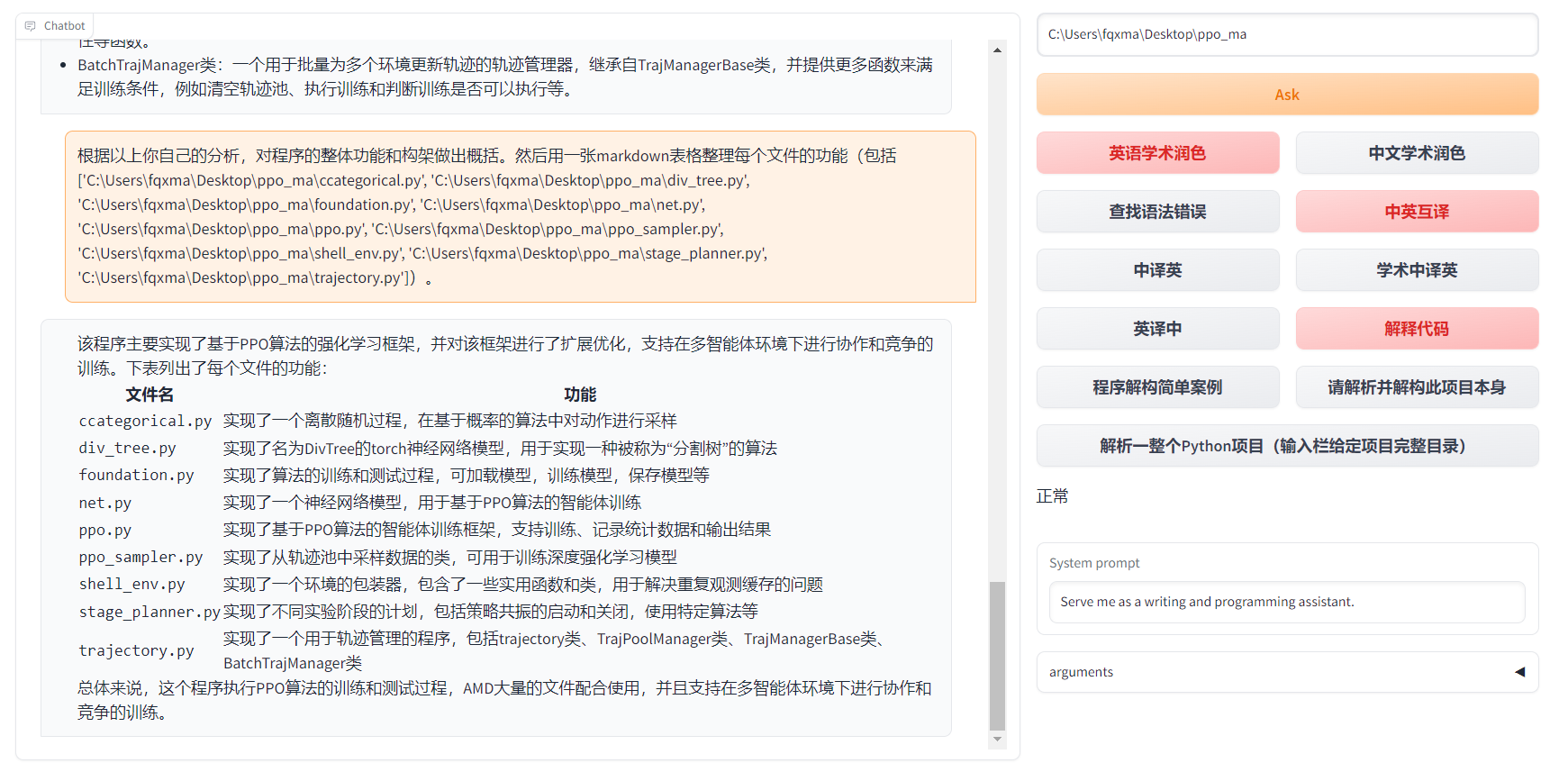
- Python project analysis
- Self-code interpretation and dissection
- Experimental function template
| Function | Description |
|---|---|
| One-click polishing | Supports one-click polishing and finding grammar errors in papers |
| One-click Chinese-English translation | One-click Chinese-English translation |
| One-click code interpretation | Can display code correctly and interpret code |
| Custom shortcut keys | Supports custom shortcut keys |
| Configure proxy server | Supports configuring proxy server |
| Modular design | Supports customizable high-order experimental functions |
| Self-program analysis | [Experimental feature] One-click to understand the source code of this project |
| Program analysis | [Experimental feature] One-click to analyze other Python/C++ projects |
| Reading papers | [Experimental feature] One-click to read the full text of a latex paper and generate an abstract |
| Batch comment generation | [Experimental feature] One-click to generate function comments in batches |
| chat analysis report generation | [Experimental feature] Automatically generates summary reports after running |
| Formula display | Can display the tex form and rendering form of the formula at the same time |
| Image display | Can display images in markdown |
| Supports markdown tables generated by GPT | Supports markdown tables generated by GPT |
- New interface

- All buttons are dynamically generated by reading functional.py, and custom functions can be freely added to free the clipboard

- Code display is also natural https://www.bilibili.com/video/BV1F24y147PD/

- Supports markdown tables generated by GPT

- If the output contains formulas, it will be displayed in both tex and rendering forms at the same time for easy copying and reading

- Too lazy to look at the project code? Just show off the chatgpt mouth
Usage
Prerequisites
- OpenAI API key (can be obtained from here)
- Python 3.9 or higher
Setup
$pip install academic-chatgpt
Run
- Set your OpenAI API key and other configurations in
chataca.tomlor~/.config/chataca/chataca.toml
The configuration file will locate at current working directory or ~/.config/chataca/.
The example of chataca.toml
API_KEY = "sk-zH**********************************************"
API_URL = "https://api.openai.com/v1/chat/completions"
USE_PROXY = false
TIMEOUT_SECONDS = 30
WEB_PORT = 8080
MAX_RETRY = 3
LLM_MODEL = "gpt-3.5-turbo"
If you are in China, you need to set up an overseas agent to use the OpenAI API.
- Start the server:
chataca
Experimental features
C++ project header file analysis
In the project path area, enter the project path and click on "[Experimental] Analyze entire C++ project (input the root directory of the project)
LaTeX project abstract generation
In the project path area, enter the project path and click on "[Experimental] Read LaTeX paper and write abstract (input the root directory of the project)
Python project analysis
In the project path area, enter the project path and click on "[Experimental] Analyze entire Python project (input the root directory of the project)"
Release history Release notifications | RSS feed


Download files
Download the file for your platform. If you're not sure which to choose, learn more about installing packages.
Source Distribution
Built Distribution
Filter files by name, interpreter, ABI, and platform.
If you're not sure about the file name format, learn more about wheel file names.
Copy a direct link to the current filters
File details
Details for the file academic_chatgpt-0.4.1.tar.gz.
File metadata
- Download URL: academic_chatgpt-0.4.1.tar.gz
- Upload date:
- Size: 31.4 kB
- Tags: Source
- Uploaded using Trusted Publishing? No
- Uploaded via: twine/4.0.2 CPython/3.9.16
File hashes
| Algorithm | Hash digest | |
|---|---|---|
| SHA256 |
3fae2875a19546903ca284b408c498a2b30090b24e20c8765f088fbb1b976fef
|
|
| MD5 |
351334332b6b319f54c612c154aa4d7a
|
|
| BLAKE2b-256 |
267f38131163eaad80a65c1efa8024e6126eae622eb1178e3d7afdd928498f3e
|
File details
Details for the file academic_chatgpt-0.4.1-py3-none-any.whl.
File metadata
- Download URL: academic_chatgpt-0.4.1-py3-none-any.whl
- Upload date:
- Size: 36.1 kB
- Tags: Python 3
- Uploaded using Trusted Publishing? No
- Uploaded via: twine/4.0.2 CPython/3.9.16
File hashes
| Algorithm | Hash digest | |
|---|---|---|
| SHA256 |
1c6f078f85b00b39c4834387acb89fc82f5dd4de13a4e5f3a2c7c0a06b8726f6
|
|
| MD5 |
5eea2080f21ec2131786f66d1d9e88dc
|
|
| BLAKE2b-256 |
994b54c4a74e83954522c6da6e596369a612097c2c0ea658b67c8d3fcb6f3ab8
|






