
Get your puzzle data with a single import

Project description





Get your puzzle data with a single import statement:
from aocd import dataMight be useful for lazy Pythonistas and speedhackers.
If you’d just like to print or keep your own input files, there’s a shell entry point for that:
aocd > input.txt  # saves today's data
aocd 13 2018 > day13.txt  # save some other day's data
There are currently two convenience transforms (maybe more to come later):
from aocd import lines  # like data.splitlines()
from aocd import numbers  # uses regex pattern -?\d+ to extract integers from data
If all that sounds too magical, there is a simple getter function to just return your raw data.
>>> from aocd import get_data
>>> get_data(day=24, year=2015)
'1\n2\n3\n7\n11\n13\n17\n19\n23\n31...
Note that aocd will cache puzzle inputs and answers (including incorrect guesses) clientside, to save unnecessary requests to the server.
Quickstart
Install with pip
pip install advent-of-code-dataIf you want to use this within a Jupyter notebook, there are some extra deps:
pip install 'advent-of-code-data[nb]'Puzzle inputs differ by user. So export your session ID, for example:
export AOC_SESSION=cafef00db01dfaceba5eba11deadbeefThis is a cookie which is set when you login to AoC. You can find it with your browser inspector. If you’re hacking on AoC at all you probably already know these kind of tricks, but if you need help with that part then you can look here.
Note: If you don’t like the env var, you could also keep your token(s) in files. By default the location is ~/.config/aocd/token. Set the AOCD_DIR environment variable to some existing directory if you wish to use another location to store token(s).
New in version 0.9.0. There’s a utility script aocd-token which attempts to find session tokens from your browser’s cookie storage. This feature is experimental and requires you to additionally install the package browser-cookie3. Only Chrome and Firefox browsers are currently supported. On macOS, you may get an authentication dialog requesting permission, since Python is attempting to read browser storage files. This is expected, the script is actually scraping those private files to access AoC session token(s).
If this utility script was able to locate your token, you can save it to file with:
$ aocd-token > ~/.config/aocd/tokenAutomated submission
New in version 0.4.0. Basic use:
from aocd import submit
submit(my_answer, part="a", day=25, year=2017)
Note that the same filename introspection of year/day also works for automated submission. There’s also introspection of the “level”, i.e. part a or part b, aocd can automatically determine if you have already completed part a or not and submit your answer for the correct part accordingly. In this case, just use:
from aocd import submit
submit(my_answer)
The response message from AoC will be printed in the terminal. If you gave the right answer, then the puzzle will be refreshed in your web browser (so you can read the instructions for the next part, for example). Proceed with caution! If you submit wrong guesses, your user WILL get rate-limited by Eric, so don’t call submit until you’re fairly confident you have a correct answer!
OOP-style interfaces
New in version 0.8.0.
Input data is via regular attribute access. Example usage:
>>> from aocd.models import Puzzle
>>> puzzle = Puzzle(year=2017, day=20)
>>> puzzle
<Puzzle(2017, 20) at 0x107322978 - Particle Swarm>
>>> puzzle.input_data
'p=<-1027,-979,-188>, v=<7,60,66>, a=<9,1,-7>\np=<-1846,-1539,-1147>, v=<88,145,67>, a=<6,-5,2> ...
Submitting answers is also by regular attribute access. Any incorrect answers you submitted are remembered, and aocd will prevent you from attempting to submit the same incorrect value twice:
>>> puzzle.answer_a = 299
That's not the right answer; your answer is too high. If you're stuck, there are some general tips on the about page, or you can ask for hints on the subreddit. Please wait one minute before trying again. (You guessed 299.) [Return to Day 20]
>>> puzzle.answer_a = 299
aocd will not submit that answer again. You've previously guessed 299 and the server responded:
That's not the right answer; your answer is too high. If you're stuck, there are some general tips on the about page, or you can ask for hints on the subreddit. Please wait one minute before trying again. (You guessed 299.) [Return to Day 20]
Your own solutions can be executed by writing and using an entry-point into your code, registered in the group "adventofcode.user". Your entry-point should resolve to a callable, and it will be called with three keyword arguments: year, day, and data. For example, my entry-point is called “wim” and running against my code (after pip install advent-of-code-wim) would be like this:
>>> puzzle = Puzzle(year=2018, day=10)
>>> puzzle.solve_for("wim")
('XLZAKBGZ', '10656')
If you’ve never written a plugin before, see https://entrypoints.readthedocs.io/ for more info about plugin systems based on Python entry-points.
Verify your code against multiple different inputs
New in version 0.8.0.
Ever tried running your code against other people’s inputs? AoC is full of tricky edge cases. You may find that sometimes you’re only getting the right answer by luck, and your code will fail on some other dataset. Using aocd, you can collect a few different auth tokens for each of your accounts (github/google/reddit/twitter) and verify your answers across multiple datasets.
To see an example of how to setup the entry-point for your code, look at advent-of-code-sample for some inspiration. After dumping a bunch of session tokens into ~/.config/aocd/tokens.json you could do something like this by running the aoc console script:
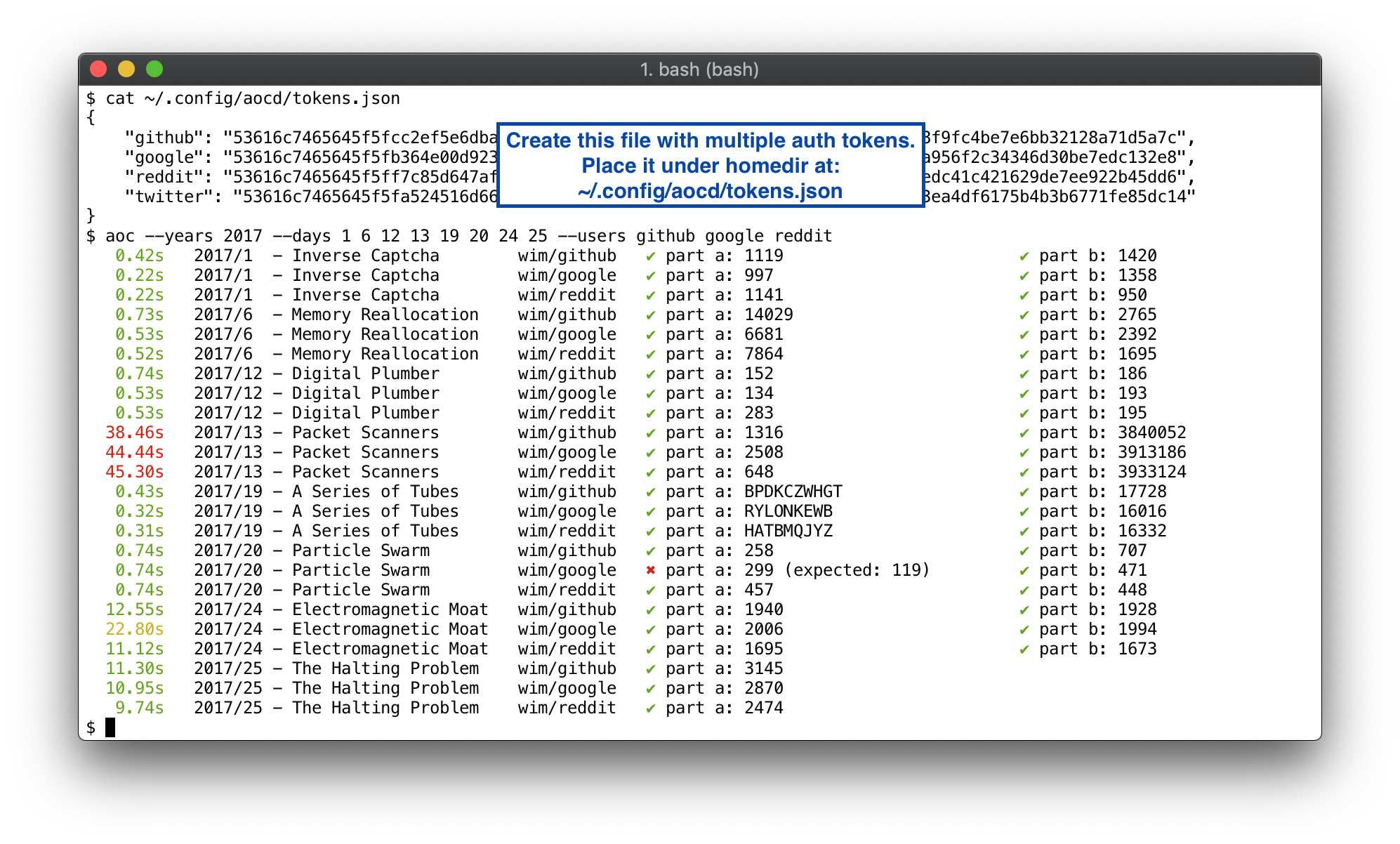
As you can see above, I actually had incorrect code for 2017 Day 20: Particle Swarm, but that bug only showed up for the google token’s dataset. Whoops. Also, it looks like my algorithm for 2017 Day 13: Packet Scanners was kinda garbage. Too slow. According to AoC FAQ:
every problem has a solution that completes in at most 15 seconds on ten-year-old hardware
By the way, the aoc runner will kill your code if it takes more than 60 seconds, you can increase/decrease this by passing a command-line option, e.g. --timeout=120.
New in version 1.1.0: Added option --quiet to suppress any output from plugins so it doesn’t mess up the aoc runner’s display.
How does this library work?
It will automatically get today’s data at import time, if used within the interactive interpreter. Otherwise, the date is found by introspection of the path and file name from which aocd module was imported.
This means your filenames should be something sensible. The examples below should all parse correctly, because they have digits in the path that are unambiguously recognisable as AoC years (2015+) or days (1-25).
q03.py
xmas_problem_2016_25b_dawg.py
~/src/aoc/2015/p8.py
A filename like problem_one.py will not work, so don’t do that. If you don’t like weird frame hacks, just use the aocd.get_data() function instead and have a nice day!
Cache invalidation?
aocd saves puzzle inputs, answers, names, and your bad guesses to avoid hitting the AoC servers any more often than strictly necessary (this also speeds things up). All data is persisted in plain text files under ~/.config/aocd. To remove any caches, you may simply delete whatever files you want under that directory tree. If you’d prefer to use a different path, then export an AOCD_DIR environment variable with the desired location.
New in version 1.1.0: By default, your token files are also stored under ~/.config/aocd. If you want the token(s) and cached inputs/answers to exist in separate locations, you can set the environment variable AOCD_CONFIG_DIR to specify a different location for the token(s).
Release history Release notifications | RSS feed


Download files
Download the file for your platform. If you're not sure which to choose, learn more about installing packages.
Source Distribution
Built Distribution
Filter files by name, interpreter, ABI, and platform.
If you're not sure about the file name format, learn more about wheel file names.
Copy a direct link to the current filters
File details
Details for the file advent-of-code-data-1.3.0.tar.gz.
File metadata
- Download URL: advent-of-code-data-1.3.0.tar.gz
- Upload date:
- Size: 21.8 kB
- Tags: Source
- Uploaded using Trusted Publishing? No
- Uploaded via: twine/4.0.2 CPython/3.10.8
File hashes
| Algorithm | Hash digest | |
|---|---|---|
| SHA256 |
732e63118bf1a59612a15ddcbcb2d9203c838abfed1faeb2c3153620d4cbb2fa
|
|
| MD5 |
f28a9ecae8a905c7ff351111b535a4ea
|
|
| BLAKE2b-256 |
ecd4e4085c9798fb93e07fe3574867ad69b4553819aed860e2e95e084f215fa8
|
File details
Details for the file advent_of_code_data-1.3.0-py2.py3-none-any.whl.
File metadata
- Download URL: advent_of_code_data-1.3.0-py2.py3-none-any.whl
- Upload date:
- Size: 25.7 kB
- Tags: Python 2, Python 3
- Uploaded using Trusted Publishing? No
- Uploaded via: twine/4.0.2 CPython/3.10.8
File hashes
| Algorithm | Hash digest | |
|---|---|---|
| SHA256 |
8c125c8d4a04aa83b76786e62ae7315ea7323fb419cadec77213f532b8c2006b
|
|
| MD5 |
9722aea8b37b463047ce6766f7f9a5eb
|
|
| BLAKE2b-256 |
6dc9f52db288d4d716b7e423c15956114ceeb5559fd4b816975de53bbee4028d
|






