
Build and document REST APIs with aiohttp and apispec

Project description
aiohttp-apispec
Build and document REST APIs with aiohttp and apispec


![[codcov]](https://pypi-camo.freetls.fastly.net/f56b5d44b01d5eb05b4b78029ed4d86231a786d6/68747470733a2f2f636f6465636f762e696f2f67682f6d6178696d64616e696c6368656e6b6f2f61696f687474702d617069737065632f6272616e63682f6d61737465722f67726170682f62616467652e737667)
![[docs]](https://pypi-camo.freetls.fastly.net/02e5ae6502bb36ec7f2219d04943dabd499b55f1/68747470733a2f2f72656164746865646f63732e6f72672f70726f6a656374732f61696f687474702d617069737065632f62616467652f3f76657273696f6e3d6c6174657374)




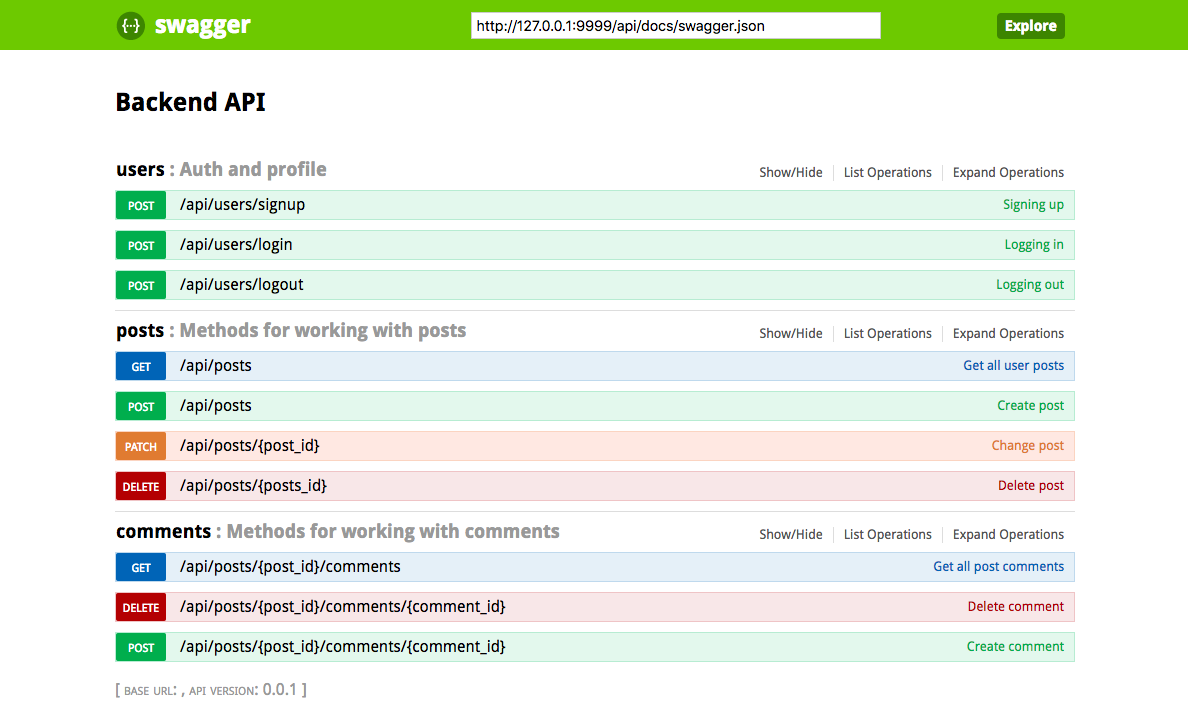
aiohttp-apispec key features:
docs,use_kwargsandmarshal_withdecorators to add swagger spec support out of the boxvalidation_middlewaremiddleware to enable validating with marshmallow schemas from those decorators
aiohttp-apispec api is fully inspired by flask-apispec library
Contents
Install
pip install aiohttp-apispec
Quickstart
from aiohttp_apispec import docs, use_kwargs, marshal_with, setup_aiohttp_apispec
from aiohttp import web
from marshmallow import Schema, fields


class RequestSchema(Schema):
    id = fields.Int()
    name = fields.Str(description="name")


class ResponseSchema(Schema):
    msg = fields.Str()
    data = fields.Dict()


@docs(tags=["mytag"],
      summary="Test method summary",
      description="Test method description")
@use_kwargs(RequestSchema(strict=True))
@marshal_with(ResponseSchema(), 200)
async def index(request):
    return web.json_response({"msg": "done", "data": {}})


app = web.Application()
app.router.add_post("/v1/test", index)

# init docs with all parameters, usual for ApiSpec
setup_aiohttp_apispec(app=app, title="My Documentation", version="v1")

# now we can find it on 'http://localhost:8080/api/docs/api-docs'
web.run_app(app)
Class based views are also supported:
class TheView(web.View):
    @docs(
        tags=["mytag"],
        summary="View method summary",
        description="View method description",
    )
    @use_kwargs(RequestSchema(strict=True))
    @marshal_with(ResponseSchema(), 200)
    def delete(self):
        return web.json_response(
            {"msg": "done", "data": {"name": self.request["data"]["name"]}}
        )


app.router.add_view("/v1/view", TheView)
Adding validation middleware
from aiohttp_apispec import validation_middleware

...

app.middlewares.append(validation_middleware)
Now you can access all validated data in route from request['data'] like so:
@docs(
    tags=['mytag'],
    summary='Test method summary',
    description='Test method description',
)
@use_kwargs(RequestSchema(strict=True))
@marshal_with(ResponseSchema(), 200)
async def index(request):
    uid = request['data']['id']
    name = request['data']['name']
    return web.json_response(
        {'msg': 'done', 'data': {'info': f'name - {name}, id - {uid}'}}
    )
You can change Request's 'data' param to another with request_data_name argument of
setup_aiohttp_apispec function:
setup_aiohttp_apispec(app=app,
                      request_data_name='validated_data',
                      title='My Documentation',
                      version='v1',
                      url='/api/docs/api-docs')

...

@use_kwargs(RequestSchema(strict=True))
async def index(request):
    uid = request['validated_data']['id']
        ...
If you want to catch validation errors you should write your own middleware and catch
web.HTTPClientError, json.JSONDecodeError and so on. Like this:
@web.middleware
async def my_middleware(request, handler):
    try:
        return await handler(request)
    except web.HTTPClientError:
        return web.json_response(status=400)

app.middlewares.extend([
    my_middleware,  # Catch exception by your own, format it and respond to client
    validation_middleware,
])
Build swagger web client
aiohttp-apispec adds swagger_dict parameter to aiohttp web application after initialization (with setup_aiohttp_apispec function).
So you can use it easily with aiohttp_swagger library:
from aiohttp_apispec import setup_aiohttp_apispec
from aiohttp_swagger import setup_swagger


def create_app(app):
    setup_aiohttp_apispec(app)

    async def swagger(app):
        setup_swagger(
            app=app, swagger_url='/api/doc', swagger_info=app['swagger_dict']
        )
    app.on_startup.append(swagger)
    # now we can access swagger client on '/api/doc' url
    ...
    return app
Release history Release notifications | RSS feed


Download files
Download the file for your platform. If you're not sure which to choose, learn more about installing packages.
Source Distribution
File details
Details for the file aiohttp-apispec-0.9.0rc1.macosx-10.9-x86_64.tar.gz.
File metadata
- Download URL: aiohttp-apispec-0.9.0rc1.macosx-10.9-x86_64.tar.gz
- Upload date:
- Size: 11.3 kB
- Tags: Source
- Uploaded using Trusted Publishing? No
- Uploaded via: twine/1.12.1 pkginfo/1.5.0.1 requests/2.21.0 setuptools/39.1.0 requests-toolbelt/0.9.1 tqdm/4.31.0 CPython/3.7.0
File hashes
| Algorithm | Hash digest | |
|---|---|---|
| SHA256 |
75c9e358fd0eb24e8da76e0e562a25c69955f68ea89453a88f4328825734bdd8
|
|
| MD5 |
9073785d1c48b44af1159f2e125141d2
|
|
| BLAKE2b-256 |
b03e13df4a8723180ba16be897fdf24d91c1c1c721852d381bf3da8c6ca07c2b
|






