
Asynchronous Python API for building Viber bots.

Project description
aioviber
--------
Asynchronous Python API for building Viber bots.
[](https://travis-ci.org/nonamenix/aioviber)
[](https://coveralls.io/github/nonamenix/aioviber)
[](https://pypi.python.org/pypi/aioviber)
[](https://www.python.org/doc/versions/)
# Example
```python
import logging
from aioviber.bot import Bot
from aioviber.chat import Chat
from viberbot.api.viber_requests import ViberSubscribedRequest
logger = logging.getLogger(__name__)
bot = Bot(
name='ViberBot',
avatar='http://avatar.example.com/avatar.jpg',
auth_token="**************-**************-**************", # Public account auth token
host="my.host.com", # should be available from wide area network
port=80,
webhook="https://my.host.com", # Webhook url
)
@bot.command('ping')
async def ping(chat: Chat, matched):
await chat.send_text('pong')
@bot.event_handler('subscribed')
async def user_subscribed(chat: Chat, request: ViberSubscribedRequest):
await chat.send_text('Welcome')
@bot.message_handler('sticker')
async def sticker(chat: Chat):
await chat.send_sticker(5900)
if __name__ == '__main__': # pragma: no branch
bot.run() # pragma: no cover
```
API designed similar to [aiotg](https://github.com/szastupov/aiotg)
# Getting Started
In order to implement the API you will need the following:
1. An Active Viber account on a platform which supports PA (iOS/Android).
2. Active Public Account;
3. Public Account authentication token;
4. Write your bot with **aioviber**.
Read more: [Public Account Documentation — Viber REST API](https://developers.viber.com/docs/api/rest-bot-api/#getting-started)
There is no way to run viber bot in polling mode like Telegram.
# Install
```
pip install aioviber
```
# Viber API
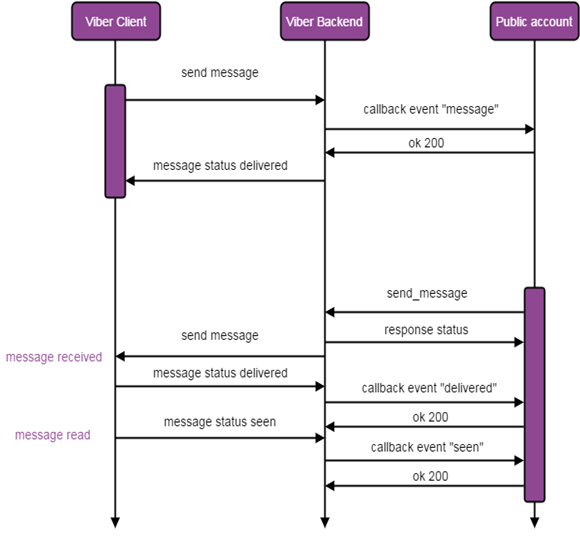
## Messaging flow
## Events types
Documentation about events types https://developers.viber.com/docs/api/rest-bot-api/#callbacks
Callbacks can be proceeded with `@bot.event_handler('subscribed')` decorator
* [Subscribed](https://developers.viber.com/docs/api/rest-bot-api/#subscribed)
* [Unsubscribed](https://developers.viber.com/docs/api/rest-bot-api/#unsubscribed)
* [Conversation started](https://developers.viber.com/docs/api/rest-bot-api/#conversation-started)
* [Sending a welcome message](https://developers.viber.com/docs/api/rest-bot-api/#welcome-message-flow)
* [Message receipts callbacks](https://developers.viber.com/docs/api/rest-bot-api/#message-receipts-callbacks)
* [Failed callback](https://developers.viber.com/docs/api/rest-bot-api/#failed-callback)
* [Receive message from user](https://developers.viber.com/docs/api/rest-bot-api/#receive-message-from-user)
## Messages types
Text messages can be proceeded with `@bot.command('regexp') decorator`
```python
@bot.command('ping')
async def ping(chat: Chat, matched):
await chat.send_text('pong')
```
Below is a list of all supported message types:
* [text](https://developers.viber.com/docs/api/rest-bot-api/#text-message)
* [picture](https://developers.viber.com/docs/api/rest-bot-api/#picture-message)
* [video](https://developers.viber.com/docs/api/rest-bot-api/#video-message)
* [file](https://developers.viber.com/docs/api/rest-bot-api/#file-message)
* [location](https://developers.viber.com/docs/api/rest-bot-api/#location-message)
* [contact](https://developers.viber.com/docs/api/rest-bot-api/#contact-message)
* [sticker](https://developers.viber.com/docs/api/rest-bot-api/#sticker-message)
* [URL](https://developers.viber.com/docs/api/rest-bot-api/#resource-url-2)
For processing other messages type you can use `@bot.message_handler('location')` decorator.
## Send messages
First argument for coroutines decorated with aioviber decorators — `chat: Chat`. Chat instance allow to send messages
to sender.
```python
@bot.command('ping')
async def ping(chat: Chat, matched):
await chat.send_text('pong')
await chat.send_picture('https://placeholdit.imgix.net/~text?txtsize=33&txt=350%C3%97150&w=350&h=150')
await chat.send_sticker(5900)
# etc
```
### Keyboard
```python
@bot.event_handler('subscribed')
async def user_subscribed(chat: Chat, request: ViberSubscribedRequest):
await chat.send_text('ping', keyboard=Keyboard(buttons=[
Button("pong", text="pong")
]))
```
Also available `Carousel` class for [rich media messages](https://developers.viber.com/docs/api/rest-bot-api/#carousel-content-message).
# Deployment
Simple way to run viber-bot based on aioviber — run it in docker container with nginx-proxy and let's encrypt companion.
**nginx-proxy** — Automated nginx proxy for Docker containers... [https://github.com/jwilder/nginx-proxy](https://github.com/jwilder/nginx-proxy)
**Let's Encrypt** — Free SSL/TLS Certificates [https://letsencrypt.org/](https://letsencrypt.org/)
Run it in tandem: [https://github.com/fatk/docker-letsencrypt-nginx-proxy-companion-examples](https://github.com/fatk/docker-letsencrypt-nginx-proxy-companion-examples)
--------
Asynchronous Python API for building Viber bots.
[](https://travis-ci.org/nonamenix/aioviber)
[](https://coveralls.io/github/nonamenix/aioviber)
[](https://pypi.python.org/pypi/aioviber)
[](https://www.python.org/doc/versions/)
# Example
```python
import logging
from aioviber.bot import Bot
from aioviber.chat import Chat
from viberbot.api.viber_requests import ViberSubscribedRequest
logger = logging.getLogger(__name__)
bot = Bot(
name='ViberBot',
avatar='http://avatar.example.com/avatar.jpg',
auth_token="**************-**************-**************", # Public account auth token
host="my.host.com", # should be available from wide area network
port=80,
webhook="https://my.host.com", # Webhook url
)
@bot.command('ping')
async def ping(chat: Chat, matched):
await chat.send_text('pong')
@bot.event_handler('subscribed')
async def user_subscribed(chat: Chat, request: ViberSubscribedRequest):
await chat.send_text('Welcome')
@bot.message_handler('sticker')
async def sticker(chat: Chat):
await chat.send_sticker(5900)
if __name__ == '__main__': # pragma: no branch
bot.run() # pragma: no cover
```
API designed similar to [aiotg](https://github.com/szastupov/aiotg)
# Getting Started
In order to implement the API you will need the following:
1. An Active Viber account on a platform which supports PA (iOS/Android).
2. Active Public Account;
3. Public Account authentication token;
4. Write your bot with **aioviber**.
Read more: [Public Account Documentation — Viber REST API](https://developers.viber.com/docs/api/rest-bot-api/#getting-started)
There is no way to run viber bot in polling mode like Telegram.
# Install
```
pip install aioviber
```
# Viber API
## Messaging flow

## Events types
Documentation about events types https://developers.viber.com/docs/api/rest-bot-api/#callbacks
Callbacks can be proceeded with `@bot.event_handler('subscribed')` decorator
* [Subscribed](https://developers.viber.com/docs/api/rest-bot-api/#subscribed)
* [Unsubscribed](https://developers.viber.com/docs/api/rest-bot-api/#unsubscribed)
* [Conversation started](https://developers.viber.com/docs/api/rest-bot-api/#conversation-started)
* [Sending a welcome message](https://developers.viber.com/docs/api/rest-bot-api/#welcome-message-flow)
* [Message receipts callbacks](https://developers.viber.com/docs/api/rest-bot-api/#message-receipts-callbacks)
* [Failed callback](https://developers.viber.com/docs/api/rest-bot-api/#failed-callback)
* [Receive message from user](https://developers.viber.com/docs/api/rest-bot-api/#receive-message-from-user)
## Messages types
Text messages can be proceeded with `@bot.command('regexp') decorator`
```python
@bot.command('ping')
async def ping(chat: Chat, matched):
await chat.send_text('pong')
```
Below is a list of all supported message types:
* [text](https://developers.viber.com/docs/api/rest-bot-api/#text-message)
* [picture](https://developers.viber.com/docs/api/rest-bot-api/#picture-message)
* [video](https://developers.viber.com/docs/api/rest-bot-api/#video-message)
* [file](https://developers.viber.com/docs/api/rest-bot-api/#file-message)
* [location](https://developers.viber.com/docs/api/rest-bot-api/#location-message)
* [contact](https://developers.viber.com/docs/api/rest-bot-api/#contact-message)
* [sticker](https://developers.viber.com/docs/api/rest-bot-api/#sticker-message)
* [URL](https://developers.viber.com/docs/api/rest-bot-api/#resource-url-2)
For processing other messages type you can use `@bot.message_handler('location')` decorator.
## Send messages
First argument for coroutines decorated with aioviber decorators — `chat: Chat`. Chat instance allow to send messages
to sender.
```python
@bot.command('ping')
async def ping(chat: Chat, matched):
await chat.send_text('pong')
await chat.send_picture('https://placeholdit.imgix.net/~text?txtsize=33&txt=350%C3%97150&w=350&h=150')
await chat.send_sticker(5900)
# etc
```
### Keyboard
```python
@bot.event_handler('subscribed')
async def user_subscribed(chat: Chat, request: ViberSubscribedRequest):
await chat.send_text('ping', keyboard=Keyboard(buttons=[
Button("pong", text="pong")
]))
```
Also available `Carousel` class for [rich media messages](https://developers.viber.com/docs/api/rest-bot-api/#carousel-content-message).
# Deployment
Simple way to run viber-bot based on aioviber — run it in docker container with nginx-proxy and let's encrypt companion.
**nginx-proxy** — Automated nginx proxy for Docker containers... [https://github.com/jwilder/nginx-proxy](https://github.com/jwilder/nginx-proxy)
**Let's Encrypt** — Free SSL/TLS Certificates [https://letsencrypt.org/](https://letsencrypt.org/)
Run it in tandem: [https://github.com/fatk/docker-letsencrypt-nginx-proxy-companion-examples](https://github.com/fatk/docker-letsencrypt-nginx-proxy-companion-examples)
Release history Release notifications | RSS feed


Download files
Download the file for your platform. If you're not sure which to choose, learn more about installing packages.
Source Distribution
aioviber-0.1.3.tar.gz
(11.4 kB
view details)
File details
Details for the file aioviber-0.1.3.tar.gz.
File metadata
- Download URL: aioviber-0.1.3.tar.gz
- Upload date:
- Size: 11.4 kB
- Tags: Source
- Uploaded using Trusted Publishing? No
File hashes
| Algorithm | Hash digest | |
|---|---|---|
| SHA256 |
bc7896b5dccda90e54b3a347c215d6dbaad48651221f8ec6e6ce6ec5f9f5f690
|
|
| MD5 |
778e19f52991c27230c56b7b44080c78
|
|
| BLAKE2b-256 |
03072259880e106fb991fd9b77127ec0ac0fae80aa26ee15be129fcfb6b8b43d
|






