
ML Observability in your notebook

Project description





Phoenix provides MLOps insights at lightning speed with zero-config observability for model drift, performance, and data quality. Phoenix is notebook-first python library that leverages embeddings to uncover problematic cohorts of your LLM, CV, NLP and tabular models.

Installation
pip install arize-phoenix
Quickstart


Import libraries.
from dataclasses import replace
import pandas as pd
import phoenix as px
Download curated datasets and load them into pandas DataFrames.
train_df = pd.read_parquet(
    "https://storage.googleapis.com/arize-assets/phoenix/datasets/unstructured/cv/human-actions/human_actions_training.parquet"
)
prod_df = pd.read_parquet(
    "https://storage.googleapis.com/arize-assets/phoenix/datasets/unstructured/cv/human-actions/human_actions_production.parquet"
)
Define schemas that tell Phoenix which columns of your DataFrames correspond to features, predictions, actuals (i.e., ground truth), embeddings, etc.
train_schema = px.Schema(
    prediction_id_column_name="prediction_id",
    timestamp_column_name="prediction_ts",
    prediction_label_column_name="predicted_action",
    actual_label_column_name="actual_action",
    embedding_feature_column_names={
        "image_embedding": px.EmbeddingColumnNames(
            vector_column_name="image_vector",
            link_to_data_column_name="url",
        ),
    },
)
prod_schema = replace(train_schema, actual_label_column_name=None)
Define your production and training datasets.
prod_ds = px.Dataset(prod_df, prod_schema)
train_ds = px.Dataset(train_df, train_schema)
Launch the app.
session = px.launch_app(prod_ds, train_ds)
You can open Phoenix by copying and pasting the output of session.url into a new browser tab.
session.url
Alternatively, you can open the Phoenix UI in your notebook with
session.view()
When you're done, don't forget to close the app.
px.close_app()
Features
Embedding Drift Analysis
Explore UMAP point-clouds at times of high euclidean distance and identify clusters of drift.
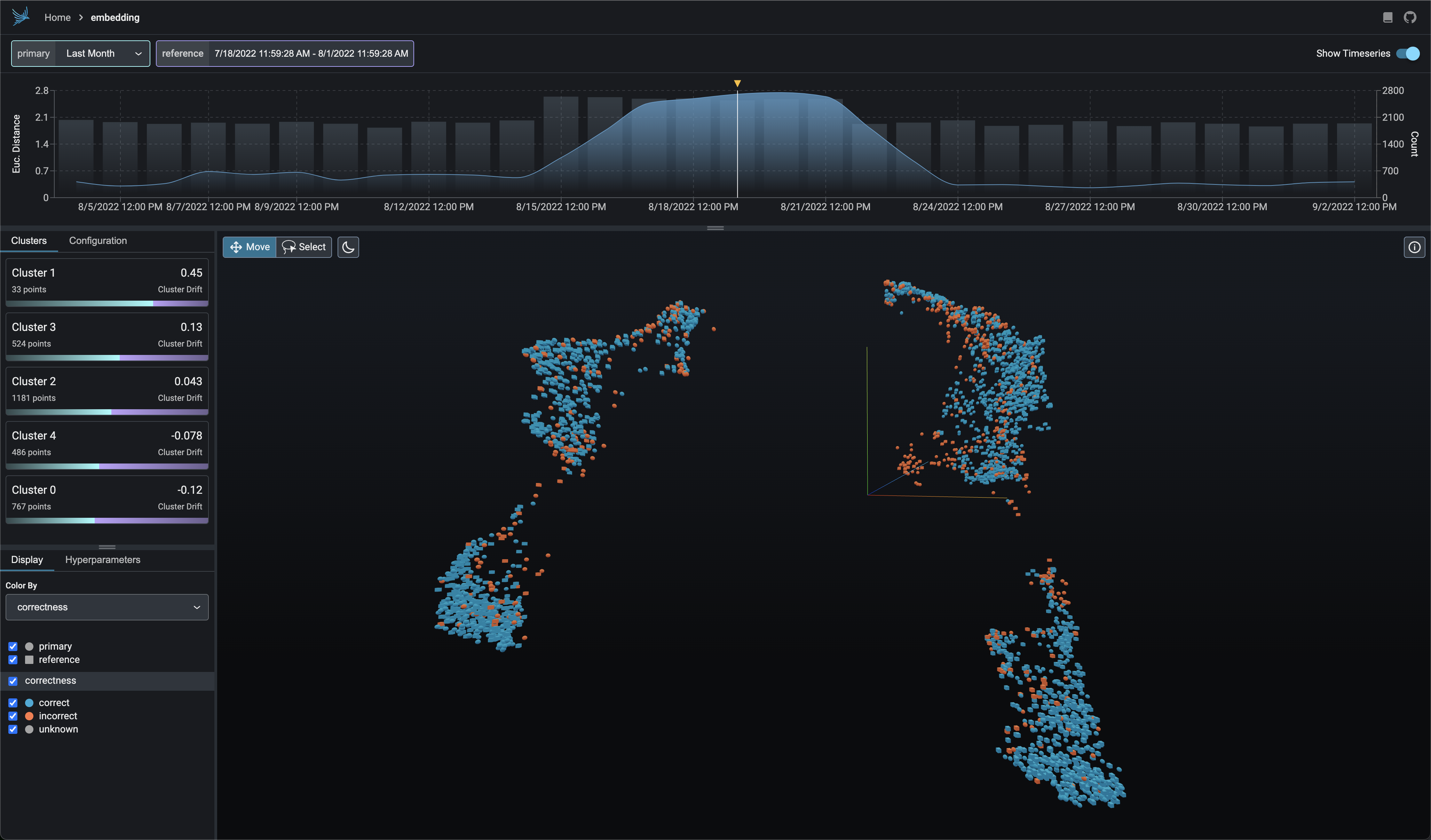
UMAP-based Exploratory Data Analysis
Color your UMAP point-clouds by your model's dimensions, drift, and performance to identify problematic cohorts.
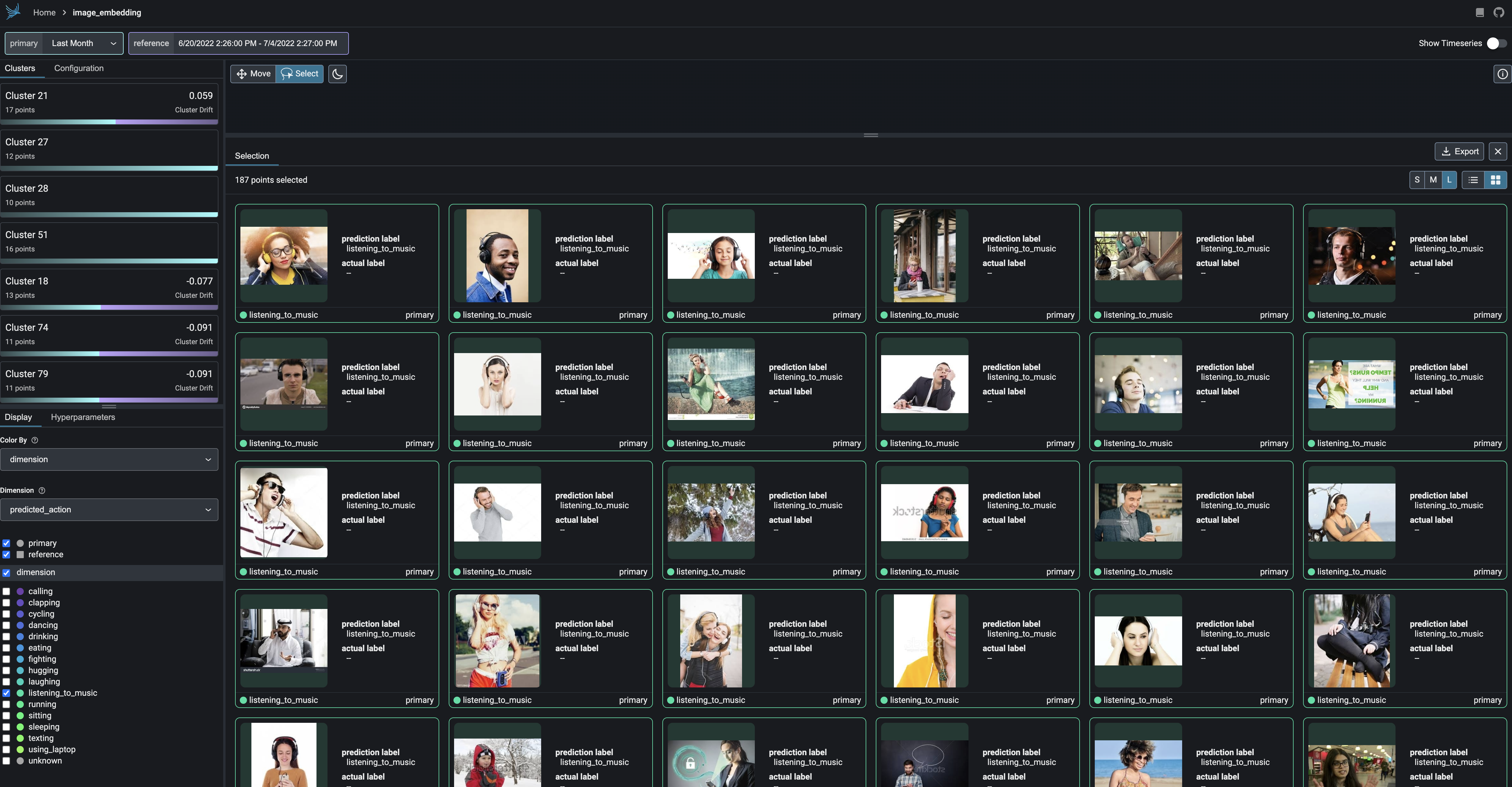
Cluster-driven Drift and Performance Analysis
Break-apart your data into clusters of high drift or bad performance using HDBSCAN
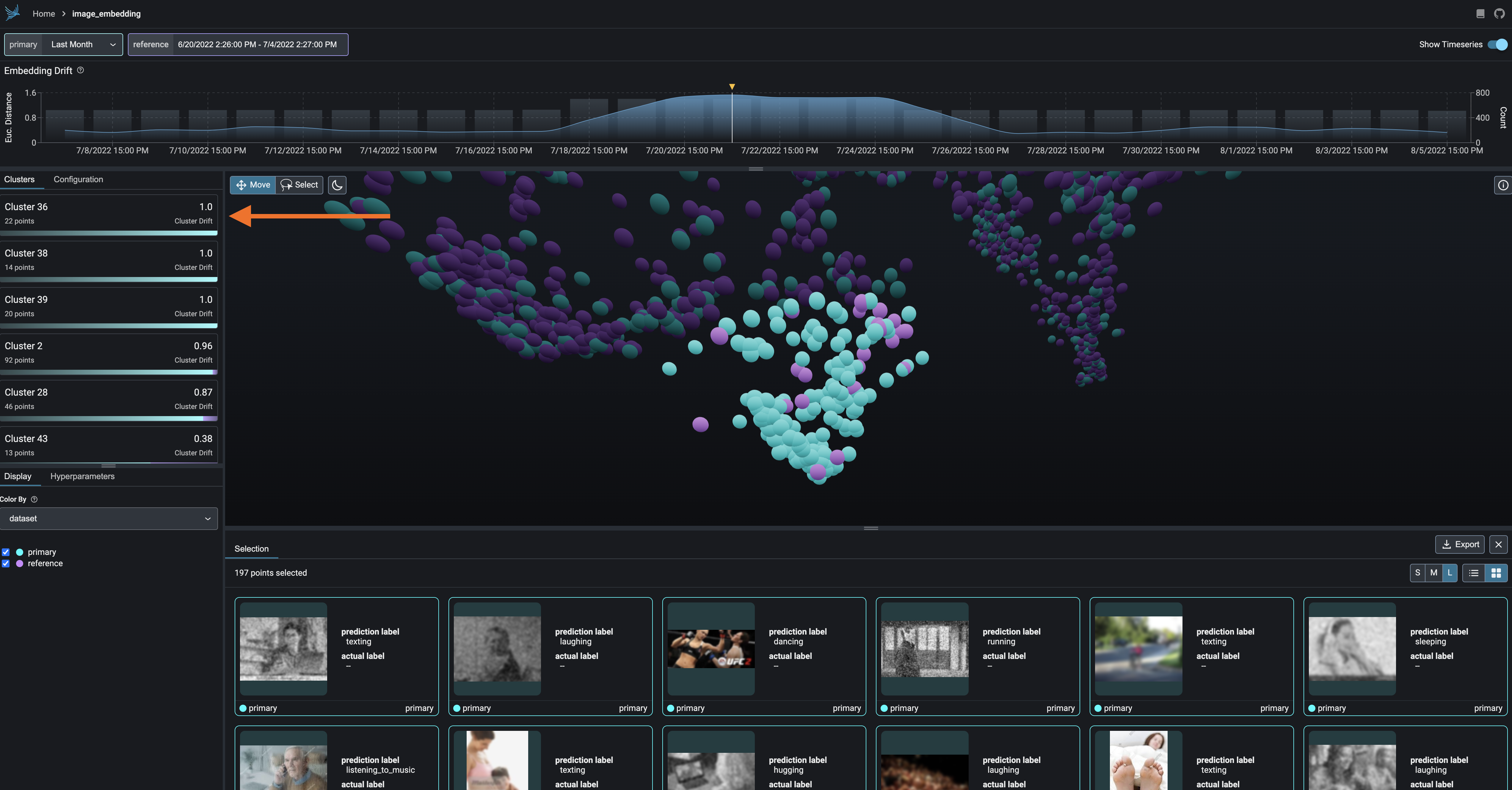
Exportable Clusters
Export your clusters to parquet files or dataframes for further analysis and fine-tuning.
Documentation
For in-depth examples and explanations, read the docs.
Community
Join our community to connect with thousands of machine learning practitioners and ML observability enthusiasts.
- 🌍 Join our Slack community.
- 💡 Ask questions and provide feedback in the #phoenix-support channel.
- 🌟 Leave a star on our GitHub.
- 🐞 Report bugs with GitHub Issues.
- 🐣 Follow us on twitter.
- 💌️ Sign up for our mailing list.
- 🗺️ Check out our roadmap to see where we're heading next.
- 🎓 Learn the fundamentals of ML observability with our introductory and advanced courses.
Thanks
- UMAP For unlocking the ability to visualize and reason about embeddings
- HDBSCAN For providing a clustering algorithm to aid in the discovery of drift and performance degradation
Copyright, Patent, and License
Copyright 2023 Arize AI, Inc. All Rights Reserved.
Portions of this code are patent protected by one or more U.S. Patents. See IP_NOTICE.
This software is licensed under the terms of the Elastic License 2.0 (ELv2). See LICENSE.
Release history Release notifications | RSS feed


Download files
Download the file for your platform. If you're not sure which to choose, learn more about installing packages.
Source Distribution
Built Distribution
Filter files by name, interpreter, ABI, and platform.
If you're not sure about the file name format, learn more about wheel file names.
Copy a direct link to the current filters
File details
Details for the file arize_phoenix-0.0.19rc1.tar.gz.
File metadata
- Download URL: arize_phoenix-0.0.19rc1.tar.gz
- Upload date:
- Size: 785.7 kB
- Tags: Source
- Uploaded using Trusted Publishing? No
- Uploaded via: python-httpx/0.24.0
File hashes
| Algorithm | Hash digest | |
|---|---|---|
| SHA256 |
5859e7d08394e4afcb177a81d29062e7fd7be9ba48ee85d297cfbf6672ea16c2
|
|
| MD5 |
1ff87ebbb9a962a89740dd0e476f855c
|
|
| BLAKE2b-256 |
e0a199ea0bbc82460f8617b529945e4e50c5f56a5135833ff56aebf055f79bec
|
File details
Details for the file arize_phoenix-0.0.19rc1-py3-none-any.whl.
File metadata
- Download URL: arize_phoenix-0.0.19rc1-py3-none-any.whl
- Upload date:
- Size: 812.5 kB
- Tags: Python 3
- Uploaded using Trusted Publishing? No
- Uploaded via: python-httpx/0.24.0
File hashes
| Algorithm | Hash digest | |
|---|---|---|
| SHA256 |
5f0a87a134c0d71a3e3cf961978a19c260a2d12eca5d4b75fb37977b1c2dc604
|
|
| MD5 |
76a685af3734505c1b52f267d39f727d
|
|
| BLAKE2b-256 |
7a4fd62af74a7938e3ce965bedf51d4a81bbc8a6e7af2f27c08cbea2756157bb
|






