
Automatically crops faces from batches of pictures

Project description
autocrop






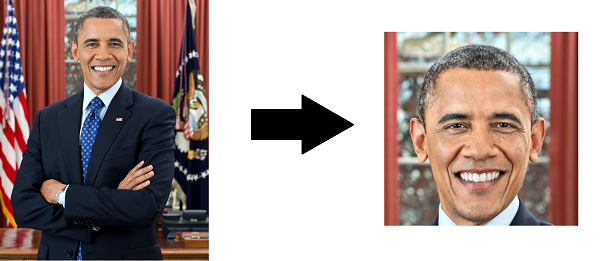
Perfect for profile picture processing for your website or batch work for ID cards, autocrop will output images centered around the biggest face detected.
Installation
Simple!
pip install autocrop
Use
Autocrop can be used from the command line or directly from Python API.
From Python
Import the Cropper class, set some parameters (optional), and start cropping.
The crop method accepts filepaths or np.ndarray, and returns Numpy arrays. These are easily handled with PIL or Matplotlib.
from PIL import Image
from autocrop import Cropper

cropper = Cropper()

# Get a Numpy array of the cropped image
cropped_array = cropper.crop('portrait.png')

# Save the cropped image with PIL if a face was detected:
if cropped_array:
    cropped_image = Image.fromarray(cropped_array)
    cropped_image.save('cropped.png')
Further examples and use cases are found in the accompanying Jupyter Notebook.
From the command line
usage: [-h] [-o OUTPUT] [-i INPUT] [-w WIDTH] [-H HEIGHT] [-e EXTENSION] [-v]

Automatically crops faces from batches of pictures

optional arguments:
  -h, --help
  		Show this help message and exit
  -o, --output, -p, --path
		Folder where cropped images will be placed.
		Default: current working directory
  -r, --reject
		Folder where images without detected faces will be placed.
		Default: same as output directory
  -i, --input
		Folder where images to crop are located.
		Default: current working directory
  -w, --width
		Width of cropped files in px. Default=500
  -H, --height
		Height of cropped files in px. Default=500
  --facePercent
  		Zoom factor. Percentage of face height to image height.
  -e, --extension
  		Enter the image extension which to save at output.
  		Default: Your current image extension
  -v, --version
  		Show program's version number and exit
Examples
- Crop every image in the
picsfolder, resize them to 400 px squares, and output them in thecropdirectory:autocrop -i pics -o crop -w 400 -H 400.- Images where a face can't be detected will be left in
crop.
- Same as above, but output the images with undetected faces to the
rejectdirectory:autocrop -i pics -o crop -r reject -w 400 -H 400.
- Same as above but the image extension will be
png:autocrop -i pics -o crop -w 400 -H 400 -e png
If no output folder is added, asks for confirmation and destructively crops images in-place.
Detecting faces from video files
You can use autocrop to detect faces in frames extracted from a video. A great way to perform the frame extraction step is with ffmpeg:
mkdir frames faces

# Extract one frame per second
ffmpeg -i input.mp4 -filter:v fps=fps=1/60 frames/ffmpeg_%0d.bmp

# Crop faces as jpg
autocrop -i frames -o faces -e jpg
Supported file types
The following file types are supported:
- EPS files (
.eps) - GIF files (
.gif) (only the first frame of an animated GIF is used) - JPEG 2000 files (
.j2k,.j2p,.jp2,.jpx) - JPEG files (
.jpeg,.jpg,.jpe) - LabEye IM files (
.im) - macOS ICNS files (
.icns) - Microsoft Paint bitmap files (
.msp) - PCX files (
.pcx) - Portable Network Graphics (
.png) - Portable Pixmap files (
.pbm,.pgm,.ppm) - SGI files (
.sgi) - SPIDER files (
.spi) - TGA files (
.tga) - TIFF files (
.tif,.tiff) - WebP (
.webp) - Windows bitmap files (
.bmp,.dib) - Windows ICO files (
.ico) - X bitmap files (
.xbm)
Gotchas
Autocrop uses OpenCV to perform face detection, which is installed through binary wheels. If you already have OpenCV 3+ installed, you may wish to uninstall the additional OpenCV installation: pip uninstall opencv-python.
Installing directly
In some cases, you may wish the package directly, instead of through PyPI:
cd ~
git clone https://github.com/leblancfg/autocrop
cd autocrop
pip install .
conda
Development of a conda-forge package for the Anaconda Python distribution is currently stalled due to the complexity of setting up the workflow with OpenCV. Please leave feedback on issue #7 to see past attempts if you are insterested in helping out!
Requirements
Best practice for your projects is of course to use virtual environments. At the very least, you will need to have pip installed.
Autocrop is currently being tested on:
- Python 3.6+
- OS:
- Linux
- macOS
- Windows
More Info
Check out:
- http://docs.opencv.org/master/d7/d8b/tutorial_py_face_detection.html#gsc.tab=0
- http://docs.opencv.org/master/d5/daf/tutorial_py_histogram_equalization.html#gsc.tab=0
Adapted from:
Contributing
Although autocrop is essentially a CLI wrapper around a single OpenCV function, it is actively developed. It has active users throughout the world.
If you would like to contribute, please consult the contribution docs.
Release history Release notifications | RSS feed


Download files
Download the file for your platform. If you're not sure which to choose, learn more about installing packages.
Source Distribution
Built Distribution
Filter files by name, interpreter, ABI, and platform.
If you're not sure about the file name format, learn more about wheel file names.
Copy a direct link to the current filters
File details
Details for the file autocrop-1.2.0.tar.gz.
File metadata
- Download URL: autocrop-1.2.0.tar.gz
- Upload date:
- Size: 11.0 MB
- Tags: Source
- Uploaded using Trusted Publishing? No
- Uploaded via: twine/3.2.0 pkginfo/1.6.1 requests/2.25.0 setuptools/41.2.0 requests-toolbelt/0.9.1 tqdm/4.52.0 CPython/3.8.0
File hashes
| Algorithm | Hash digest | |
|---|---|---|
| SHA256 |
40ebc76e54fef6cd353a51b17327775b2e2608e6bb0e0e187c8ef4dae36e7704
|
|
| MD5 |
72faea9e11fe2bb343f926f438a2f964
|
|
| BLAKE2b-256 |
d14f10ff2c7f4b8870010b4fc3f6e644ff8cca82e167565c4021e6b8792287af
|
File details
Details for the file autocrop-1.2.0-py3-none-any.whl.
File metadata
- Download URL: autocrop-1.2.0-py3-none-any.whl
- Upload date:
- Size: 159.1 kB
- Tags: Python 3
- Uploaded using Trusted Publishing? No
- Uploaded via: twine/3.2.0 pkginfo/1.6.1 requests/2.25.0 setuptools/41.2.0 requests-toolbelt/0.9.1 tqdm/4.52.0 CPython/3.8.0
File hashes
| Algorithm | Hash digest | |
|---|---|---|
| SHA256 |
30a29787e998ce87b62d9dfdb1114bfefd73891fef78b9fe4ece1e6742d114ef
|
|
| MD5 |
88a6c8f477baaaca9fc0ebcb1abbc765
|
|
| BLAKE2b-256 |
2f1c8cb4ed593bc932b206f2f477f8cc6906a5edd4918ce2cf16409d98106230
|






