
A Python-based platform for developing, optimising and deploying automated trading systems.

Project description

AutoTrader



AutoTrader is Python-based platform intended to help in the development, optimisation and deployment of automated trading systems. From simple indicator-based strategies, to complex non-directional hedging strategies, AutoTrader can do it all. If you prefer a more hands-on approach to trading, AutoTrader can also assist you by notifying you of price behaviour, ensuring you never miss a signal again. A basic level of experience with Python is recommended for using AutoTrader, but the website aims to make using it as easy as possible with detailed tutorials.
Features
- Backtesting, featuring multiple order types (market, limit, stop-limit, trailing stops, etc.) and the ability to trade multiple instruments, multiple timeframes, and multiple strategies in the same backtest, against the same broker
- Integrated data feeds, such as Yahoo Finance (via yfinance) and Oanda v20 REST API
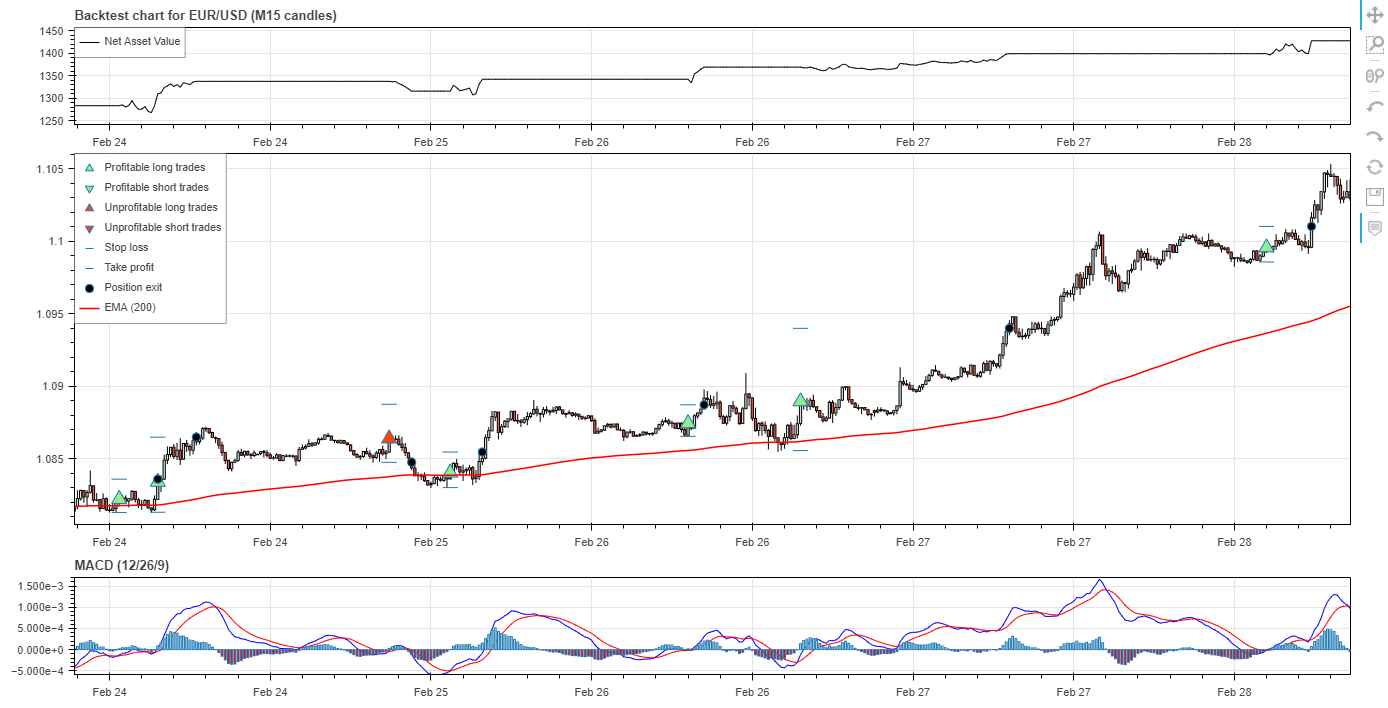
- Automated interactive visualisation using Bokeh
- Built-in parameter optimisation using scipy
- Library of custom indicators
- Price streaming through Oanda v20 REST API
- Live trading through Oanda v20 REST API (with support for more brokers coming soon!)
- Email notification system
- Detailed documenation and tutorials
- Repository of example strategies
Installation
AutoTrader can be installed using pip:
pip install autotrader
Updating
AutoTrader can be updated by appending the --upgrade flag to the install command:
pip install autotrader --upgrade
Documentation
AutoTrader is well documented on the project website. There is also a detailed Quick Start Guide.
Example Strategies
Example strategies can be found in the demo repository. You can also request your own strategy to be added here.
Demo Chart
The chart below is produced by a backtest of a MACD strategy (which can be found in the demo repository). Note that stop loss and take profit levels are shown for each trade taken. This allows you to see how effective your exit strategy is - are you being stopped out too early by placing your stop losses too tight? Are you missing out on otherwise profitable trades becuase your take profits are too far away? AutoTrader helps you visualise your strategy and answer these questions.
Legal
License
AutoTrader is licensed under the GNU General Public License v3.0.
Disclaimer
Never risk money you cannot afford to lose. Always test your strategies on a paper trading account before taking it live.
Release history Release notifications | RSS feed


Download files
Download the file for your platform. If you're not sure which to choose, learn more about installing packages.
Source Distribution
Built Distribution
Filter files by name, interpreter, ABI, and platform.
If you're not sure about the file name format, learn more about wheel file names.
Copy a direct link to the current filters
File details
Details for the file autotrader-0.5.0.tar.gz.
File metadata
- Download URL: autotrader-0.5.0.tar.gz
- Upload date:
- Size: 82.9 kB
- Tags: Source
- Uploaded using Trusted Publishing? No
- Uploaded via: twine/3.4.2 importlib_metadata/4.6.2 pkginfo/1.6.1 requests/2.24.0 requests-toolbelt/0.9.1 tqdm/4.50.2 CPython/3.8.5
File hashes
| Algorithm | Hash digest | |
|---|---|---|
| SHA256 |
989bb464db3b976a797c6aa7aeb1746ab24d8a28541b281967d3f09ad665eb38
|
|
| MD5 |
4fe41e9b7acae3c63280f74075a6af5f
|
|
| BLAKE2b-256 |
ee378b2ffa3effd5831d5fa8ec11b9bcbfa16495725de02e7a03f9f8c76e8c0d
|
File details
Details for the file autotrader-0.5.0-py3-none-any.whl.
File metadata
- Download URL: autotrader-0.5.0-py3-none-any.whl
- Upload date:
- Size: 83.9 kB
- Tags: Python 3
- Uploaded using Trusted Publishing? No
- Uploaded via: twine/3.4.2 importlib_metadata/4.6.2 pkginfo/1.6.1 requests/2.24.0 requests-toolbelt/0.9.1 tqdm/4.50.2 CPython/3.8.5
File hashes
| Algorithm | Hash digest | |
|---|---|---|
| SHA256 |
4dd091f141733a0bebbbaf96b06acea07025d0d0cdaf7c40289c899ce496b0db
|
|
| MD5 |
8516f4b6d7602ce96e7ee5c255765288
|
|
| BLAKE2b-256 |
78b211e925a5731077a028e03a16f0d101a2a021cb2f339d092c37fdcae76579
|






