
A mod manager for The Legend of Zelda: Breath of the Wild on Cemu

Project description

Breath of the Wild Cemu Mod Loader
A mod installer and manager for BoTW mods on Cemu
Dependencies
- Cemu (duh)
- Python 3.7 (64-bit, installed to system PATH)
The following pip packages, which will be automatically installed:
Setup
First, make sure you have Python 3.7 64-bit installed and in your system PATH.
BCML is available through Python's pip installer, so just run: pip install bcml
Alternatively, you can clone the repository, and then run python setup.py install from the BCML root folder.
On first use, you will have to specify the directory to which Cemu is installed.
Notice: While it is certainly possible to use BCML for some mods and install others manually, no compatibility is guaranteed. It is recommended to uninstall all Cemu mods before using BCML, and then to reinstall them through BCML.
Supported Mods
- Mods must be packed as ZIP, 7z, or RAR archives.
- Only mods with a
rules.txtfile for Cemu graphics pack file replacement are suppported. If you want to convert an older mod, you might find help from this guide.
GUI Usage
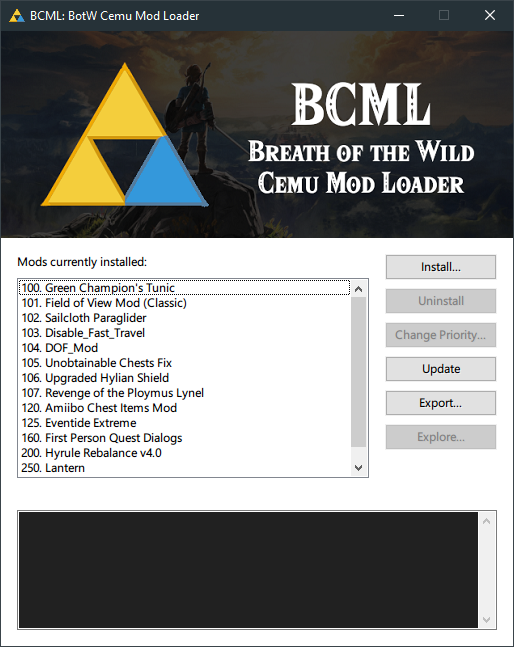
As of version 0.98, BCML now includes a graphical user interface. Hopefully this is simpler for everyone. You can run the graphical BCML simply by:
bcml-gui
You can also create a shortcut on your desktop if you wish. The path to the executable is will be in the "Scripts" folder in your Python installation (e.g. C:\Python37\Scripts\bcml-gui.exe), and an icon is included in the data folder where the BCML package is installed (e.g. C:\Python37\Lib\site-packages\bcml\data\bcml.ico).
The interface is previewed below and seems fairly self-explanatory. If you need more details, check the detailed reference for the CLI version below.
CLI Usage
All BCML commands take the following arguments:
  -h, --help            show this help message and exit
  -d DIRECTORY, --directory DIRECTORY
                        Specify path to Cemu graphicPacks folder, if different from saved
  -v, --verbose         Verbose output covering every file processed
Running bcml by itself with no arguments will list installed mods like so:
No command given, listing mods currently installed:

Modified Beedle Shop — Priority: 100
"Amiibo Chest Items Mod" — Priority: 101
"Disable_Fast_Travel" — Priority: 102
Unobtainable Chests Fix — Priority: 103
Hyrule Rebalance v4.0 — Priority: 109
Linkle Mod — Priority: 110
Install a Mod
bcml install SuperCoolMod.zip
That's the gist of it. More detailed usage information:
usage: bcml install [-h] [-p PRIORITY] [--nomerge] [--notext] [-s] [-l] mod

positional arguments:
  mod                   Path to a ZIP or RAR archive containing a BOTW mod in Cemu 1.15+ format

optional arguments:
  -h, --help            show this help message and exit
  -p PRIORITY, --priority PRIORITY
                        Mod load priority, default 100
  --nomerge             Do not automatically merge pack files
  --notext              Do not automatically merge text modifications
  -s, --shrink          Update RSTB entries for files which haven't grown
  -l, --leave           Do not remove RSTB entries for file sizes which cannot be calculated
More details on each argument:
--priority: This specifies the load priority of the mod. By default, mods start with a priority of 100 and go up by 1 for each installation. Higher priority mods will overwrite conflicting changes from lower priority ones.--nomerge: By default, BCML will try to merge changes when multiple mods modify the same pack files. Sometimes this will break things when mods have completely incompatible changes. This option disables pack merging on the current mod. Any packs with conflicting changes will either give way to or trump the whole pack depending on load priority.--notext: By default, BCML will try to merge changes in game text files (like dialogue, item descriptions, etc.). This can be slow, and if you don't want to use it, this argument disables it.--shrink: By default, BCML will ignore files with equal or smaller sizes to what was originally in the RSTB. This option forces it to update anyway. I can't think of any reason to use this except as a last ditch effort to stop blood moon spam on a heavily modded setup.--leave: By default, BCML will delete RSTB entries when the RSTB size of a file cannot be calculated. This option leaves them alone. Be warned: This can cause instability.
Uninstall a Mod
bcml uninstall
Dead simple. Run this script and you will be presented with a list of installed mods like so:
1. Modified Beedle Shop — Priority: 100
2. Double Durability — Priority: 101
3. "Disable_Fast_Travel" — Priority: 102
4. Upgraded Hylian Shield — Priority: 103
5. Hyrule Rebalance v4.0 — Priority: 175
6. "Lantern" — Priority: 150
7. First Person Quest Dialogs — Priority: 200

Enter the number of the mod you would like to uninstall:
Pick one and it will be uninstalled. The RSTB will be regenerated, and any merged packs will be reprocessed.
Update Mod Configuration
bcml update
If you make any manual changes to mods installed with BCML, run this script afterwards to make sure any necessary updates to the RSTB, merged packs, or merged text edits are made. Usage is simple:
usage: bcml update [-h] [--nomerge] [--notext]

Refreshes RSTB, merged packs, and merge text edits for BCML-managed mods

optional arguments:
  -h, --help  show this help message and exit
  --nomerge   Skip updating merged packs
  --notext    Skip merging text modifications
Change a Mod's Priority
bcml reorder
You can change a mod's load priority with this command. It will give you a list of mods, like the uninstall command, and then prompt you to pick one and enter its new priority value. Usage:
usage: bcml reorder [-h] [-t TARGET] [-p PRIORITY]
Change priority for BCML-managed mod

optional arguments:
  -h, --help            show this help message and exit
  -t TARGET, --target TARGET
                        Specify the priority of the mod to target for re-
                        ordering
  -p PRIORITY, --priority PRIORITY
                        Specify new load priority for mod
Export Mod Configuration
bcml export LotsOfCoolMods.zip
This script exports all of your installed mods, including the BCML merges, into a single modpack. By default, it exports in graphicPack format, but it also supports SDCafiine and the MLC folder in Cemu (or on the Wii U). Usage info:
usage: bcml export [-h] [-o] [-s | -m] [-t TITLE] output

positional arguments:
  output                Path to the mod ZIP that BCML should create

optional arguments:
  -h, --help            show this help message and exit
  -o, --onlymerges      Only include the merged RSTB and packs, not all installed content
  -s, --sdcafiine       Export in SDCafiine format instead of graphicPack
  -m, --mlc             Export in the mlc content format instead of graphicPack
  -t TITLE, --title TITLE
                        The TitleID to use for SDCafiine or mlc export, default 00050000101C9400 (US version)
More details on each argument:
--onlymerges: By default, BCML will create a zip with the whole contents of all your active mod files. This option exports only the RSTB and any packs which BCML has merged. I'm not entirely sure why you might need this, but it's here in case you do.--sdcafiine: By default, BCML exports to Cemu's graphicPack format. This option exports to a format which can be easily used with SDCafiine on your Wii U instead.--mlc: By default, BCML exports to Cemu's graphicPack format. This option exports to a format that can be extracted directly into the MLC directory for Cemu or on your Wii U using FTPiiU.--title: By default, BCML assumes you are using the US version of BOTW. Use this option with SDCafiine or MLC exports to specify the TitleID for another region.
Known Bugs
- At present, this probably only works completely with the US version of the game. I don't yet have hashes or complete RSTB info for non-US versions. If you would like to help with that, open an issue.
License
This software is licensed under the terms of the GNU General Public License, version 3 or later.
This software includes the 7-Zip console application 7z.exe and the library 7z.dll, which are licensed under the GNU Lesser General Public License. The source code for this application is available for free at https://www.7-zip.org/download.html.
This software includes the console application msyt.exe by Kyle Clemens, copyrighted 2018 under the MIT License. The source code for this application is available for free at https://gitlab.com/jkcclemens/msyt.
Release history Release notifications | RSS feed


Download files
Download the file for your platform. If you're not sure which to choose, learn more about installing packages.
Source Distribution
Built Distributions
Filter files by name, interpreter, ABI, and platform.
If you're not sure about the file name format, learn more about wheel file names.
Copy a direct link to the current filters
File details
Details for the file bcml-1.14.tar.gz.
File metadata
- Download URL: bcml-1.14.tar.gz
- Upload date:
- Size: 4.6 MB
- Tags: Source
- Uploaded using Trusted Publishing? No
- Uploaded via: twine/1.13.0 pkginfo/1.5.0.1 requests/2.22.0 setuptools/40.8.0 requests-toolbelt/0.9.1 tqdm/4.32.1 CPython/3.7.3
File hashes
| Algorithm | Hash digest | |
|---|---|---|
| SHA256 |
a1401ce073880d436c009f1df5dd9020416b94c0fa33c8573f8beed369f444dc
|
|
| MD5 |
18caf3f4569bd37b06c50da6b81e93c2
|
|
| BLAKE2b-256 |
c10eb8b9f563afd78a12d370bb84f8abcffc04006b6ab20364c25b4c92e9ad22
|
File details
Details for the file bcml-1.14-py3.7.egg.
File metadata
- Download URL: bcml-1.14-py3.7.egg
- Upload date:
- Size: 6.7 MB
- Tags: Egg
- Uploaded using Trusted Publishing? No
- Uploaded via: twine/1.13.0 pkginfo/1.5.0.1 requests/2.22.0 setuptools/40.8.0 requests-toolbelt/0.9.1 tqdm/4.32.1 CPython/3.7.3
File hashes
| Algorithm | Hash digest | |
|---|---|---|
| SHA256 |
97010af12379201952fe69db4b4234fc560c7c22b50c2bfa14b2936965ad7d7c
|
|
| MD5 |
86502d1943ab40f3b2ea703e36a2df58
|
|
| BLAKE2b-256 |
2508053eeb96f51d717b01b9d77e5fb9870138ceb5f5a91c7f9add6317c2d6a1
|
File details
Details for the file bcml-1.14-py3-none-any.whl.
File metadata
- Download URL: bcml-1.14-py3-none-any.whl
- Upload date:
- Size: 6.7 MB
- Tags: Python 3
- Uploaded using Trusted Publishing? No
- Uploaded via: twine/1.13.0 pkginfo/1.5.0.1 requests/2.22.0 setuptools/40.8.0 requests-toolbelt/0.9.1 tqdm/4.32.1 CPython/3.7.3
File hashes
| Algorithm | Hash digest | |
|---|---|---|
| SHA256 |
df59c523e98712ef641186ca50f9613453c773ede23fa8fd2468d9e10adeb011
|
|
| MD5 |
e690547f9774fcbc8a8d5ae7a6a86243
|
|
| BLAKE2b-256 |
f0ac3ea5841159a2cdd3f2e1c38c8d6e2b79dd82a4166ab1937898439a743d84
|






