
Brunel Visualization For Jupyter/IPython Notebooks


Project description
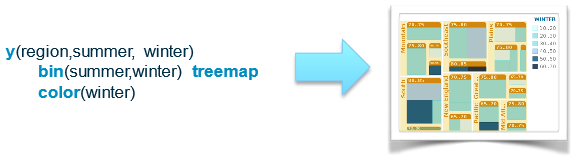
Brunel defines a highly succinct and novel language that produces interactive data visualizations using pandas DataFrame objects. The language is well suited for both data scientists and more aggressive business users. The system interprets the language syntax and produces live visualizations directly within Jupyter notebooks.
Articles and notes on Brunel can be found in the brunelvis.org blog. Videos are available on YouTube.
Details about the language can be found in the Brunel Language Tutorial
Examples can be found in the Brunel Visualization Gallery and the Brunel Visualization Cookbook.
See the 1.1 Release Notes for new features and changes.
New in 1.1: Support for Python 2
Please report any issues on our Github site. Q&A now available on Gitter
Dependencies
Brunel Visualization currently only works in IPython/Jupyter notebooks which must be installed prior to installing Brunel.
Java 1.7+ must be installed
It is likely that environment variable JAVA_HOME also needs to be properly set to the location of the Java installation.
Installation
pip install brunel
Note, if after installing the visualizations are not visible try installing using:
pip install brunel --user
Example
Sample code that reads data from a CSV file and creates a simple bar chart of averages using the Brunel magic function:
import pandas as pd
import brunel

cars = pd.read_csv("data/Cars.csv")

%brunel data('cars') x(origin) y(horsepower) mean(horsepower) bar tooltip(#all) :: width=300, height=300
Release history Release notifications | RSS feed


Download files
Download the file for your platform. If you're not sure which to choose, learn more about installing packages.
Source Distribution
File details
Details for the file brunel-1.1.zip.
File metadata
- Download URL: brunel-1.1.zip
- Upload date:
- Size: 908.3 kB
- Tags: Source
- Uploaded using Trusted Publishing? No
File hashes
| Algorithm | Hash digest | |
|---|---|---|
| SHA256 |
31e67775ee1b71d98b9467bb727aea88f2fd385b4ef0f086ef693e1e9ea9ba50
|
|
| MD5 |
dc1f8e4efd59e572a9645e1354809ed5
|
|
| BLAKE2b-256 |
806443173c81f79adfe29fa21a8132f911683ea0db4a9df01fb3f28158ce27cd
|






