
Camunda external task Robot Framework RCC client

Project description
Camunda external task Robot Framework RCC client
Technology preview.
carrot-rcc is an opinionated Camunda external task client for executing Robot Framework RPA framework automation tasks. It is based on Robocorp RCC toolchain and Camunda external task client for Node JS.
carrot-rcc executes automation tasks built and wrapped into robot.zip packages as instructed by Robocorp documentation. Single carrot-rcc service can subscribe multiple topics and execute tasks from same or different robot-packages concurrently, although only locally on the same computer. carrot-rcc should work fine on Windows, Linux and on MacOS.
usage: carrot-rcc [<robots>...]
                  [--base-url] [--authorization]
                  [--worker-id] [--max-tasks] [--poll-interval]
                  [--rcc-executable] [--rcc-encoding] [--rcc-telemetry]
                  [--rcc-controller] [--rcc-fixed-spaces]
                  [--vault-addr] [--vault-token]
                  [--healthz-host] [--healthz-port]
                  [--log-level]
                  [-h] [--help]

<robots> could also be passed as a comma separated env RCC_ROBOTS

options:

  --base-url[=<url>]                       [env: CAMUNDA_API_BASE_URL] [default: http://localhost:8080/engine-rest]
  --authorization[=<header>]               [env: CAMUNDA_API_AUTHORIZATION] [example: Basic ZGVtbzpkZW1v]

  --worker-id[=<string>]                   [env: CLIENT_WORKER_ID] [default: carrot-rcc]
  --max-tasks[=<cpus>]                     [env: CLIENT_MAX_TASKS] [default: [cpu count]]
  --poll-interval[=<milliseconds>]         [env: CLIENT_POLL_INTERVAL] [default: 60000]
  --log-level[=<debug|info|warn|error>]    [env: CLIENT_LOG_LEVEL] [default: info]

  --rcc-executable[=<path>]                [env: RCC_EXECUTABLE] (or RCC_EXE) [default: rcc]
  --rcc-controller[=<controller>]          [env: RCC_CONTROLLER] [default: carrot]
  --rcc-encoding[=<encoding>]              [env: RCC_ENCODING] [default: utf-8]
  --rcc-telemetry                          [env: RCC_TELEMETRY]
  --rcc-fixed-spaces                       [env: RCC_FIXED_SPACES]

  --vault-addr[=<addr>]                    [env: VAULT_ADDR] [default: http://127.0.0.1:8200]
  --vault-token[=<token>]                  [env: VAULT_TOKEN] [default: token]

  --healthz-host[=<host>]                  [env: HEALTHZ_HOST] [default: localhost]
  --healthz-port[=<port>]                  [env: HEALTHZ_PORT] (default: disabled)

  -h, --help

examples:

  $ carrot-rcc robot1.zip

  $ carrot-rcc robot1.zip robot2.zip --log-level=debug

  $ RCC_ROBOTS="robot1.zip,robot2.zip" LOG_LEVEL="debug" carrot-rcc

  $ CAMUNDA_API_AUTHORIZATION="Bearer MY_TOKEN" carrot-rcc robot1.zip

When --rcc-fixed-spaces is set, concurrent tasks for the same topic may share
RCC space, possibly resulting in faster startup.
Design
When carrot-rcc is started, it examines every given robot-package and examines available task names from their robot.yaml. Currently, carrot-rcc can only find packages preloaded onto local filesystem.
Then carrot-rcc subscribes every found task name as they were Camunda external task topics, and starts listening for new tasks for its topics to become available at Camunda.
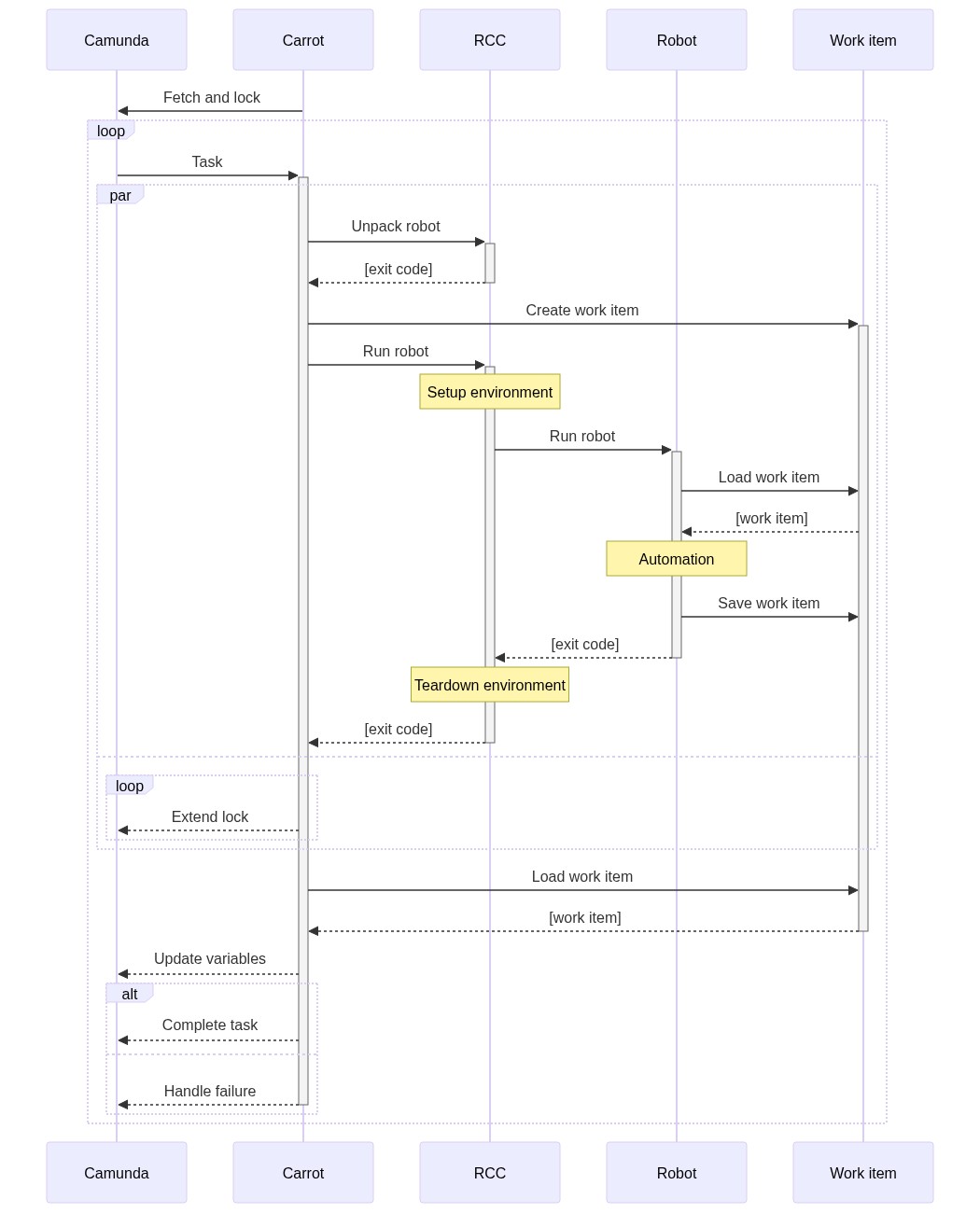
On a new task, carrot-rcc remembers which topic was mapped to which task on which robot-package, and unpacks the correct robot-package into a new temporary directory. Then it creates another temporary directory with all external task variables and files as a local robot work item.
Similarly to work item, for convenience, all carrot-rcc process environment variables are made available as env secret to keep their use out of Robot Framework logs when used with RPA framework's Secrets -library.
Next RCC is called to resolve robot's dependencies and execute the robot. Robot package may declare any available Conda or Pip package as its dependency. For example, this makes it possible to have fully functional browser automation stack as a task dependency independently what the local machine actually has available. RCC caches the dependency environments on the machine to enable their fast re-use.
Finally, carrot-rcc saves all the changed and added variables from the saved work item back to Camunda. In addition, it also saves full Robot Framework execution logs. All these are saved back into the task execution context, to leave their further use for the BPMN designer. At the end carrot-rcc either completes of fails the task at Camunda.

Usage
carrot-rcc requires only NodeJS 12 or later and expects RCC to be on the environment PATH. RCC location may also be configured manually with --rcc-executable argument.
It is also possible to bootstrap everything with just using RCC:
-
Create a directory for
carrot-rccand download RCC into that directory. -
Download an example conda.yaml defining the requirements for
carrot-rcc. -
Install
carrot-rccinto RCC managed environment with$ rcc holotree variables conda.yaml > activate.sh
or
$ rcc.exe holotree variables conda.yaml > activate.bat
-
And activate the environment:
$ source activate.sh
or
$ .\activate.bat
Done. Now carrot-rcc should be ready to be run, for example:
$ carrot-rcc robot.zip --base-url=http://localhost:8080/engine-rest --log-level=debug
or
$ carrot-rcc.exe robot.zip --base-url=http://192.168.86.156:8080/engine-rest --log-level=debug
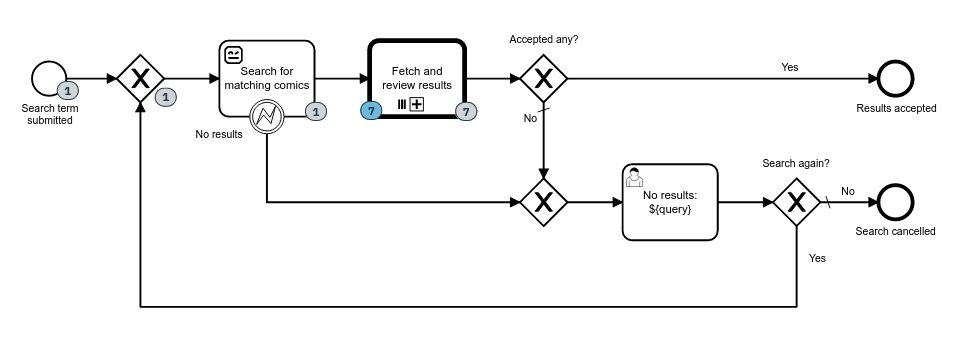
The project's repository includes example Camunda processes with example RCC compatible robots (1, 2) available.
Retry on failure
It is possible to define automatic retries on failure with defining retries with a number and retryTimout and retryTimeoutMax (optional) with milliseconds to wait before the retry. When retryTimeoutMax is defined with larger value than retryTimeout, timeout will be gradually increased between retries.
tasks:

  Camunda Topic:
    robotTaskName:
      My Robot Task
    retries: 10
    retryTimeout: 60000
    retryTimeoutMax: 3600000
Vault support
carrot-rcc has some support for HashiCorp Vault KV secrets engine. When working VAULT_ADDR and VAULT_TOKEN set, carrot_rcc will resolve secrets defined in each robots' robot.yaml each time before a robot execution.
An example robot.yaml with secrets:
tasks:

  Camunda Topic:
    robotTaskName:
      My Robot Task

vault:
  my-secret: /secret-engine-path/data/my-secret-path

condaConfigFile:
  conda.yaml

artifactsDir:
  output
Note: carrot-rcc does NOT manage renewal for the given VAULT_TOKEN.
Release history Release notifications | RSS feed


Download files
Download the file for your platform. If you're not sure which to choose, learn more about installing packages.
Source Distributions
Built Distribution
Filter files by name, interpreter, ABI, and platform.
If you're not sure about the file name format, learn more about wheel file names.
Copy a direct link to the current filters
File details
Details for the file carrot_rcc-0.8.3-py3-none-any.whl.
File metadata
- Download URL: carrot_rcc-0.8.3-py3-none-any.whl
- Upload date:
- Size: 273.2 kB
- Tags: Python 3
- Uploaded using Trusted Publishing? No
- Uploaded via: twine/4.0.2 CPython/3.10.12
File hashes
| Algorithm | Hash digest | |
|---|---|---|
| SHA256 |
d64c7b6a87c465c3e4913d3ebf9d86b07cfce54fee9c631b7c7ca974a04e0865
|
|
| MD5 |
a53118de7bbdc10e9a32c3ce1f29bc54
|
|
| BLAKE2b-256 |
654fbb883e68dcdeca615e2834f55af2a89662e43d4936840720d6f6545dc1fe
|






