
(Karvy/Kfintech/CAMS) Consolidated Account Statement (CAS) PDF parser

Project description
CASParser





Parse Consolidated Account Statement (CAS) PDF files generated from CAMS/KFINTECH
Installation
pip install -U casparser
with faster PyMuPDF parser
pip install -U 'casparser[mupdf]'
Note: Enabling this dependency could result in licensing changes. Check the License section for more details
Usage
import casparser
data = casparser.read_cas_pdf("/path/to/cas/file.pdf", "password")

# Get data in json format
json_str = casparser.read_cas_pdf("/path/to/cas/file.pdf", "password", output="json")

# Get transactions data in csv string format
csv_str = casparser.read_cas_pdf("/path/to/cas/file.pdf", "password", output="csv")
Data structure
{
    "statement_period": {
        "from": "YYYY-MMM-DD",
        "to": "YYYY-MMM-DD"
    },
    "file_type": "CAMS/KARVY/UNKNOWN",
    "cas_type": "DETAILED/SUMMARY",
    "investor_info": {
        "email": "string",
        "name": "string",
        "mobile": "string",
        "address": "string"
    },
    "folios": [
        {
            "folio": "string",
            "amc": "string",
            "PAN": "string",
            "KYC": "OK/NOT OK",
            "PANKYC": "OK/NOT OK",
            "schemes": [
                {
                    "scheme": "string",
                    "isin": "string",
                    "amfi": "string",
                    "advisor": "string",
                    "rta_code": "string",
                    "rta": "string",
                    "open": "number",
                    "close": "number",
                    "close_calculated": "number",
                    "valuation": {
                      "date": "date",
                      "nav": "number",
                      "value": "number"
                    },
                    "transactions": [
                        {
                            "date": "YYYY-MM-DD",
                            "description": "string",
                            "amount": "number",
                            "units": "number",
                            "nav": "number",
                            "balance": "number",
                            "type": "string",
                            "dividend_rate": "number"
                        }
                    ]
                }
            ]
        }
    ]
}
Notes:
- Transaction
typecan be any value from the followingPURCHASEPURCHASE_SIPREDEMPTIONSWITCH_INSWITCH_IN_MERGERSWITCH_OUTSWITCH_OUT_MERGERDIVIDEND_PAYOUTDIVIDEND_REINVESTMENTTAXMISC
dividend_rateis applicable only forDIVIDEND_PAYOUTandDIVIDEND_REINVESTMENTtransactions.
CLI
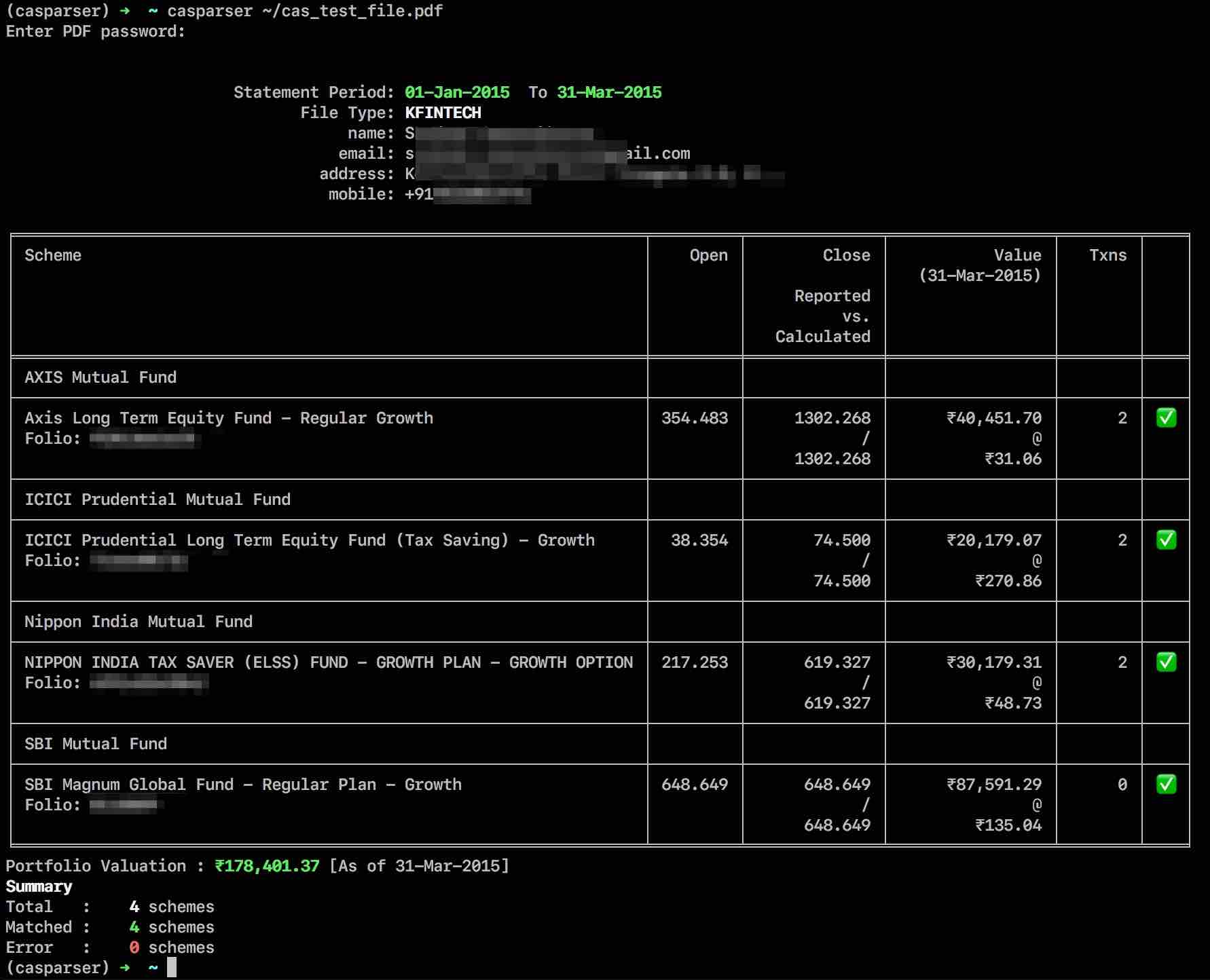
casparser also comes with a command-line interface that prints summary of parsed portfolio in a wide variety of formats.
Usage: casparser [-o output_file.json|output_file.csv] [-p password] [-s type] [-a] CAS_PDF_FILE

  -o, --output FILE               Output file path. Saves the parsed data as json or csv
                                  depending on the file extension. For other extensions, the
                                  summary output is saved. [See note below]

  -s, --summary simple|plain|grid|fancy_grid|html...
                                  Print Summary of transactions parsed.
  -p PASSWORD                     CAS password
  -a, --include-all               Include schemes with zero valuation in the
                                  summary output

  --force-pdfminer                Force PDFMiner parser even if MuPDF is
                                  detected

  --version                       Show the version and exit.
  -h, --help                      Show this message and exit.
Note: casparser cli supports two special output file formats [-o file.json / file.csv]
json- complete parsed data is exported in json format (including investor info)csv- Summary info is exported in csv format if the input file is a summary statement or if a summary flag (-s/--summary) is passed as argument to the CLI. Otherwise, full transaction history is included in the export.- any other extension - The summary output is saved in the file.
Demo
ISIN & AMFI code support
Since v0.4.3, casparser includes support for identifying ISIN and AMFI code for the parsed schemes
via the helper module casparser-isin. If the parser
fails to assign ISIN or AMFI codes to a scheme, try updating the local ISIN database by
casparser-isin --update
If it still fails, please raise an issue at casparser-isin with the failing scheme name(s).
License
CASParser is distributed under MIT license by default. However enabling the optional dependency
mupdf would imply the use of PyMuPDF /
MuPDF and hence the licenses GNU GPL v3 and GNU Affero GPL v3
would apply. Copies of all licenses have been included in this repository. - IANAL
Resources
Release history Release notifications | RSS feed


Download files
Download the file for your platform. If you're not sure which to choose, learn more about installing packages.
Source Distribution
Built Distribution
Filter files by name, interpreter, ABI, and platform.
If you're not sure about the file name format, learn more about wheel file names.
Copy a direct link to the current filters
File details
Details for the file casparser-0.4.4.tar.gz.
File metadata
- Download URL: casparser-0.4.4.tar.gz
- Upload date:
- Size: 20.1 kB
- Tags: Source
- Uploaded using Trusted Publishing? No
- Uploaded via: twine/3.3.0 pkginfo/1.7.0 requests/2.25.1 setuptools/49.2.1 requests-toolbelt/0.9.1 tqdm/4.56.0 CPython/3.8.7
File hashes
| Algorithm | Hash digest | |
|---|---|---|
| SHA256 |
500673ae96963bee1a409fd7e9ac8d66e73bda01ef7478dc18cf598f8ec9f512
|
|
| MD5 |
22771080ee8d7de44162b1b672097254
|
|
| BLAKE2b-256 |
94eda6682b8818b372013fcd9c0400865b72a1a35211180384d333d3a2a80b9b
|
File details
Details for the file casparser-0.4.4-py3-none-any.whl.
File metadata
- Download URL: casparser-0.4.4-py3-none-any.whl
- Upload date:
- Size: 24.9 kB
- Tags: Python 3
- Uploaded using Trusted Publishing? No
- Uploaded via: twine/3.3.0 pkginfo/1.7.0 requests/2.25.1 setuptools/49.2.1 requests-toolbelt/0.9.1 tqdm/4.56.0 CPython/3.8.7
File hashes
| Algorithm | Hash digest | |
|---|---|---|
| SHA256 |
4603639148bcd4372bc12e7f1cb90ceff63fde6a34df4436eeee695c12f06df7
|
|
| MD5 |
791b450274ff5ef75b187071afb07cac
|
|
| BLAKE2b-256 |
32691f264fd1c30fd4d520375766769226bc47603537fdfc9c59c07b4b390df2
|






