
AWS IAM policy statement generator with fluent interface for AWS CDK

Project description
IAM Floyd





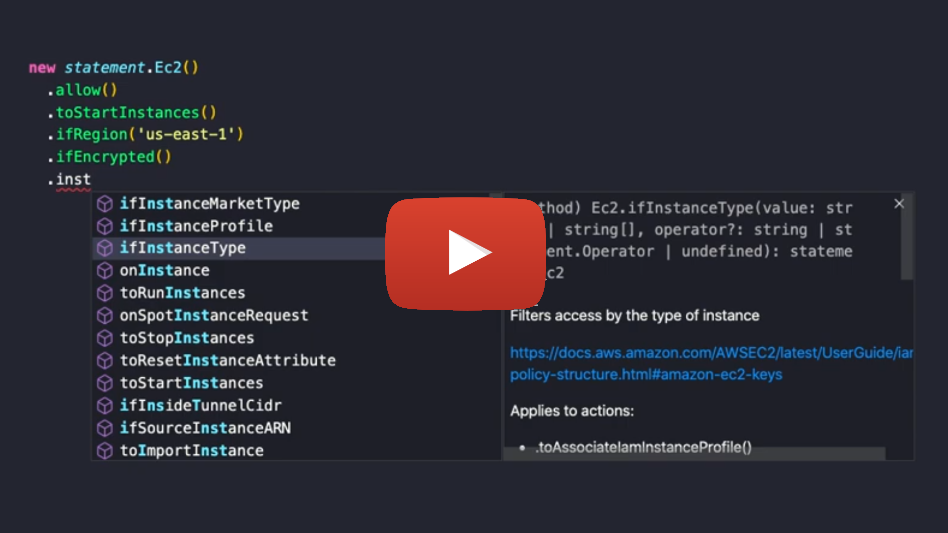
AWS IAM policy statement generator with fluent interface.
Support for:
- 235 Services
- 7750 Actions
- 753 Resource Types
- 452 Conditions
This is an early version of the package. The API will change while I implement new features. Therefore make sure you use an exact version in your package.json before it reaches 1.0.0.

Packages
There are two different package variants available:
- iam-floyd: Can be used in AWS SDK, Boto 3 or for whatever you need an IAM policy statement for
- cdk-iam-floyd: Integrates into AWS CDK and extends
iam.PolicyStatement






Usage
The package contains a statement provider for each AWS service, e.g. Ec2. A statement provider is a class with methods for each and every available action, resource type and condition. Calling such method will add the action/resource/condition to the statement:
# Example automatically generated without compilation. See https://github.com/aws/jsii/issues/826
import iam_floyd as statement

statement.Ec2().start_instances()
Every method returns the statement provider, so you can chain method calls:
# Example automatically generated without compilation. See https://github.com/aws/jsii/issues/826
statement.Ec2().start_instances().stop_instances()
The default effect of any statement is Allow. To add some linguistic sugar you can explicitly call the allow() method:
# Example automatically generated without compilation. See https://github.com/aws/jsii/issues/826
statement.Ec2().allow().start_instances().stop_instances()
And of course deny():
# Example automatically generated without compilation. See https://github.com/aws/jsii/issues/826
statement.Ec2().deny().start_instances().stop_instances()
If you don't want to be verbose and add every single action manually to the statement, you discovered the reason why this package was created. You can work with access levels!
There are 5 access levels you can use: LIST, READ, WRITE, PERMISSION_MANAGEMENT and TAGGING:
# Example automatically generated without compilation. See https://github.com/aws/jsii/issues/826
statement.Ec2().allow().all_actions(statement.AccessLevel.LIST, statement.AccessLevel.READ)
The allActions() method also accepts regular expressions which test against the action name:
# Example automatically generated without compilation. See https://github.com/aws/jsii/issues/826
statement.Ec2().deny().all_actions(/vpn/i)
If no value is passed, all actions (ec2:*) will be added:
# Example automatically generated without compilation. See https://github.com/aws/jsii/issues/826
statement.Ec2().allow().all_actions()
For every available condition key, there are if*() methods available.
# Example automatically generated without compilation. See https://github.com/aws/jsii/issues/826
statement.Ec2().allow().start_instances().if_encrypted().if_instance_type(["t3.micro", "t3.nano"]).if_associate_public_ip_address(False).if_aws_request_tag("Owner", "John")
If you want to add a condition not covered by the available methods, you can define just any condition yourself via if():
# Example automatically generated without compilation. See https://github.com/aws/jsii/issues/826
statement.Ec2().allow().start_instances().if("aws:RequestTag/Owner", "John")
The default operator for conditions of type String is StringLike.
Most of the if*() methods allow an optional operator as last argument:
# Example automatically generated without compilation. See https://github.com/aws/jsii/issues/826
statement.Ec2().allow().start_instances().if("aws:RequestTag/Owner", "*John*", "StringEquals")
By default the statement applies to all resources. To limit to specific resources, add them via on*().
For every resource type an on*() method exists:
# Example automatically generated without compilation. See https://github.com/aws/jsii/issues/826
statement.S3().allow().all_actions().on_bucket("some-bucket").on_object("some-bucket", "some/path/*")
If instead you have an ARN ready, use the on() method:
# Example automatically generated without compilation. See https://github.com/aws/jsii/issues/826
statement.S3().allow().all_actions().on("arn:aws:s3:::some-bucket", "arn:aws:s3:::another-bucket")
To invert the policy you can use notActions() and notResources():
# Example automatically generated without compilation. See https://github.com/aws/jsii/issues/826
statement.S3().allow().not_actions().not_resources().delete_bucket().on_bucket("some-bucket")
Examples
# Example automatically generated without compilation. See https://github.com/aws/jsii/issues/826
policy = {
    "Version": "2012-10-17",
    "Statement": [
        statement.Ec2().allow().start_instances().if_aws_request_tag("Owner", "${aws:username}"),
        statement.Ec2().allow().stop_instances().if_resource_tag("Owner", "${aws:username}"),
        statement.Ec2().allow().all_actions(statement.AccessLevel.LIST, statement.AccessLevel.READ)
    ]
}
# Example automatically generated without compilation. See https://github.com/aws/jsii/issues/826
policy = {
    "Version": "2012-10-17",
    "Statement": [
        statement.Cloudformation().allow().all_actions(),
        statement.All().allow().all_actions().if_aws_called_via("cloudformation.amazonaws.com"),
        statement.S3().allow().all_actions().on("arn:aws:s3:::cdktoolkit-stagingbucket-*"),
        statement.Account().deny().all_actions(statement.AccessLevel.PERMISSION_MANAGEMENT, statement.AccessLevel.WRITE),
        statement.Organizations().deny().all_actions(statement.AccessLevel.PERMISSION_MANAGEMENT, statement.AccessLevel.WRITE)
    ]
}
Methods
allow
Sets the Effect of the statement to Allow.
# Example automatically generated without compilation. See https://github.com/aws/jsii/issues/826
statement.Ec2().allow().stop_instances()
deny
Sets the Effect of the statement to Deny.
# Example automatically generated without compilation. See https://github.com/aws/jsii/issues/826
statement.Ec2().deny().stop_instances()
allActions
This method allows you to add multiple actions at once. If called without parameters, it adds all actions of the service.
# Example automatically generated without compilation. See https://github.com/aws/jsii/issues/826
statement.Ec2().allow().all_actions()
The method can take regular expressions and access levels as options and will add only the matching actions:
# Example automatically generated without compilation. See https://github.com/aws/jsii/issues/826
statement.Ec2().allow().all_actions(/vpn/i)
# Example automatically generated without compilation. See https://github.com/aws/jsii/issues/826
statement.Ec2().allow().all_actions(statement.AccessLevel.LIST, statement.AccessLevel.READ)
There exist 5 access levels:
- LIST
- READ
- WRITE
- PERMISSION_MANAGEMENT
- TAGGING
if*, if
For every available condition key, there are if*() methods available.
# Example automatically generated without compilation. See https://github.com/aws/jsii/issues/826
statement.Ec2().allow().start_instances().if_encrypted().if_instance_type(["t3.micro", "t3.nano"]).if_associate_public_ip_address(False).if_aws_request_tag("Owner", "John")
Most of them allow an optional operator as last argument:
# Example automatically generated without compilation. See https://github.com/aws/jsii/issues/826
statement.Ec2().allow().start_instances().if_instance_type("*.nano", "StringLike")
Global conditions are prefixed with ifAws, e.g. ifAwsRequestedRegion()
If you want to add a condition not covered by the available methods, you can define just any condition yourself via if():
# Example automatically generated without compilation. See https://github.com/aws/jsii/issues/826
statement.Ec2().allow().start_instances().if("aws:RequestTag/Owner", "${aws:username}", "StringEquals")
on*, on
Limit statement to specified resources.
For every resource type an on*() method exists:
# Example automatically generated without compilation. See https://github.com/aws/jsii/issues/826
statement.S3().allow().all_actions().on_bucket("some-bucket")
If instead you have an ARN ready, use the on() method:
# Example automatically generated without compilation. See https://github.com/aws/jsii/issues/826
statement.S3().allow().all_actions().on("arn:aws:s3:::some-bucket")
If no resources are applied to the statement, it defaults to all resources (*). You can also be verbose and set this yourself:
# Example automatically generated without compilation. See https://github.com/aws/jsii/issues/826
statement.S3().allow().all_actions().on("*")
notActions
Switches the policy provider to use NotAction.
# Example automatically generated without compilation. See https://github.com/aws/jsii/issues/826
statement.S3().allow().not_actions().delete_bucket().on_bucket("some-bucket")
notResources
Switches the policy provider to use NotResource.
# Example automatically generated without compilation. See https://github.com/aws/jsii/issues/826
statement.S3().allow().not_resources().delete_bucket().on_bucket("some-bucket")
notPrincipals
Switches the policy provider to use NotPrincipal.
# Example automatically generated without compilation. See https://github.com/aws/jsii/issues/826
statement.Sts().deny().not_principals().assume_role().for_user("1234567890", "Bob")
for*
To create assume policies, use the for*() methods. There are methods available for any type of principal:
# Example automatically generated without compilation. See https://github.com/aws/jsii/issues/826
statement.Sts().allow().assume_role().for_account("1234567890")

statement.Sts().allow().assume_role_with_sAML().for_service("lambda.amazonaws.com")

statement.Sts().allow().assume_role().for_user("1234567890", "Bob")

statement.Sts().allow().assume_role().for_role("1234567890", "role-name")

statement.Sts().allow().assume_role_with_sAML().for_federated_cognito()

statement.Sts().allow().assume_role_with_sAML().for_federated_amazon()

statement.Sts().allow().assume_role_with_sAML().for_federated_google()

statement.Sts().allow().assume_role_with_sAML().for_federated_facebook()

statement.Sts().allow().assume_role_with_sAML().for_saml("1234567890", "saml-provider")

statement.Sts().allow().assume_role().for_public()

statement.Sts().allow().assume_role().for_assumed_role_session("123456789", "role-name", "session-name")

statement.Sts().allow().assume_role().for_canonical_user("userID")

statement.Sts().allow().assume_role().for("arn:foo:bar")
To reverse the assume policy you can call the notPrincipals() method:
# Example automatically generated without compilation. See https://github.com/aws/jsii/issues/826
statement.Sts().deny().not_principals().assume_role().for_user("1234567890", "Bob")
If you use the cdk variant of the package you should not have the need to manually create assume policies. But if you do, there is an additional method forCdkPrincipal() which takes any number of iam.IPrincipal objects:
# Example automatically generated without compilation. See https://github.com/aws/jsii/issues/826
statement.Sts().allow().assume_role().for_cdk_principal(
    iam.ServicePrincipal("sns.amazonaws.com"),
    iam.ServicePrincipal("lambda.amazonaws.com"))
Floyd?
George Floyd has been murdered by racist police officers on May 25th, 2020.
This package is not named after him to just remind you of him and his death. I want this package to be of great help to you and I want you to use it on a daily base. Every time you use it, I want you to remember our society is ill and needs change. The riots will stop. The news will fade. The issue persists!
If this statement annoys you, this package is not for you.
Similar projects
Legal
The code contained in the lib folder is generated from the AWS documentation. The class- and function-names and their description therefore are property of AWS.
AWS and their services are trademarks, registered trademarks or trade dress of AWS in the U.S. and/or other countries.
This project is not affiliated, funded, or in any way associated with AWS.
Release history Release notifications | RSS feed


Download files
Download the file for your platform. If you're not sure which to choose, learn more about installing packages.
Source Distribution
Built Distribution
Filter files by name, interpreter, ABI, and platform.
If you're not sure about the file name format, learn more about wheel file names.
Copy a direct link to the current filters
File details
Details for the file cdk-iam-floyd-0.41.0.tar.gz.
File metadata
- Download URL: cdk-iam-floyd-0.41.0.tar.gz
- Upload date:
- Size: 3.1 MB
- Tags: Source
- Uploaded using Trusted Publishing? No
- Uploaded via: twine/3.1.1 pkginfo/1.5.0.1 requests/2.23.0 setuptools/41.6.0 requests-toolbelt/0.9.1 tqdm/4.43.0 CPython/3.7.5
File hashes
| Algorithm | Hash digest | |
|---|---|---|
| SHA256 |
39373c3f9b89a658c1e2db357aca0d14f48555f90ecf056144579f7ca9802219
|
|
| MD5 |
26b7a8d459cc8dc64202b394f642e152
|
|
| BLAKE2b-256 |
a9912a0d91a4d2556398832bc081efdc9c521eb06307a14e7f46c784f9286d28
|
File details
Details for the file cdk_iam_floyd-0.41.0-py3-none-any.whl.
File metadata
- Download URL: cdk_iam_floyd-0.41.0-py3-none-any.whl
- Upload date:
- Size: 3.1 MB
- Tags: Python 3
- Uploaded using Trusted Publishing? No
- Uploaded via: twine/3.1.1 pkginfo/1.5.0.1 requests/2.23.0 setuptools/41.6.0 requests-toolbelt/0.9.1 tqdm/4.43.0 CPython/3.7.5
File hashes
| Algorithm | Hash digest | |
|---|---|---|
| SHA256 |
5cf592beae8587b4233cbb3104043102f1f3fb820e292d56ce1fbe824251ca1d
|
|
| MD5 |
0f32323f0c7b0a691a990387fd8fe3a0
|
|
| BLAKE2b-256 |
f95dfbb9bc9b72e499e552b20d21f99acc6212a58e502ff5bcbec9d2c2bb000f
|






