
Provides previews for multiple archive formats


Project description

ckanext-unfold
Enhance your CKAN experience with our extension that enables seamless previews of various archive formats, ensuring easy access and efficient data management.
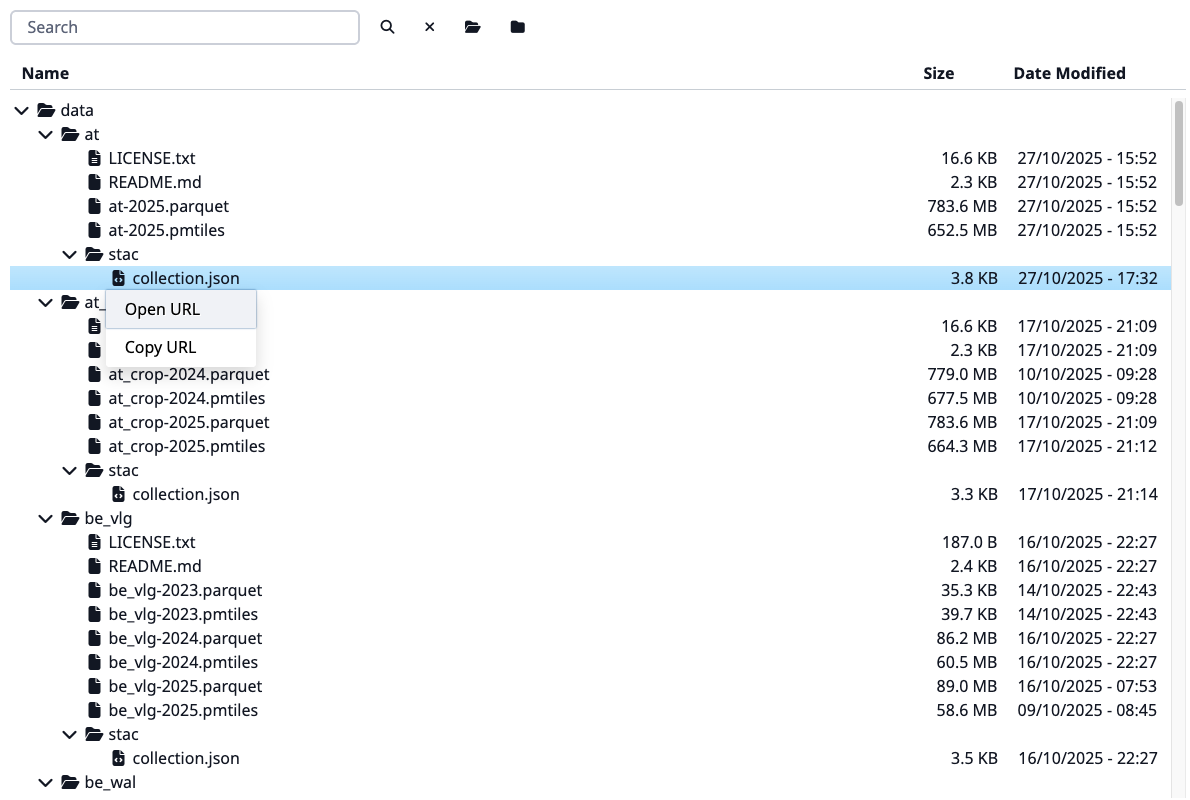
Features:
- Represents an archive as a file tree
- Supports the following archive formats: ZIP, ZIPX, JAR, RAR, CBR, 7Z, TAR, TAR.XZ, TAR.GZ, TAR.BZ2, DEB, RPM, A, AR, LIB
- Password-protected archives support for RAR format
- Caching the file tree for faster access
- File and folder search
- Support local and remote files
- Support for large archives
Requirements
CKAN >= 2.10
Python >= 3.11
Redis (for caching)
Configuration
ckan.plugins = unfold
ckan.views.default_views = unfold_view
Settings
See the config declaration file.
Signals
The extension provides the following signals for customization and extension:
unfold:register_format_adapters: Register custom adapters for specific file formats.unfold:get_adapter_for_resource: Get a custom adapter for a specific resource.
Registering a custom adapter
You can register your own adapter for a specific file format by using the unfold:register_format_adapters signal.
In fact, it doesn't have to be an archive format — you can register an adapter for any file format that makes sense to be represented as a file tree. To create your own adapter, you need to inherit from adapters.BaseAdapter and implement the required methods.
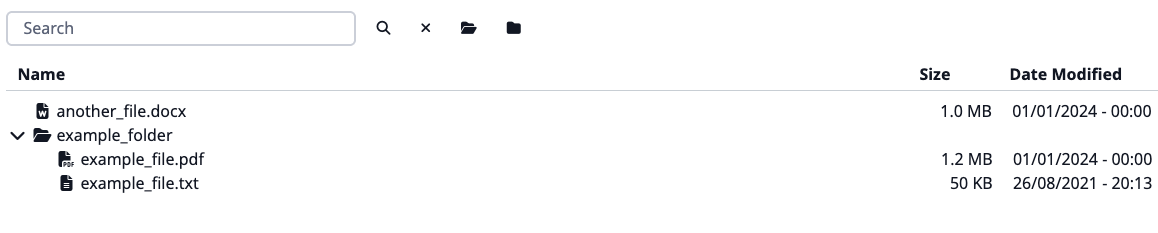
We're providing a simple example adapter below. The node list generation is up to the developer.
from ckanext.unfold.adapters import BaseAdapter
from ckanext.unfold.types import Node

class ExampleAdapter(BaseAdapter):
    def get_node_list(self) -> list[Node]:
        """Return list of nodes representing the archive structure.

        Ensure, that your implementation handles both local and remote files
        based on the `self.remote` attribute.
        """
        return self.get_mock_node_list()

    def get_mock_node_list(self) -> list[Node]:
        return [
            unf_types.Node(
                id="example_folder/",
                text="example_folder",
                icon="fa fa-folder",
                parent="#",
            ),
            unf_types.Node(
                id="example_folder/example_file.txt",
                text="example_file.txt",
                icon="fa fa-file-text",
                parent="example_folder/",
                a_attr={"href": "http://example.com/example_file.txt", "target": "_blank"},
                data={"type": "file", "size": "50 KB", "modified_at": "26/08/2021 - 20:13"},
            ),
            unf_types.Node(
                id="example_folder/example_file.pdf",
                text="example_file.pdf",
                icon="fa fa-file-pdf",
                parent="example_folder/",
                data={"type": "file", "size": "1.2 MB", "modified_at": "01/01/2024 - 00:00"},
            ),
            unf_types.Node(
                id="another_file.docx",
                text="another_file.docx",
                icon="fa fa-file-word",
                parent="#",
                data={"type": "file", "size": "1.0 MB", "modified_at": "01/01/2024 - 00:00"},
            ),
        ]
Then, you need to register your adapter using the signal. Each adapter registration function should accept a single argument, which is the adapter registry.
class ExamplePlugin(p.SingletonPlugin):
    ...

    p.implements(p.ISignal)

    # ISignal
    def get_signal_subscriptions(self) -> types.SignalMapping:
        return {
            tk.signals.ckanext.signal("unfold:register_format_adapters"): [
                self._register_format_adapters
            ],
        }

    @classmethod
    def _register_format_adapters(cls, adapters: type[unf_adapters.Registry]) -> None:
        adapters.update({"my.format": ExampleAdapter})
Each adapter is responsible for handling a specific file format. The key in the registry dictionary is the file format, and the value is the adapter class.
[!NOTE]
- You can register multiple adapters for different file formats.
- This way, you can replace existing adapters by registering your own adapter for the same format.
The result preview will look like this:
Getting a custom adapter for a resource
Sometimes, you may want to provide a custom adapter for a specific resource based on some criteria, such as resource metadata or other attributes. Or you may want not to preview certain resources. You can do this by listening to the unfold:get_adapter_for_resource signal and returning your custom adapter when the criteria are met.
...
class ExamplePlugin(p.SingletonPlugin):
    ...

    p.implements(p.ISignal)

    # ISignal
    def get_signal_subscriptions(self) -> types.SignalMapping:
        return {
            tk.signals.ckanext.signal("unfold:get_adapter_for_resource"): [
                self._get_adapter_for_resource
            ],
        }

    @classmethod
    def _get_adapter_for_resource(cls, resource: dict[str, str]) -> type[BaseAdapter] | None | bool:
        if resource.get("format", "").lower() == "my.format":
            return ExampleAdapter

        return None
- Return an adapter class if you want to provide a custom adapter for the resource.
- If you return
None, another extension may provide an adapter, or the default adapter lookup mechanism will be used. - If you return
Falsefrom the signal handler, it will prevent further processing, and no adapter will be used for that resource.
Dependencies
Working with different archive formats requires different tools:
RAR, CBR
It depends on unrar command-line utility to do the actual decompression. Note that by default it expect it to be in PATH.
If unrar launching fails, you need to fix this.
Alternatively, rarfile can also use either unar from TheUnarchiver or
bsdtar from libarchive as
decompression backend. From those unar is preferred as bsdtar has very limited support for RAR archives.
It depends on cryptography or PyCryptodome modules to process archives with password-protected headers.
7Z
We are using py7zr library.
The py7zr depends on several external libraries. You should install these libraries with py7zr.
There are PyCryptodome, PyZstd, PyPPMd, bcj-cffi, texttable, and multivolumefile.
These packages are automatically installed when installing with pip command.
For extra information, please visit the official documentation, especially the dependencies section.
ZIP, ZIPX, JAR
We are using built-in library zipfile. Please consider referring to the official documentation for more information.
TAR, TAR.XZ, TAR.GZ, TAR.BZ2
We are using built-in library tarfile. Please consider referring to the official documentation for more information.
RPM
We are using rpmfile library.
If you want to use rpmfile with zstd compressed rpms, you'll need to install the zstandard module.
DEB, A, AR, LIB
We are using ar library. Please consider referring to the official documentation for more information.
License
Release history Release notifications | RSS feed


Download files
Download the file for your platform. If you're not sure which to choose, learn more about installing packages.
Source Distribution
Built Distribution
Filter files by name, interpreter, ABI, and platform.
If you're not sure about the file name format, learn more about wheel file names.
Copy a direct link to the current filters
File details
Details for the file ckanext_unfold-2.3.2.tar.gz.
File metadata
- Download URL: ckanext_unfold-2.3.2.tar.gz
- Upload date:
- Size: 71.5 kB
- Tags: Source
- Uploaded using Trusted Publishing? No
- Uploaded via: twine/6.1.0 CPython/3.11.4
File hashes
| Algorithm | Hash digest | |
|---|---|---|
| SHA256 |
42d150c2330ad6357a167a11eb965a18a1acfc84405365c53781656fcf8e1fc3
|
|
| MD5 |
35dcf3f585e3d15eb39968e0362f27fc
|
|
| BLAKE2b-256 |
3a7bf54bd7e874b15a5ac165f3ea0af1a52227c7ad5364d8e7c52c7d42af6217
|
File details
Details for the file ckanext_unfold-2.3.2-py3-none-any.whl.
File metadata
- Download URL: ckanext_unfold-2.3.2-py3-none-any.whl
- Upload date:
- Size: 76.6 kB
- Tags: Python 3
- Uploaded using Trusted Publishing? No
- Uploaded via: twine/6.1.0 CPython/3.11.4
File hashes
| Algorithm | Hash digest | |
|---|---|---|
| SHA256 |
572bd53e011d36707c4296511754bd973c3f56858148cce821be2a05b5d5cd79
|
|
| MD5 |
b051359985e704a1827ed1c0c4c60bb6
|
|
| BLAKE2b-256 |
4448e319cd391cc1b2a8e2876f7037c87d2f1462d5e5590c3bb27d0d4feec321
|






