
🌈 Drop-in replacement for Click to make user-friendly and colorful CLI

Project description







What is Click Extra?
It should be easy to write a good CLI in Python. Click makes it so. But there is still hundrends of tweaks to implement by yourself to have a user-friendly CLI.
Click Extra is a ready-to-use wrapper around Click to make your CLI look good and behave well. It is a drop-in replacement with good defaults that saves lots of boilerplate code and frustration by making all parts working together.
It also comes with workarounds and patches that have not reached upstream yet (or are unlikely to).
Demo
You can try Click Extra right now in your terminal, without installing any dependency or virtual env thanks to uvx:
$ uvx --from click-extra -- click-extra-demo
This is a great way to play with Click Extra and check that it runs fine on your system, and renders properly in your terminal.
Example
It transforms this vanilla click CLI:
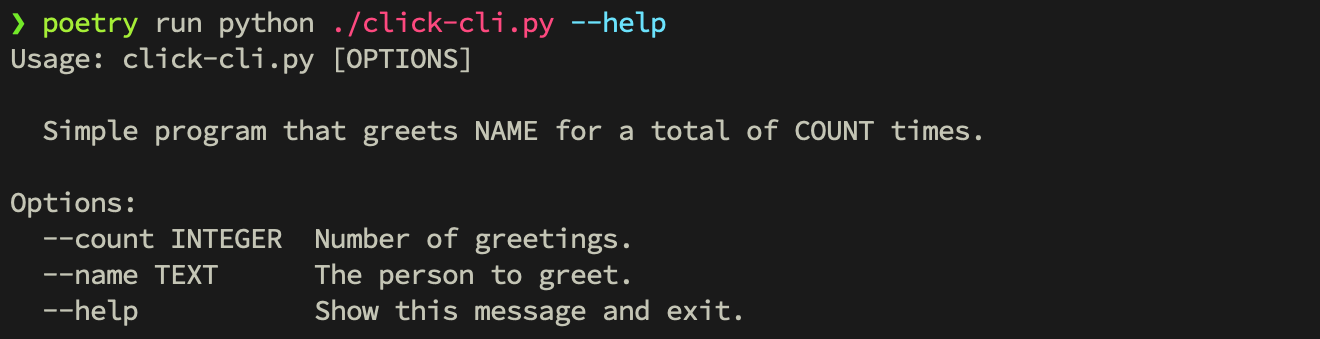
Into this:
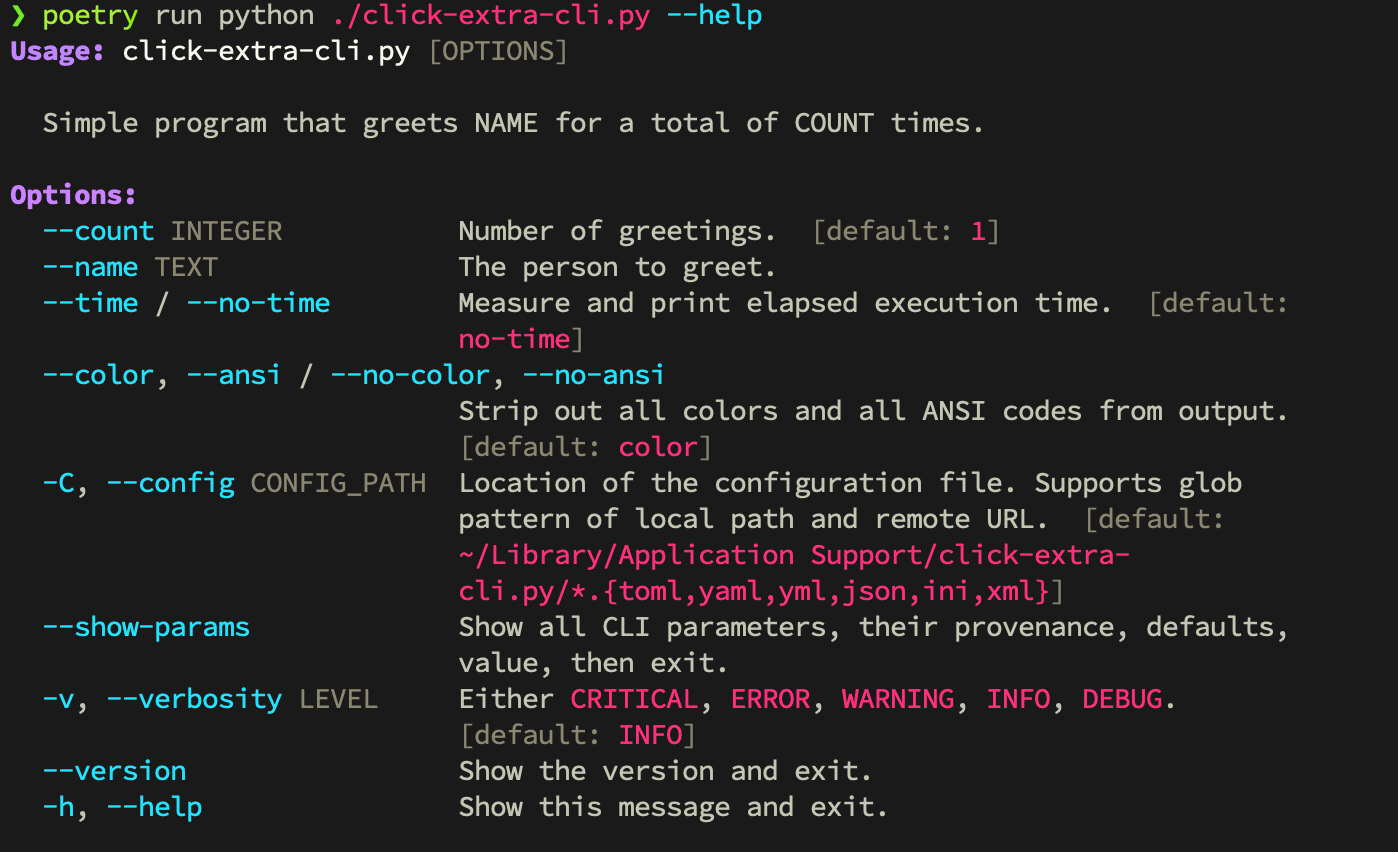
To undestrand how we ended up with the result above, go read the tutorial.
Features
- Configuration file loader for:
TOMLYAMLJSON,JSON5,JSONCandHJSONINI, with extended interpolation, multi-level sections and non-native types (list,set, …)XML
- Automatic inference of the configuration file structure from your CLI's options
- Remote loading of configuration from URLs
- Optional strict validation of configuration
- Respect the default application path on each platform (XDG spec. on Linux)
- Glob search patterns for configuration files
- A
--no-configoption to disable configuration file loading - Respect of
CLI>Configuration>Environment>Defaultsprecedence - Normalization and discoverability of environment variables
--show-paramsoption to debug parameters defaults, values, environment variables and provenance- Click parameters introspection
- Colorization of help screens at the semantic-level of options, parameters, subheadings, choices, metavars and defaults
- Global
show_envvaroption to display all environment variables in help screens -h/--helpoption names (see rant on other inconsistencies)--color/--no-coloroption flag--telemetry/--no-telemetryflag to opt-in/out of tracking code- Recognize traditional environment variable conventions:
NO_COLORfromno-color.orgDO_NOT_TRACKfromconsoledonottrack.com
- Colored
--versionoption - Colored
--verbosityoption and logs --time/--no-timeflag to measure duration of command execution- Global
show_choicesto activate selection of choices on user input prompts - Lazy-loading of subcommands from module paths to speed up CLI startup time
click:sourceandclick:runSphinx directives in MyST Markdown and reStructuredText to document CLI source code and their execution- Inline testing of CLI examples in documentation
- Render GitHub alerts into MyST admonitions
- ANSI-capable Pygments lexers for shell session and console output
- Fixes 50+ bugs from other Click-related projects
- Rely on Cloup to add:
- option groups
- constraints
- subcommands sections
- aliases
- command suggestion (
Did you mean <subcommand>?)
Used in
Check these projects to get real-life examples of click-extra usage:
Meta Package Manager - A unifying CLI for multiple package managers.
Mail Deduplicate - A CLI to deduplicate similar emails.
fireproxng - A rewrite of the fireprox tool.
agent-catalog - Couchbase agent catalog.
badger-proxy - An mDNS-based reverse proxy for naming services on a local network.
Feel free to send a PR to add your project in this list if you are relying on Click Extra in any way.
Development
Development guidelines
are the same as
parent project mpm, from
which click-extra originated.
Release history Release notifications | RSS feed


Download files
Download the file for your platform. If you're not sure which to choose, learn more about installing packages.
Source Distribution
Built Distribution
Filter files by name, interpreter, ABI, and platform.
If you're not sure about the file name format, learn more about wheel file names.
Copy a direct link to the current filters
File details
Details for the file click_extra-7.5.2.tar.gz.
File metadata
- Download URL: click_extra-7.5.2.tar.gz
- Upload date:
- Size: 94.4 kB
- Tags: Source
- Uploaded using Trusted Publishing? No
- Uploaded via: uv/0.10.2 {"installer":{"name":"uv","version":"0.10.2","subcommand":["publish"]},"python":null,"implementation":{"name":null,"version":null},"distro":{"name":"Ubuntu","version":"24.04","id":"noble","libc":null},"system":{"name":null,"release":null},"cpu":null,"openssl_version":null,"setuptools_version":null,"rustc_version":null,"ci":true}
File hashes
| Algorithm | Hash digest | |
|---|---|---|
| SHA256 |
8249dca29840b0d37d6f53667e29d6d76fea208b2a86f7c945c76aa8ad51ba72
|
|
| MD5 |
7422796d69142511f01d49d9813e4b20
|
|
| BLAKE2b-256 |
6261905878019ad939b66423797c8a72577a9fe0948a09f80a290bb151eb617e
|
File details
Details for the file click_extra-7.5.2-py3-none-any.whl.
File metadata
- Download URL: click_extra-7.5.2-py3-none-any.whl
- Upload date:
- Size: 109.5 kB
- Tags: Python 3
- Uploaded using Trusted Publishing? No
- Uploaded via: uv/0.10.2 {"installer":{"name":"uv","version":"0.10.2","subcommand":["publish"]},"python":null,"implementation":{"name":null,"version":null},"distro":{"name":"Ubuntu","version":"24.04","id":"noble","libc":null},"system":{"name":null,"release":null},"cpu":null,"openssl_version":null,"setuptools_version":null,"rustc_version":null,"ci":true}
File hashes
| Algorithm | Hash digest | |
|---|---|---|
| SHA256 |
d34a7d0b5cd1cce23d446c7be32ce62ef8c4c4bf702d52fdbfa1c2126be89f08
|
|
| MD5 |
c58c090604aca8f8300b6bcbd2b1bc76
|
|
| BLAKE2b-256 |
87d8f5b846fa22e306feb782780e784256a4e3ef0f6a0482daba32a5e97a4aa2
|






