
No project description provided
Verified details
These details have been verified by PyPIProject links
Owner
GitHub Statistics
Maintainers

Project description

Estimate and track carbon emissions from your computer, quantify and analyze their impact.
CodeCarbon websites:
- Main website to learn why we do this.
- Dashboard to see your emissions, read the API doc before.
- Documentation to learn how to use the package and our methodology.
- GitHub to look at the source code and contribute.
- Discord to chat with us.



About CodeCarbon 💡
CodeCarbon started with a quite simple question:
What is the carbon emission impact of my computer program? :shrug:
We found some global data like "computing currently represents roughly 0.5% of the world’s energy consumption" but nothing on our individual/organisation level impact.
At CodeCarbon, we believe, along with Niels Bohr, that "Nothing exists until it is measured". So we found a way to estimate how much CO2 we produce while running our code.
How?
We created a Python package that estimates your hardware electricity power consumption (GPU + CPU + RAM) and we apply to it the carbon intensity of the region where the computing is done.

We explain more about this calculation in the Methodology section of the documentation.
Our hope is that this package will be used widely for estimating the carbon footprint of computing, and for establishing best practices with regards to the disclosure and reduction of this footprint.
So ready to "change the world one run at a time"? Let's start with a very quick set up.
Quickstart 🚀
Installation 🔧
From PyPI repository
pip install codecarbon
Using Conda environments If you're using Conda, you can install CodeCarbon with pip in your Conda environment:
conda activate your_env
pip install codecarbon
To see more installation options please refer to the documentation: Installation
Start to estimate your impact 📏
Without using the online dashboard
from codecarbon import track_emissions
@track_emissions()
def your_function_to_track():
  # your code
After running your code, you will find an emissions.csv that you can visualize with carbonboard --filepath="examples/emissions.csv".
With the online dashboard
To use the online dashboard you need to create an account on CodeCarbon Dashboard. Once you have an account, you can create an experiment_id to track your emissions.
To get an experiment_id enter:
! codecarbon login
You can now store it in a .codecarbon.config at the root of your project
[codecarbon]
log_level = DEBUG
save_to_api = True
experiment_id = 2bcbcbb8-850d-4692-af0d-76f6f36d79b2 #the experiment_id you get with init
Now you have 2 main options:
Monitoring your machine 💻
In your command prompt use:
codecarbon monitor
The package will track your emissions independently from your code.
Detecting your hardware 🔍
In your command prompt use:
codecarbon detect
The package will detect and print your hardware information (RAM, CPU, GPU).
In your Python code 🐍
from codecarbon import track_emissions
@track_emissions()
def your_function_to_track():
  # your code
The package will track the emissions generated by the execution of your function.
There is other ways to use codecarbon package, please refer to the documentation to learn more about it: Usage
Visualize 📊
You can now visualize your experiment emissions on the dashboard.

Hope you enjoy your first steps monitoring your carbon computing impact! Thanks to the incredible codecarbon community 💪🏼 a lot more options are available using codecarbon including:
- offline mode
- cloud mode
- comet integration...
Please explore the Documentation to learn about it If ever what your are looking for is not yet implemented, let us know through the issues and even better become one of our 🦸🏼♀️🦸🏼♂️ contributors! more info 👇🏼
Contributing 🤝
We are hoping that the open-source community will help us edit the code and make it better!
You are welcome to open issues, even suggest solutions and better still contribute the fix/improvement! We can guide you if you're not sure where to start but want to help us out 🥇
In order to contribute a change to our code base, please submit a pull request (PR) via GitHub and someone from our team will go over it and accept it.
Check out our contribution guidelines :arrow_upper_right:
Feel free to chat with us on Discord.
How To Cite 📝
If you find CodeCarbon useful for your research, you can find a citation under a variety of formats on Zenodo.
Here is a sample for BibTeX:
@software{benoit_courty_2024_11171501,
  author       = {Benoit Courty and
                  Victor Schmidt and
                  Sasha Luccioni and
                  Goyal-Kamal and
                  MarionCoutarel and
                  Boris Feld and
                  Jérémy Lecourt and
                  LiamConnell and
                  Amine Saboni and
                  Inimaz and
                  supatomic and
                  Mathilde Léval and
                  Luis Blanche and
                  Alexis Cruveiller and
                  ouminasara and
                  Franklin Zhao and
                  Aditya Joshi and
                  Alexis Bogroff and
                  Hugues de Lavoreille and
                  Niko Laskaris and
                  Edoardo Abati and
                  Douglas Blank and
                  Ziyao Wang and
                  Armin Catovic and
                  Marc Alencon and
                  Michał Stęchły and
                  Christian Bauer and
                  Lucas Otávio N. de Araújo and
                  JPW and
                  MinervaBooks},
  title        = {mlco2/codecarbon: v2.4.1},
  month        = may,
  year         = 2024,
  publisher    = {Zenodo},
  version      = {v2.4.1},
  doi          = {10.5281/zenodo.11171501},
  url          = {https://doi.org/10.5281/zenodo.11171501}
}
Contact 📝
Feel free to chat with us on Discord.
Codecarbon was formerly developed by volunteers from Mila and the DataForGoodFR community alongside donated professional time of engineers at Comet.ml and BCG GAMMA.
Now CodeCarbon is supported by Code Carbon, a French non-profit organization whose mission is to accelerate the development and adoption of CodeCarbon.
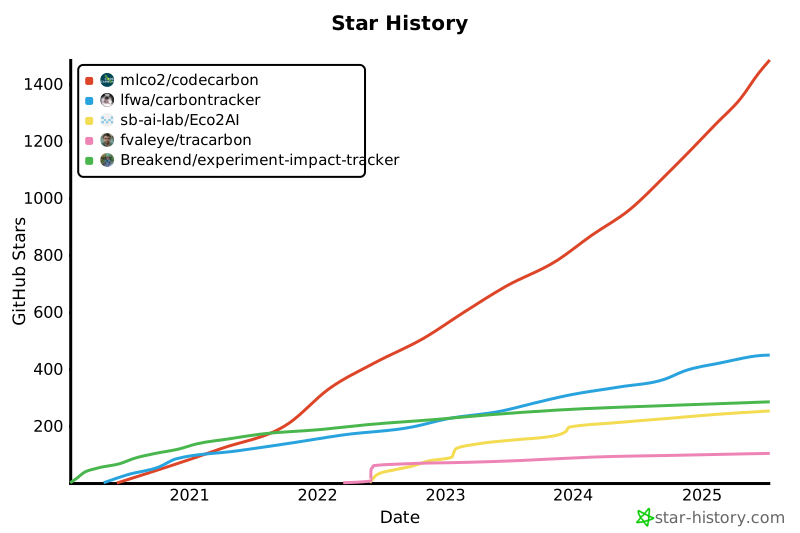
Star History
Comparison of the number of stars accumulated by the different Python CO2 emissions projects:
Project details
Verified details
These details have been verified by PyPIProject links
Owner
GitHub Statistics
Maintainers
Release history Release notifications | RSS feed


Download files
Download the file for your platform. If you're not sure which to choose, learn more about installing packages.
Source Distribution
Built Distribution
Filter files by name, interpreter, ABI, and platform.
If you're not sure about the file name format, learn more about wheel file names.
Copy a direct link to the current filters
File details
Details for the file codecarbon-3.2.2.tar.gz.
File metadata
- Download URL: codecarbon-3.2.2.tar.gz
- Upload date:
- Size: 382.4 kB
- Tags: Source
- Uploaded using Trusted Publishing? Yes
- Uploaded via: twine/6.1.0 CPython/3.13.7
File hashes
| Algorithm | Hash digest | |
|---|---|---|
| SHA256 |
a848c3960d48312fb527c9565c7dc6264035dc104eb40007564ef0ed4479bb22
|
|
| MD5 |
2c9fc56e8ebe50ca970b56f53155eab9
|
|
| BLAKE2b-256 |
16573b44a0b105e6d718db79038181777158b6386f627fd2700807358c5cf21e
|
Provenance
The following attestation bundles were made for codecarbon-3.2.2.tar.gz:
Publisher:
python-publish.yml on mlco2/codecarbon
-
Statement:
-
Statement type:
https://in-toto.io/Statement/v1 -
Predicate type:
https://docs.pypi.org/attestations/publish/v1 -
Subject name:
codecarbon-3.2.2.tar.gz -
Subject digest:
a848c3960d48312fb527c9565c7dc6264035dc104eb40007564ef0ed4479bb22 - Sigstore transparency entry: 896113251
- Sigstore integration time:
-
Permalink:
mlco2/codecarbon@efedba874bfc3feeeaca600f6aef9cb034e5abb6 -
Branch / Tag:
refs/tags/v3.2.2 - Owner: https://github.com/mlco2
-
Access:
public
-
Token Issuer:
https://token.actions.githubusercontent.com -
Runner Environment:
github-hosted -
Publication workflow:
python-publish.yml@efedba874bfc3feeeaca600f6aef9cb034e5abb6 -
Trigger Event:
release
-
Statement type:
File details
Details for the file codecarbon-3.2.2-py3-none-any.whl.
File metadata
- Download URL: codecarbon-3.2.2-py3-none-any.whl
- Upload date:
- Size: 359.6 kB
- Tags: Python 3
- Uploaded using Trusted Publishing? Yes
- Uploaded via: twine/6.1.0 CPython/3.13.7
File hashes
| Algorithm | Hash digest | |
|---|---|---|
| SHA256 |
f469c0824da8efb4ed3080ba5724f1ca93bf88d7306afb98f1809b7c4db1cf4c
|
|
| MD5 |
9a01a4428e5476dd95d0443aaf4f1159
|
|
| BLAKE2b-256 |
db4067fcc5e2059fce715098fd6b680ffb9baca86b2c9307a50cc491cfa0b60a
|
Provenance
The following attestation bundles were made for codecarbon-3.2.2-py3-none-any.whl:
Publisher:
python-publish.yml on mlco2/codecarbon
-
Statement:
-
Statement type:
https://in-toto.io/Statement/v1 -
Predicate type:
https://docs.pypi.org/attestations/publish/v1 -
Subject name:
codecarbon-3.2.2-py3-none-any.whl -
Subject digest:
f469c0824da8efb4ed3080ba5724f1ca93bf88d7306afb98f1809b7c4db1cf4c - Sigstore transparency entry: 896113325
- Sigstore integration time:
-
Permalink:
mlco2/codecarbon@efedba874bfc3feeeaca600f6aef9cb034e5abb6 -
Branch / Tag:
refs/tags/v3.2.2 - Owner: https://github.com/mlco2
-
Access:
public
-
Token Issuer:
https://token.actions.githubusercontent.com -
Runner Environment:
github-hosted -
Publication workflow:
python-publish.yml@efedba874bfc3feeeaca600f6aef9cb034e5abb6 -
Trigger Event:
release
-
Statement type:






