
Collate SQL Lineage for Analysis Tool powered by Python and sqlfluff based on sqllineage.

Project description
SQLLineage
SQL Lineage Analysis Tool powered by Python.
This is a fork authored by the OpenMetadata community, where we are adding sqlfluff as a parsing backend instead of sqlparse.









Never get the hang of a SQL parser? SQLLineage comes to the rescue. Given a SQL command, SQLLineage will tell you its source and target tables, without worrying about Tokens, Keyword, Identifier and all the jagons used by SQL parsers.
Behind the scene, SQLLineage pluggable leverages parser library (sqlfluff
and sqlparse) to parse the SQL command, analyze the AST, stores the lineage
information in a graph (using graph library networkx), and brings you all the
human-readable result with ease.
Demo & Documentation
Talk is cheap, show me a demo.
Documentation is online hosted by readthedocs, and you can check the release note there.
Quick Start
Install sqllineage via PyPI:
$ pip install sqllineage
Using sqllineage command to parse a quoted-query-string:
$ sqllineage -e "insert into db1.table1 select * from db2.table2"
Statements(#): 1
Source Tables:
    db2.table2
Target Tables:
    db1.table1
Or you can parse a SQL file with -f option:
$ sqllineage -f foo.sql
Statements(#): 1
Source Tables:
    db1.table_foo
    db1.table_bar
Target Tables:
    db2.table_baz
Advanced Usage
Multiple SQL Statements
Lineage result combined for multiple SQL statements, with intermediate tables identified:
$ sqllineage -e "insert into db1.table1 select * from db2.table2; insert into db3.table3 select * from db1.table1;"
Statements(#): 2
Source Tables:
    db2.table2
Target Tables:
    db3.table3
Intermediate Tables:
    db1.table1
Verbose Lineage Result
And if you want to see lineage result for every SQL statement, just toggle verbose option
$ sqllineage -v -e "insert into db1.table1 select * from db2.table2; insert into db3.table3 select * from db1.table1;"
Statement #1: insert into db1.table1 select * from db2.table2;
    table read: [Table: db2.table2]
    table write: [Table: db1.table1]
    table cte: []
    table rename: []
    table drop: []
Statement #2: insert into db3.table3 select * from db1.table1;
    table read: [Table: db1.table1]
    table write: [Table: db3.table3]
    table cte: []
    table rename: []
    table drop: []
==========
Summary:
Statements(#): 2
Source Tables:
    db2.table2
Target Tables:
    db3.table3
Intermediate Tables:
    db1.table1
Dialect-Awareness Lineage
By default, sqllineage doesn't validate your SQL and could give confusing result in case of invalid SQL syntax. In addition, different SQL dialect has different set of keywords, further weakening sqllineage's capabilities when keyword used as table name or column name. To reduce the impact, user are strongly encouraged to pass the dialect to assist the lineage analyzing.
Take below example, analyze is a reserved keyword in PostgreSQL. Default non-validating dialect gives incomplete result,
while ansi dialect gives the correct one and postgres dialect tells you this causes syntax error:
$ sqllineage -e "insert into analyze select * from foo;"
Statements(#): 1
Source Tables:
    <default>.foo
Target Tables:

$ sqllineage -e "insert into analyze select * from foo;" --dialect=ansi
Statements(#): 1
Source Tables:
    <default>.foo
Target Tables:
    <default>.analyze

$ sqllineage -e "insert into analyze select * from foo;" --dialect=postgres
...
sqllineage.exceptions.InvalidSyntaxException: This SQL statement is unparsable, please check potential syntax error for SQL
Use sqllineage --dialects to see all available dialects.
Column-Level Lineage
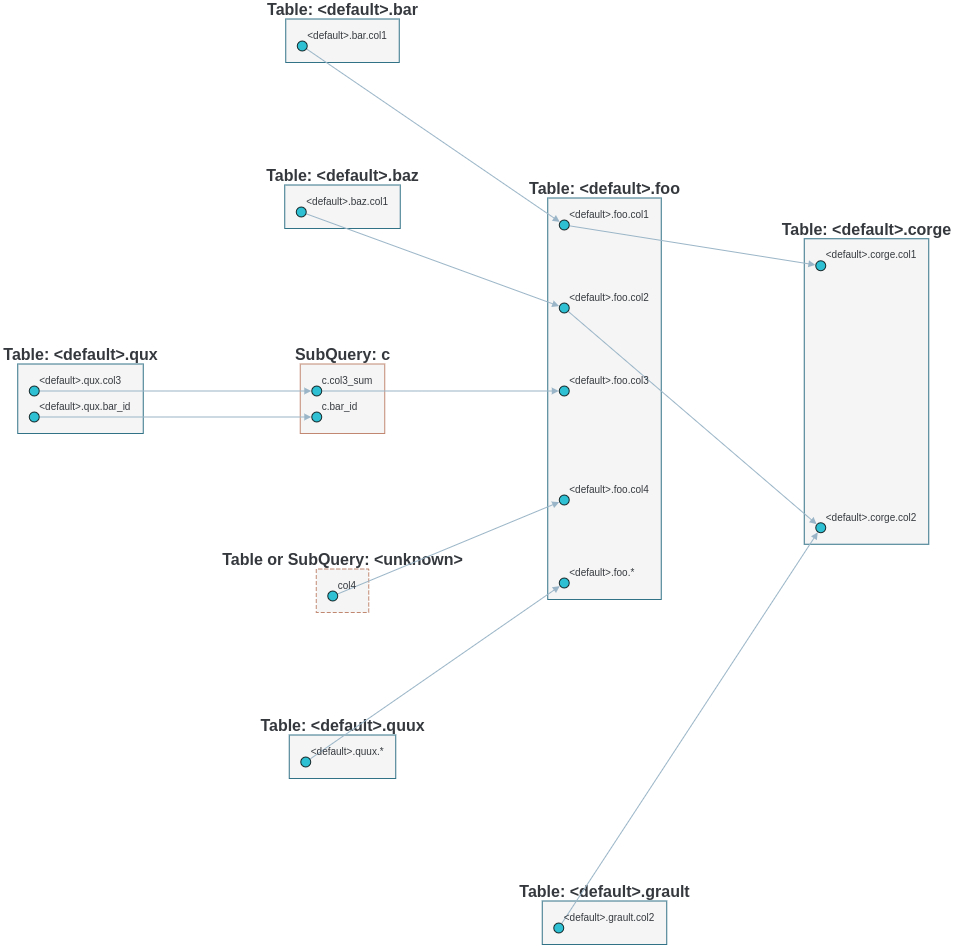
We also support column level lineage in command line interface, set level option to column, all column lineage path will be printed.
INSERT OVERWRITE TABLE foo
SELECT a.col1,
       b.col1     AS col2,
       c.col3_sum AS col3,
       col4,
       d.*
FROM bar a
         JOIN baz b
              ON a.id = b.bar_id
         LEFT JOIN (SELECT bar_id, sum(col3) AS col3_sum
                    FROM qux
                    GROUP BY bar_id) c
                   ON a.id = sq.bar_id
         CROSS JOIN quux d;

INSERT OVERWRITE TABLE corge
SELECT a.col1,
       a.col2 + b.col2 AS col2
FROM foo a
         LEFT JOIN grault b
              ON a.col1 = b.col1;
Suppose this sql is stored in a file called foo.sql
$ sqllineage -f foo.sql -l column
<default>.corge.col1 <- <default>.foo.col1 <- <default>.bar.col1
<default>.corge.col2 <- <default>.foo.col2 <- <default>.baz.col1
<default>.corge.col2 <- <default>.grault.col2
<default>.foo.* <- <default>.quux.*
<default>.foo.col3 <- c.col3_sum <- <default>.qux.col3
<default>.foo.col4 <- col4
Lineage Visualization
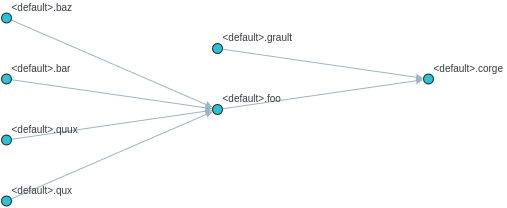
One more cool feature, if you want a graph visualization for the lineage result, toggle graph-visualization option
Still using the above SQL file
sqllineage -g -f foo.sql
A webserver will be started, showing DAG representation of the lineage result in browser:
- Table-Level Lineage
- Column-Level Lineage
Release history Release notifications | RSS feed


Download files
Download the file for your platform. If you're not sure which to choose, learn more about installing packages.
Source Distribution
Built Distribution
Filter files by name, interpreter, ABI, and platform.
If you're not sure about the file name format, learn more about wheel file names.
Copy a direct link to the current filters
File details
Details for the file collate-sqllineage-1.3.0.tar.gz.
File metadata
- Download URL: collate-sqllineage-1.3.0.tar.gz
- Upload date:
- Size: 4.6 MB
- Tags: Source
- Uploaded using Trusted Publishing? No
- Uploaded via: twine/4.0.2 CPython/3.12.1
File hashes
| Algorithm | Hash digest | |
|---|---|---|
| SHA256 |
0678f032be3acdf6d7e6f94998958079c7ff0305750317f58fa73964442c121c
|
|
| MD5 |
06d8a4b89e164006cf98f815d22b1bdd
|
|
| BLAKE2b-256 |
d21ca36953dd6b68ed8e1af8f227008ecacad02c83584fc52bc5a444c8e37191
|
File details
Details for the file collate_sqllineage-1.3.0-py3-none-any.whl.
File metadata
- Download URL: collate_sqllineage-1.3.0-py3-none-any.whl
- Upload date:
- Size: 4.4 MB
- Tags: Python 3
- Uploaded using Trusted Publishing? No
- Uploaded via: twine/4.0.2 CPython/3.12.1
File hashes
| Algorithm | Hash digest | |
|---|---|---|
| SHA256 |
ad914aed653300f02d76f89bbda2ff837a11a3410e506a2af7d15ab7fa3fd87d
|
|
| MD5 |
acc9785a7e55f9499d6f6d1c5d8e7157
|
|
| BLAKE2b-256 |
64d5aff385458f79dfabcf09883cca9cff0e633d7cadb533ee3d8ef05c90a6e4
|






