
A Python module for extracting colors from images. Get a palette of any picture!

Project description
colorgram.py is a Python library that lets you extract colors from images. Compared to other libraries, the colorgram algorithm’s results are more intense.
colorgram.py is a port of colorgram.js, a JavaScript library written by GitHub user @darosh. The goal is to have 100% accuracy to the results of the original library (a goal that is met). I decided to port it since I much prefer the results the colorgram algorithm gets over those of alternative libraries - have a look in the next section.
Results
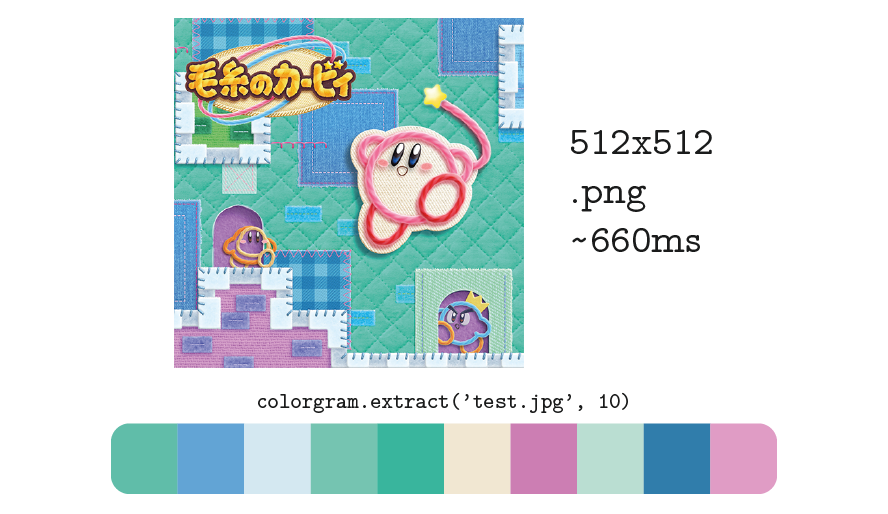
Time-wise, an extraction of a 512x512 image takes about 0.66s (another popular color extraction library, Color Thief, takes about 1.05s).
Installation
You can install colorgram.py with pip, as following:
pip install colorgram.py
How to use
Using colorgram.py is simple. Mainly there’s only one function you’ll need to use - colorgram.extract.
Example
import colorgram

# Extract 6 colors from an image.
colors = colorgram.extract('sweet_pic.jpg', 6)

# colorgram.extract returns Color objects, which let you access
# RGB, HSL, and what proportion of the image was that color.
first_color = colors[0]
rgb = first_color.rgb # e.g. (255, 151, 210)
hsl = first_color.hsl # e.g. (230, 255, 203)
proportion  = first_color.proportion # e.g. 0.34

# RGB and HSL are named tuples, so values can be accessed as properties.
# These all work just as well:
red = rgb[0]
red = rgb.r
saturation = hsl[1]
saturation = hsl.s
colorgram.extract(image, number_of_colors)
Extract colors from an image. image may be either a path to a file, or a file-like object. The function will return a list of number_of_colors Color objects.
colorgram.Color
A color extracted from an image. Its properties are:
Color.rgb - The color represented as a namedtuple of RGB from 0 to 255, e.g. (r=255, g=151, b=210).
Color.hsl - The color represented as a namedtuple of HSL from 0 to 255, e.g. (h=230, s=255, l=203).
Color.proportion - The proportion of the image that is in the extracted color from 0 to 1, e.g. 0.34.
Sorting by HSL
Something the original library lets you do is sort the colors you get by HSL. In actuality, though, the colors are only sorted by hue (as of colorgram.js 0.1.5), while saturation and lightness are ignored. To get the corresponding result in colorgram.py, simply do:
colors.sort(key=lambda c: c.hsl.h)
# or...
sorted(colors, key=lambda c: c.hsl.h)
Contact
If you find a bug in the colorgram.py, or if there’s a feature you would like to be added, please open an issue on GitHub.
If you have a question about the library, or if you’d just like to talk about, well, anything, that’s no problem at all. You can reach me in any of these ways:
To get a quick answer, Twitter is your best bet.
Enjoy!
Release history Release notifications | RSS feed


Download files
Download the file for your platform. If you're not sure which to choose, learn more about installing packages.
Source Distributions
Built Distribution
Filter files by name, interpreter, ABI, and platform.
If you're not sure about the file name format, learn more about wheel file names.
Copy a direct link to the current filters
File details
Details for the file colorgram.py-1.1.0-py2.py3-none-any.whl.
File metadata
- Download URL: colorgram.py-1.1.0-py2.py3-none-any.whl
- Upload date:
- Size: 7.9 kB
- Tags: Python 2, Python 3
- Uploaded using Trusted Publishing? No
File hashes
| Algorithm | Hash digest | |
|---|---|---|
| SHA256 |
35f1692a2f070f65eae53645f7c3eebc36488cafeb7434838beb26def2910868
|
|
| MD5 |
40e3f274f911dbe1894f9bd64dc3d7f7
|
|
| BLAKE2b-256 |
cc30dbad15ca1067d695b375b281a71fa006b6058ba71801893ac896d1638172
|






