
Cron string parser and scheduler for Python

Project description
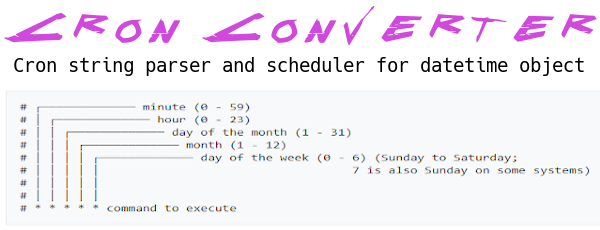
Cron-converter provides a Cron string parser ( from string/lists to string/lists ) and iteration for the datetime object with a cron like format.
This project would be a transposition in Python of JS cron-converter by roccivic.



Install
Pip
pip install cron-converter
Use
from cron_converter import Cron
Create a new instance
cron_instance = Cron()
or
cron_instance = Cron('*/10 9-17 1 * *')
or (with constructor options)
cron_instance = Cron('*/10 9-17 1 * *', {
  'output_weekday_names': True,
  'output_month_names': True
})
Parse a cron string
# Every 10 mins between 9am and 5pm on the 1st of every month
# In the case of the second or third creation method this step is not required
cron_instance.from_string('*/10 9-17 1 * *')

# Prints: '*/10 9-17 1 * *'
print(cron_instance.to_string())
# Alternatively, you could print directly the object obtaining the same result:
# print(cron_instance) # Prints: '*/10 9-17 1 * *'

# Prints:
# [
#   [ 0, 10, 20, 30, 40, 50 ],
#   [ 9, 10, 11, 12, 13, 14, 15, 16, 17 ],
#   [ 1 ],
#   [ 1, 2, 3, 4, 5, 6, 7, 8, 9, 10, 11, 12 ],
#   [ 0, 1, 2, 3, 4, 5, 6 ]
# ]
print(cron_instance.to_list())
Parse an Array
cron_instance.from_list([[0], [1], [1], [5], [0,2,4,6]])

# Prints: '0 1 1 5 */2'
print(cron_instance.to_string())
Constructor options
Possible options:
- output_weekday_names: false (default)
- output_month_mames: false (default)
- output_hashes: false (default)
output_weekday_names and output_month_mames
cron_instance = Cron(None, {
  'output_weekday_names': True,
  'output_month_names': True
})
cron_instance.from_string('*/5 9-17/2 * 1-3 1-5')
# Prints: '*/5 9-17/2 * JAN-MAR MON-FRI'
print(cron_instance)
or
cron_instance = Cron('*/5 9-17/2 * 1-3 1-5', {
  'output_weekday_names': True,
  'output_month_names': True
})
# Prints: '*/5 9-17/2 * JAN-MAR MON-FRI'
print(cron_instance)
output_hashes
cron_instance = Cron('*/5 9-17/2 * 1-3 1-5', {
  'output_hashes': True
})
# Prints: 'H/5 H(9-17)/2 H 1-3 1-5'
print(cron_instance.to_string())
Get the schedule execution times. Example with raw Datetime
# Parse a string to init a schedule
cron_instance.from_string('*/5 * * * *')

# Raw datetime without timezone info (not aware)
reference = datetime.now()
# Get the iterator, initialised to now
schedule = cron_instance.schedule(reference)

# Calls to .next() and .prev()
# return a Datetime object

# Examples with time now: '2021-01-01T09:32:00
# Prints: '2021-01-01T09:35:00'
print(schedule.next().isoformat())
# Prints: '2021-01-01T09:40:00'
print(schedule.next().isoformat())

# Reset
schedule.reset()

# Prints: '2021-01-01T09:30:00'
print(schedule.prev().isoformat())
# Prints: '2021-01-01T09:25:00'
print(schedule.prev().isoformat())
About DST
Be sure to init your cron-converter instance with a TZ aware datetime for this to work!
Example using pytz:
from pytz import timezone
from datetime import datetime
from cron_converter import Cron

tz = timezone("Europe/Rome")
local_date = tz.localize(datetime(2021, 1, 1))
cron = Cron('0 0 * * *')
schedule = cron.schedule(local_date)
next_schedule = schedule.next()
next_next_schedule = schedule.next()
# Prints: '2021-01-01T00:00:00+01:00'
print(next_schedule.isoformat())
# Prints: '2021-01-02T00:00:00+01:00'
print(next_next_schedule.isoformat())
Example using python_dateutil:
import dateutil.tz
from datetime import datetime
from cron_converter import Cron

tz = dateutil.tz.gettz('Asia/Tokyo')
local_date = datetime(2021, 1, 1, tzinfo=tz)
cron = Cron('0 0 * * *')
schedule = cron.schedule(local_date)
next_schedule = schedule.next()
next_next_schedule = schedule.next()
# Prints: '2021-01-01T00:00:00+09:00'
print(next_schedule.isoformat())
# Prints: '2021-01-02T00:00:00+09:00'
print(next_next_schedule.isoformat())
About seconds repeats
Cron-converter is NOT able to do second repetition crontabs form.
Develop & Tests
git clone https://github.com/Sonic0/cron-converter
cd cron-converter
python -m unittest discover -s src/cron_converter/tests/unit
python -m unittest discover -s src/cron_converter/tests/integration
TODO
Cron day part string output in the form:
'*(10-16)/2'
instead of:
'9-17/2'
Release history Release notifications | RSS feed


Download files
Download the file for your platform. If you're not sure which to choose, learn more about installing packages.
Source Distribution
Built Distribution
Filter files by name, interpreter, ABI, and platform.
If you're not sure about the file name format, learn more about wheel file names.
Copy a direct link to the current filters
File details
Details for the file cron-converter-0.2.0.tar.gz.
File metadata
- Download URL: cron-converter-0.2.0.tar.gz
- Upload date:
- Size: 11.3 kB
- Tags: Source
- Uploaded using Trusted Publishing? No
- Uploaded via: twine/3.2.0 pkginfo/1.6.0 requests/2.23.0 setuptools/45.2.0 requests-toolbelt/0.9.1 tqdm/4.50.2 CPython/3.8.5
File hashes
| Algorithm | Hash digest | |
|---|---|---|
| SHA256 |
59b3c07b8869ae4ebda62a1ad7b8a8a7303ae0d57f546cdad28e885fef082c08
|
|
| MD5 |
aa3c4b0c61d6b7a155cbc8e43e078b5b
|
|
| BLAKE2b-256 |
3301a817fd95e8dc6f74b2828e99fa0e8029209932f328eb6e4042850a12ba00
|
File details
Details for the file cron_converter-0.2.0-py3-none-any.whl.
File metadata
- Download URL: cron_converter-0.2.0-py3-none-any.whl
- Upload date:
- Size: 10.9 kB
- Tags: Python 3
- Uploaded using Trusted Publishing? No
- Uploaded via: twine/3.2.0 pkginfo/1.6.0 requests/2.23.0 setuptools/45.2.0 requests-toolbelt/0.9.1 tqdm/4.50.2 CPython/3.8.5
File hashes
| Algorithm | Hash digest | |
|---|---|---|
| SHA256 |
ee31e42d2f3cc7b481dd05b7a45499317b88e64a603df92f28c7aee2e06ecca0
|
|
| MD5 |
57a1ebb8af6777ba1abb7aba65560274
|
|
| BLAKE2b-256 |
2ce5aedfd81fa21e5ddd79fcd648a7c835005f260ce6585c5409dac0cd1482ff
|






