
On-Demand Earth System Data Cubes in Python
Verified details
These details have been verified by PyPIProject links
GitHub Statistics
Maintainers

Project description

On-Demand Earth System Data Cubes (ESDCs) in Python












GitHub: https://github.com/davemlz/cubo
Documentation: https://cubo.readthedocs.io/
PyPI: https://pypi.org/project/cubo/
Conda-forge: https://anaconda.org/conda-forge/cubo
Tutorials: https://cubo.readthedocs.io/en/latest/tutorials.html
Paper: https://arxiv.org/abs/2404.13105
News
[!IMPORTANT]
:star: Pinned (2024-04-19): Ourcubopaper (preprint) is out in arXiv! Check it here: Montero, D., Aybar, C., Ji, C., Kraemer, G., Sochting, M., Teber, K., & Mahecha, M.D. (2024). On-Demand Earth System Data Cubes.
Overview
SpatioTemporal Asset Catalogs (STAC) provide a standardized format that describes geospatial information. Multiple platforms are using this standard to provide clients several datasets. Nice platforms such as Planetary Computer use this standard. Additionally, Google Earth Engine (GEE) also provides a gigantic catalogue that users can harness for different tasks in Python.
cubo is a Python package that provides users of STAC and GEE an easy way to create On-Demand Earth System Data Cubes (ESDCs). This is perfectly suitable for Deep Learning (DL) tasks. You can easily create a lot of ESDCs by just knowing a pair of coordinates and the edge size of the cube in pixels!
Check the simple usage of cubo with STAC here:
import cubo
import xarray as xr

da = cubo.create(
    lat=4.31, # Central latitude of the cube
    lon=-76.2, # Central longitude of the cube
    collection="sentinel-2-l2a", # Name of the STAC collection
    bands=["B02","B03","B04"], # Bands to retrieve
    start_date="2021-06-01", # Start date of the cube
    end_date="2021-06-10", # End date of the cube
    edge_size=64, # Edge size of the cube (px)
    resolution=10, # Pixel size of the cube (m)
)
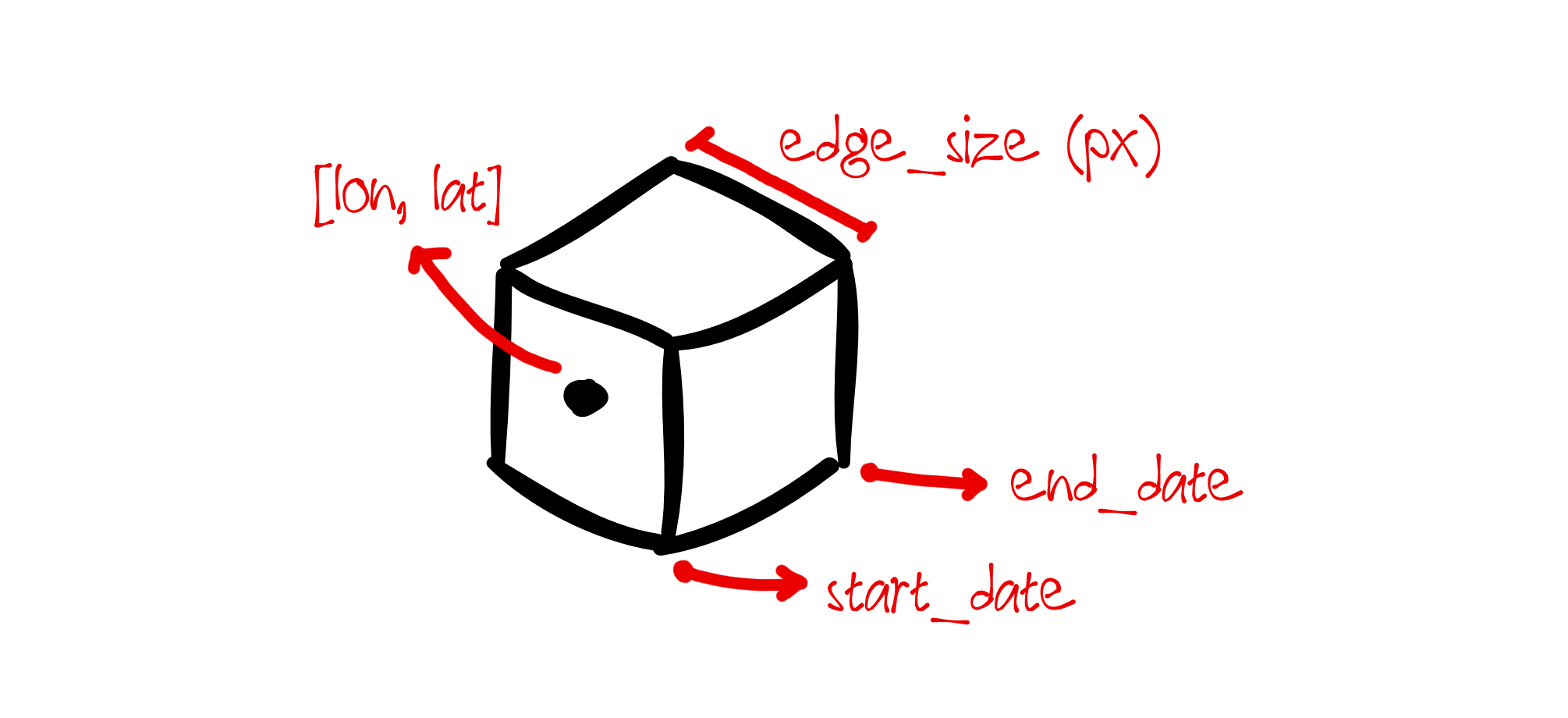
This chunk of code just created an xr.DataArray object given a pair of coordinates, the edge size of the cube (in pixels), and additional information to get the data from STAC (Planetary Computer by default, but you can use another provider!). Note that you can also use the resolution you want (in meters) and the bands that you require.
Now check the simple usage of cubo with GEE here:
import cubo
import xarray as xr

da = cubo.create(
    lat=51.079225, # Central latitude of the cube
    lon=10.452173, # Central longitude of the cube
    collection="COPERNICUS/S2_SR_HARMONIZED", # Id of the GEE collection
    bands=["B2","B3","B4"], # Bands to retrieve
    start_date="2016-06-01", # Start date of the cube
    end_date="2017-07-01", # End date of the cube
    edge_size=128, # Edge size of the cube (px)
    resolution=10, # Pixel size of the cube (m)
    gee=True # Use GEE instead of STAC
)
This chunk of code is very similar to the STAC-based cubo code. Note that the collection
is now the ID of the GEE collection to use, and note that the gee argument must be set to
True.
How does it work?
The thing is super easy and simple.
- You have the coordinates of a point of interest. The cube will be created around these coordinates (i.e., these coordinates will be approximately the spatial center of the cube).
- Internally, the coordinates are transformed to the projected UTM coordinates [x,y] in meters (i.e., local UTM CRS). They are rounded to the closest pair of coordinates that are divisible by the resolution you requested.
- The edge size you provide is used to create a Bounding Box (BBox) for the cube in the local UTM CRS given the exact amount of pixels (Note that the edge size should be a multiple of 2, otherwise it will be rounded, usual edge sizes for ML are 64, 128, 256, 512, etc.).
- Additional information is used to retrieve the data from the STAC catalogue or from GEE: starts and end dates, name of the collection, endpoint of the catalogue (ignored for GEE), etc.
- Then, by using
stackstacandpystac_clientthe cube is retrieved as axr. DataArray. In the case of GEE, the cube is retrieved viaxee. - Success! That's what
cubois doing for you, and you just need to provide the coordinates, the edge size, and the additional info to get the cube.
Installation
Install the latest version from PyPI:
pip install cubo
Install cubo with the required GEE dependencies from PyPI:
pip install cubo[ee]
Upgrade cubo by running:
pip install -U cubo
Install the latest version from conda-forge:
conda install -c conda-forge cubo
Install the latest dev version from GitHub by running:
pip install git+https://github.com/davemlz/cubo
Features
Main function: create()
cubo is pretty straightforward, everything you need is in the create() function:
da = cubo.create(
    lat=4.31,
    lon=-76.2,
    collection="sentinel-2-l2a",
    bands=["B02","B03","B04"],
    start_date="2021-06-01",
    end_date="2021-06-10",
    edge_size=64,
    resolution=10,
)
Using different units for edge_size
By default, the units of edge_size are pixels. But you can modify this using the units argument:
da = cubo.create(
    lat=4.31,
    lon=-76.2,
    collection="sentinel-2-l2a",
    bands=["B02","B03","B04"],
    start_date="2021-06-01",
    end_date="2021-06-10",
    edge_size=1500,
    units="m",
    resolution=10,
)
[!TIP] You can use "px" (pixels), "m" (meters), or any unit available in
scipy.constants.
da = cubo.create(
    lat=4.31,
    lon=-76.2,
    collection="sentinel-2-l2a",
    bands=["B02","B03","B04"],
    start_date="2021-06-01",
    end_date="2021-06-10",
    edge_size=1.5,
    units="kilo",
    resolution=10,
)
Using another endpoint
By default, cubo uses Planetary Computer. But you can use another STAC provider endpoint if you want:
da = cubo.create(
    lat=4.31,
    lon=-76.2,
    collection="sentinel-s2-l2a-cogs",
    bands=["B05","B06","B07"],
    start_date="2020-01-01",
    end_date="2020-06-01",
    edge_size=128,
    resolution=20,
    stac="https://earth-search.aws.element84.com/v0"
)
Keywords for searching data
You can pass kwargs to pystac_client.Client.search() if required:
da = cubo.create(
    lat=4.31,
    lon=-76.2,
    collection="sentinel-2-l2a",
    bands=["B02","B03","B04"],
    start_date="2021-01-01",
    end_date="2021-06-10",
    edge_size=64,
    resolution=10,
    query={"eo:cloud_cover": {"lt": 10}} # kwarg to pass
)
License
The project is licensed under the MIT license.
Citation
If you use this work, please consider citing the following paper:
@article{montero2024cubo,
  doi = {10.48550/ARXIV.2404.13105},
  url = {https://arxiv.org/abs/2404.13105},
  author = {Montero,  David and Aybar,  César and Ji,  Chaonan and Kraemer,  Guido and S\"{o}chting,  Maximilian and Teber,  Khalil and Mahecha,  Miguel D.},
  keywords = {Databases (cs.DB),  Computer Vision and Pattern Recognition (cs.CV),  Machine Learning (cs.LG),  FOS: Computer and information sciences,  FOS: Computer and information sciences},
  title = {On-Demand Earth System Data Cubes},
  publisher = {arXiv},
  year = {2024},
  copyright = {Creative Commons Attribution 4.0 International}
}
Logo Attribution
The logo and images were created using dice icons created by Freepik - Flaticon.

Project details
Verified details
These details have been verified by PyPIProject links
GitHub Statistics
Maintainers
Release history Release notifications | RSS feed


Download files
Download the file for your platform. If you're not sure which to choose, learn more about installing packages.
Source Distribution
Built Distribution
Filter files by name, interpreter, ABI, and platform.
If you're not sure about the file name format, learn more about wheel file names.
Copy a direct link to the current filters
File details
Details for the file cubo-2026.2.0.tar.gz.
File metadata
- Download URL: cubo-2026.2.0.tar.gz
- Upload date:
- Size: 14.2 kB
- Tags: Source
- Uploaded using Trusted Publishing? Yes
- Uploaded via: twine/6.1.0 CPython/3.13.7
File hashes
| Algorithm | Hash digest | |
|---|---|---|
| SHA256 |
11813daa18418b0cac26ad431770ea5aa98d0b28ce62aec0a82ff45276c47675
|
|
| MD5 |
be4a0d0919cb94b986201ce8fd17f32a
|
|
| BLAKE2b-256 |
a015f6bec929dfd4a866d7244146e0c4c586d0d52f82f7b837a1e301394d45d6
|
Provenance
The following attestation bundles were made for cubo-2026.2.0.tar.gz:
Publisher:
publish.yml on ESDS-Leipzig/cubo
-
Statement:
-
Statement type:
https://in-toto.io/Statement/v1 -
Predicate type:
https://docs.pypi.org/attestations/publish/v1 -
Subject name:
cubo-2026.2.0.tar.gz -
Subject digest:
11813daa18418b0cac26ad431770ea5aa98d0b28ce62aec0a82ff45276c47675 - Sigstore transparency entry: 944308353
- Sigstore integration time:
-
Permalink:
ESDS-Leipzig/cubo@128f797cba1447f490b30b344b132efff2c8a532 -
Branch / Tag:
refs/tags/2026.2.0 - Owner: https://github.com/ESDS-Leipzig
-
Access:
public
-
Token Issuer:
https://token.actions.githubusercontent.com -
Runner Environment:
github-hosted -
Publication workflow:
publish.yml@128f797cba1447f490b30b344b132efff2c8a532 -
Trigger Event:
release
-
Statement type:
File details
Details for the file cubo-2026.2.0-py3-none-any.whl.
File metadata
- Download URL: cubo-2026.2.0-py3-none-any.whl
- Upload date:
- Size: 11.7 kB
- Tags: Python 3
- Uploaded using Trusted Publishing? Yes
- Uploaded via: twine/6.1.0 CPython/3.13.7
File hashes
| Algorithm | Hash digest | |
|---|---|---|
| SHA256 |
e7518a2b2812cd6749eb298a83037fbadd95b458a13cab46ea848abab8913b32
|
|
| MD5 |
da9247f2d45329dc8bcc122c9d02fcd5
|
|
| BLAKE2b-256 |
8a8c4f31083a555b35c6b3ccc45b337987e06d1998b0b5b4ad65da0913a100f0
|
Provenance
The following attestation bundles were made for cubo-2026.2.0-py3-none-any.whl:
Publisher:
publish.yml on ESDS-Leipzig/cubo
-
Statement:
-
Statement type:
https://in-toto.io/Statement/v1 -
Predicate type:
https://docs.pypi.org/attestations/publish/v1 -
Subject name:
cubo-2026.2.0-py3-none-any.whl -
Subject digest:
e7518a2b2812cd6749eb298a83037fbadd95b458a13cab46ea848abab8913b32 - Sigstore transparency entry: 944308426
- Sigstore integration time:
-
Permalink:
ESDS-Leipzig/cubo@128f797cba1447f490b30b344b132efff2c8a532 -
Branch / Tag:
refs/tags/2026.2.0 - Owner: https://github.com/ESDS-Leipzig
-
Access:
public
-
Token Issuer:
https://token.actions.githubusercontent.com -
Runner Environment:
github-hosted -
Publication workflow:
publish.yml@128f797cba1447f490b30b344b132efff2c8a532 -
Trigger Event:
release
-
Statement type:






