
Dark theme for Python desktop apps

Project description
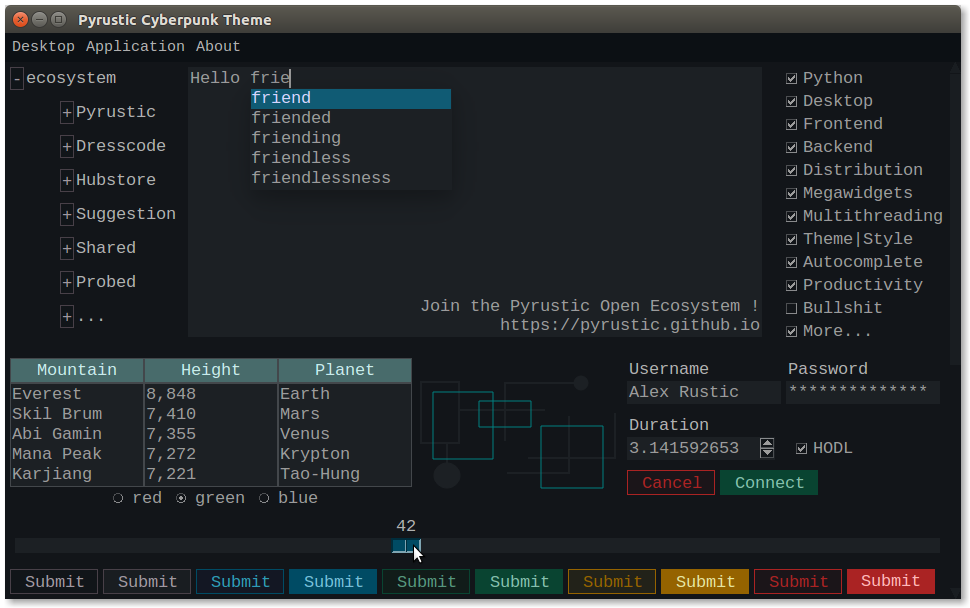
Cyberpunk theme made with TkStyle
Cyberpunk-Theme
A Dark Theme for your Tkinter Python apps
This project is part of the Pyrustic Open Ecosystem.
Installation | Reference | TkStyle
Usage
Thanks to TkStyle, the cyberpunk-theme is both flexible and easy to use.
Set the theme
import tkinter as tk
from cyberpunk_theme import Cyberpunk


# root
root = tk.Tk()

# apply the Cyberpunk theme to the GUI
cyberpunk_theme = Cyberpunk()
cyberpunk_theme.target(root)

# From now on, the theme applies to the entire GUI

# (your awesome code)
# ...

# mainloop
root.mainloop()
What if you want to customize the style of a specific widget ?
Style a specific widget
Each generic widget has a default style which can be retrieved via a function named get_{widget-name}_style_1'.
Some generic widgets like the Button widget have multiple styles.
import tkinter as tk
from cyberpunk_theme.widget.button import get_button_dark_style

# root
root = tk.Tk()

# button
button = tk.Button(root, text="Click")
button.pack()

# style
button_style_1 = get_button_dark_style()
button_style_1.target(button)

# mainloop
root.mainloop()
The generic Button widget has up to ten styles.
The package megawidget contains a collection of useful custom widgets built with the standard tkinter widgets.
You can set specific styles to megawidgets too !
Style a specific megawidget
import tkinter as tk
from megawidget.table import Table
from cyberpunk_theme.megawidget.table import get_table_style_1

# root
root = tk.Tk()

# the table megawidget
titles = ("Name", "Age")
data = [("Jack", 39), ("Jane", 42)]
table = Table(root, titles=titles, data=data)
table.pack()

# style the table
table_style_1 = get_table_style_1()
table_style_1.target(table)

# mainloop
root.mainloop()
Create your own theme
You can create your own theme or style, or modify the cyberpunk-theme as you wish.
Check out TkStyle !
Installation
$ pip install cyberpunk-theme
Release history Release notifications | RSS feed


Download files
Download the file for your platform. If you're not sure which to choose, learn more about installing packages.
Source Distribution
Built Distribution
Filter files by name, interpreter, ABI, and platform.
If you're not sure about the file name format, learn more about wheel file names.
Copy a direct link to the current filters
File details
Details for the file cyberpunk-theme-0.0.11.tar.gz.
File metadata
- Download URL: cyberpunk-theme-0.0.11.tar.gz
- Upload date:
- Size: 9.6 kB
- Tags: Source
- Uploaded using Trusted Publishing? No
- Uploaded via: twine/1.15.0 pkginfo/1.6.1 requests/2.9.1 setuptools/50.3.2 requests-toolbelt/0.9.1 tqdm/4.54.0 CPython/3.5.2
File hashes
| Algorithm | Hash digest | |
|---|---|---|
| SHA256 |
cd98ab332ac7cdd5b960c35e41b8ff441a3e13abb847745102e0f8ce9c7c5ed5
|
|
| MD5 |
f3b4ba5cb3c21c228ae7fe4309a65b07
|
|
| BLAKE2b-256 |
7113ff4a2e570736431910a340d081f18c8b568de06f990ade779b413dfda477
|
File details
Details for the file cyberpunk_theme-0.0.11-py3-none-any.whl.
File metadata
- Download URL: cyberpunk_theme-0.0.11-py3-none-any.whl
- Upload date:
- Size: 28.8 kB
- Tags: Python 3
- Uploaded using Trusted Publishing? No
- Uploaded via: twine/1.15.0 pkginfo/1.6.1 requests/2.9.1 setuptools/50.3.2 requests-toolbelt/0.9.1 tqdm/4.54.0 CPython/3.5.2
File hashes
| Algorithm | Hash digest | |
|---|---|---|
| SHA256 |
ef197519599b0e2fc41a02be9692c28e2f18268dc8801536ccbdd73ce8058db1
|
|
| MD5 |
173cbf21b389f5bc91b9bfdc8086a01d
|
|
| BLAKE2b-256 |
f592a163d54d713c2df2660a07f1c6abd0cd9255408c58262291599508442174
|






