
Upload SQLite database files to Datasette

Project description
datasette-upload-dbs




Upload SQLite database files to Datasette
Installation
Install this plugin in the same environment as Datasette.
datasette install datasette-upload-dbs
Configuration
This plugin requires you to configure a directory in which uploaded files will be stored.
On startup, Datasette will automatically load any SQLite files that it finds in that directory. This means it is safe to restart your server in between file uploads.
To configure the directory as /home/datasette/uploads, add this to a metadata.yml configuration file:
plugins:
  datasette-upload-dbs:
    directory: /home/datasette/uploads
Or if you are using metadata.json:
{
  "plugins": {
    "datasette-upload-dbs": {
      "directory": "/home/datasette/uploads"
    }
  }
}
You can use "." for the current folder when the server starts, or "uploads" for a folder relative to that folder. The folder will be created on startup if it does not already exist.
Then start Datasette like this:
datasette -m metadata.yml
The plugin defaults to loading all databases in the configured directory.
You can disable this by adding the following setting:
"skip_startup_scan": true
Usage
Only users with the upload-dbs permission will be able to upload files. The root user has this permission by default - other users can be granted access using permission plugins, see the Permissions documentation for details.
To start Datasette as the root user, run this:
datasette -m metadata.yml --root
And follow the link that is displayd on the console.
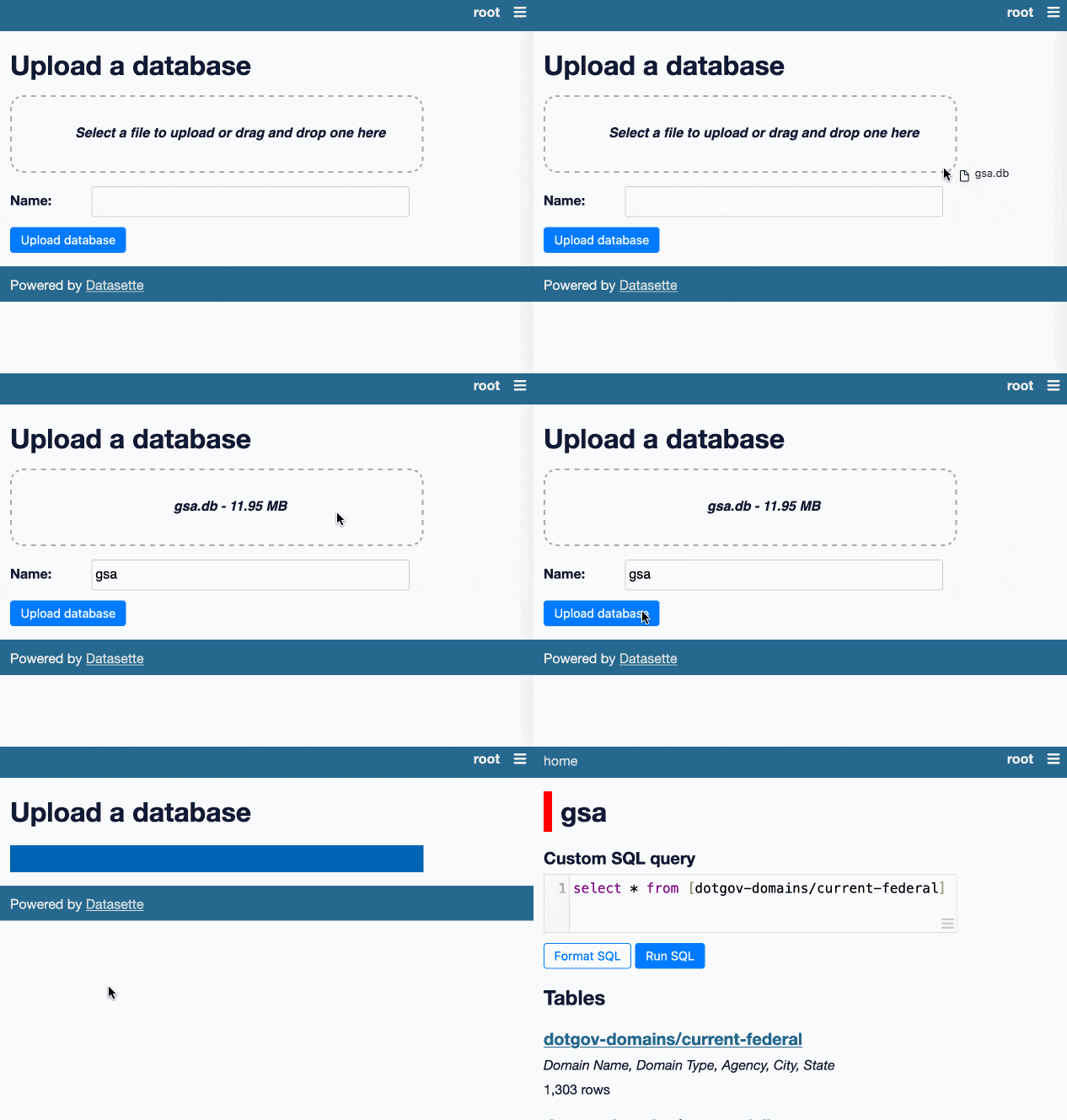
If a user has that permission they will see an "Upload database" link in the navigation menu.
This will take them to /-/upload-dbs where they will be able to upload database files, by selecting them or by dragging them onto the drop area.
Development
To set up this plugin locally, first checkout the code. Then create a new virtual environment:
cd datasette-upload-dbs
python3 -m venv venv
source venv/bin/activate
Now install the dependencies and test dependencies:
pip install -e '.[test]'
To run the tests:
pytest
Release history Release notifications | RSS feed


Download files
Download the file for your platform. If you're not sure which to choose, learn more about installing packages.
Source Distribution
Built Distribution
Filter files by name, interpreter, ABI, and platform.
If you're not sure about the file name format, learn more about wheel file names.
Copy a direct link to the current filters
File details
Details for the file datasette-upload-dbs-0.3.tar.gz.
File metadata
- Download URL: datasette-upload-dbs-0.3.tar.gz
- Upload date:
- Size: 11.4 kB
- Tags: Source
- Uploaded using Trusted Publishing? No
- Uploaded via: twine/4.0.2 CPython/3.10.12
File hashes
| Algorithm | Hash digest | |
|---|---|---|
| SHA256 |
75774c2ddfd7d5938dd7e25ed624a9c5ea9927defc7ccdd919353c66dc2a37f1
|
|
| MD5 |
a6347fa5bc02a66b615def5ac33e1186
|
|
| BLAKE2b-256 |
878cc448870040d9fd35243dbcff76e4bb8f90491c7265740362f99ec7230077
|
File details
Details for the file datasette_upload_dbs-0.3-py3-none-any.whl.
File metadata
- Download URL: datasette_upload_dbs-0.3-py3-none-any.whl
- Upload date:
- Size: 10.6 kB
- Tags: Python 3
- Uploaded using Trusted Publishing? No
- Uploaded via: twine/4.0.2 CPython/3.10.12
File hashes
| Algorithm | Hash digest | |
|---|---|---|
| SHA256 |
06735168b8b6b74586277ad5d2a2fd2b11463bce5c940893550b92d42b61583e
|
|
| MD5 |
2977b806f656ab883dce0aac64dc3357
|
|
| BLAKE2b-256 |
43ff45be48a8f3d5d05c8a8a9d473cd3f3b0464f18caf6c983f5980190394ef6
|






