
An open source multi-tool for exploring and publishing data

Project description
Datasette







An open source multi-tool for exploring and publishing data
Datasette is a tool for exploring and publishing data. It helps people take data of any shape or size and publish that as an interactive, explorable website and accompanying API.
Datasette is aimed at data journalists, museum curators, archivists, local governments and anyone else who has data that they wish to share with the world.
Explore a demo, watch a video about the project or try it out by uploading and publishing your own CSV data.
- Comprehensive documentation: https://docs.datasette.io/
- Examples: https://github.com/simonw/datasette/wiki/Datasettes
- Live demo of current main: https://latest.datasette.io/
- Support questions, feedback? Join our GitHub Discussions forum
News
- 14th September 2020: Datasette 0.49 - JSON API for writable canned queries, path parameters for custom pages. See also Datasette 0.49: The annotated release notes.
- 16th August 2020: Datasette 0.48 - Documentation now lives at docs.datasette.io, improvements to the
extra_template_vars,extra_css_urls,extra_js_urlsandextra_body_scriptplugin hooks. - 11th August 2020: Datasette 0.47 - Datasette can now be installed using Homebrew!
brew install simonw/datasette/datasette. Also new:datasette install name-of-pluginanddatasette uninstall name-of-plugincommands, anddatasette --get '/-/versions.json'to output the result of Datasette HTTP calls on the command-line. - 9th August 2020: Datasette 0.46 - security fix relating to CSRF protection for writable canned queries, a new logo, new debugging tools, improved file downloads and more.
- 6th August 2020: GraphQL in Datasette with the new datasette-graphql plugin
- 24th July 2020: Two new plugins: datasette-copyable and datasette-insert-api.
datasette-copyableadds copy-and-paste export options, anddatasette-insert-apilets you create tables and insert or update data by POSTing JSON directly to Datasette. - 1st July 2020: Datasette 0.45 - Magic parameters for canned queries, a log out feature, improved plugin documentation and four new plugin hooks. See also Datasette 0.45: The annotated release notes.
- 20th June 2020: A cookiecutter template for writing Datasette plugins
- 11th June 2020: Datasette 0.44 - Authentication and permissions, writable canned queries, flash messages, new plugin hooks and much, much more.
- 28th May 2020: Datasette 0.43 - Redesigned register_output_renderer plugin hook and various small improvements and fixes.
- 8th May 2020: Datasette 0.42 - Documented internal methods for plugins to execute read queries against a database.
- 6th May 2020: Datasette 0.41 - New mechanism for creating custom pages, new configuration directory mode, new
?column__notlike=table filter and various other smaller improvements. - 21st April 2020: Datasette 0.40 - Metadata can now be provided as YAML instead of JSON. Publishing to Zeit Now v1 is no longer supported, but Now v2 support is provided by the new datasette-publish-now plugin. Various bug fixes.
- 24th March 2020: Datasette 0.39 - New
base_urlconfiguration option for running Datasette under a different URL prefix,"sort"and"sort_desc"metadata options for setting a default sort order for a table. - 8th March 2020: Datasette 0.38 - New
--memoryoption fordatasete publish cloudrun, Docker image upgraded to SQLite 3.31.1. - 25th February 2020: Datasette 0.37 - new internal APIs enabling plugins to safely write to databases. Read more here: Datasette Writes.
- 21st February 2020: Datasette 0.36 - new internals documentation for plugins,
prepare_connection()now accepts optionaldatabaseanddatasettearguments. - 4th February 2020: Datasette 0.35 - new
.render_template()method for plugins. - 29th January 2020: Datasette 0.34 - improvements to search,
datasette publish cloudrunanddatasette package. - 21st January 2020: Deploying a data API using GitHub Actions and Cloud Run - how to use GitHub Actions and Google Cloud Run to automatically scrape data and deploy the result as an API with Datasette.
- 22nd December 2019: Datasette 0.33 - various small improvements.
- 19th December 2019: Building tools to bring data-driven reporting to more newsrooms - some notes on my JSK fellowship so far.
- 2nd December 2019: Niche Museums is a new site entirely powered by Datasette, using custom templates and plugins. niche-museums.com, powered by Datasette describes how the site works, and datasette-atom: Define an Atom feed using a custom SQL query describes how the new datasette-atom plugin was used to add an Atom syndication feed to the site.
- 14th November 2019: Datasette 0.32 now uses asynchronous rendering in Jinja templates, which means template functions can perform asynchronous operations such as executing SQL queries. datasette-template-sql is a new plugin uses this capability to add a new custom
sql(sql_query)template function. - 11th November 2019: Datasette 0.31 - the first version of Datasette to support Python 3.8, which means dropping support for Python 3.5.
- 18th October 2019: Datasette 0.30
- 13th July 2019: Single sign-on against GitHub using ASGI middleware talks about the implementation of datasette-auth-github in more detail.
- 7th July 2019: Datasette 0.29 - ASGI, new plugin hooks, facet by date and much, much more...
- datasette-auth-github - a new plugin for Datasette 0.29 that lets you require users to authenticate against GitHub before accessing your Datasette instance. You can whitelist specific users, or you can restrict access to members of specific GitHub organizations or teams.
- datasette-cors - a plugin that lets you configure CORS access from a list of domains (or a set of domain wildcards) so you can make JavaScript calls to a Datasette instance from a specific set of other hosts.
- 23rd June 2019: Porting Datasette to ASGI, and Turtles all the way down
- 21st May 2019: The anonymized raw data from the Stack Overflow Developer Survey 2019 has been published in partnership with Glitch, powered by Datasette.
- 19th May 2019: Datasette 0.28 - a salmagundi of new features!
- No longer immutable! Datasette now supports databases that change.
- Faceting improvements including facet-by-JSON-array and the ability to define custom faceting using plugins.
- datasette publish cloudrun lets you publish databases to Google's new Cloud Run hosting service.
- New register_output_renderer plugin hook for adding custom output extensions to Datasette in addition to the default
.jsonand.csv. - Dozens of other smaller features and tweaks - see the release notes for full details.
- Read more about this release here: Datasette 0.28—and why master should always be releasable
- 24th February 2019: sqlite-utils: a Python library and CLI tool for building SQLite databases - a partner tool for easily creating SQLite databases for use with Datasette.
- 31st Janary 2019: Datasette 0.27 -
datasette pluginscommand, newline-delimited JSON export option, new documentation on The Datasette Ecosystem. - 10th January 2019: Datasette 0.26.1 - SQLite upgrade in Docker image,
/-/versionsnow shows SQLite compile options. - 2nd January 2019: Datasette 0.26 - minor bug fixes,
datasette publish now --aliasargument. - 18th December 2018: Fast Autocomplete Search for Your Website - a new tutorial on using Datasette to build a JavaScript autocomplete search engine.
- 3rd October 2018: The interesting ideas in Datasette - a write-up of some of the less obvious interesting ideas embedded in the Datasette project.
- 19th September 2018: Datasette 0.25 - New plugin hooks, improved database view support and an easier way to use more recent versions of SQLite.
- 23rd July 2018: Datasette 0.24 - a number of small new features
- 29th June 2018: datasette-vega, a new plugin for visualizing data as bar, line or scatter charts
- 21st June 2018: Datasette 0.23.1 - minor bug fixes
- 18th June 2018: Datasette 0.23: CSV, SpatiaLite and more - CSV export, foreign key expansion in JSON and CSV, new config options, improved support for SpatiaLite and a bunch of other improvements
- 23rd May 2018: Datasette 0.22.1 bugfix plus we now use versioneer
- 20th May 2018: Datasette 0.22: Datasette Facets
- 5th May 2018: Datasette 0.21: New _shape=, new _size=, search within columns
- 25th April 2018: Exploring the UK Register of Members Interests with SQL and Datasette - a tutorial describing how register-of-members-interests.datasettes.com was built (source code here)
- 20th April 2018: Datasette plugins, and building a clustered map visualization - introducing Datasette's new plugin system and datasette-cluster-map, a plugin for visualizing data on a map
- 20th April 2018: Datasette 0.20: static assets and templates for plugins
- 16th April 2018: Datasette 0.19: plugins preview
- 14th April 2018: Datasette 0.18: units
- 9th April 2018: Datasette 0.15: sort by column
- 28th March 2018: Baltimore Sun Public Salary Records - a data journalism project from the Baltimore Sun powered by Datasette - source code is available here
- 27th March 2018: Cloud-first: Rapid webapp deployment using containers - a tutorial covering deploying Datasette using Microsoft Azure by the Research Software Engineering team at Imperial College London
- 28th January 2018: Analyzing my Twitter followers with Datasette - a tutorial on using Datasette to analyze follower data pulled from the Twitter API
- 17th January 2018: Datasette Publish: a web app for publishing CSV files as an online database
- 12th December 2017: Building a location to time zone API with SpatiaLite, OpenStreetMap and Datasette
- 9th December 2017: Datasette 0.14: customization edition
- 25th November 2017: New in Datasette: filters, foreign keys and search
- 13th November 2017: Datasette: instantly create and publish an API for your SQLite databases
Installation
pip3 install datasette
Datasette requires Python 3.6 or higher. We also have detailed installation instructions covering other options such as Docker.
Basic usage
datasette serve path/to/database.db
This will start a web server on port 8001 - visit http://localhost:8001/ to access the web interface.
serve is the default subcommand, you can omit it if you like.
Use Chrome on OS X? You can run datasette against your browser history like so:
datasette ~/Library/Application\ Support/Google/Chrome/Default/History
Now visiting http://localhost:8001/History/downloads will show you a web interface to browse your downloads data:
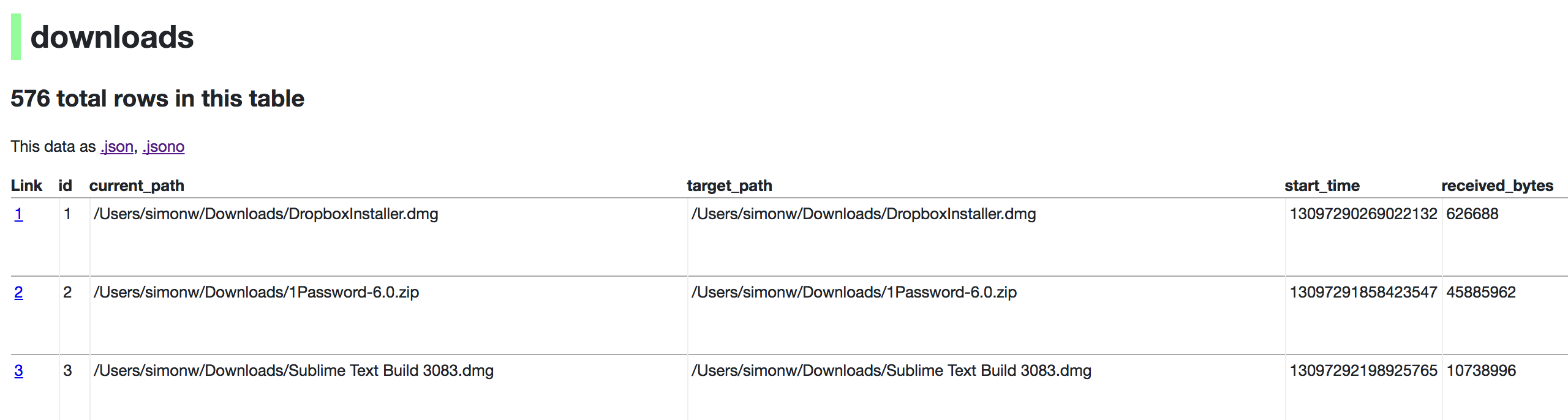
datasette serve options
Usage: datasette serve [OPTIONS] [FILES]...

  Serve up specified SQLite database files with a web UI

Options:
  -i, --immutable PATH      Database files to open in immutable mode
  -h, --host TEXT           Host for server. Defaults to 127.0.0.1 which means
                            only connections from the local machine will be
                            allowed. Use 0.0.0.0 to listen to all IPs and
                            allow access from other machines.
  -p, --port INTEGER        Port for server, defaults to 8001
  --debug                   Enable debug mode - useful for development
  --reload                  Automatically reload if database or code change
                            detected - useful for development
  --cors                    Enable CORS by serving Access-Control-Allow-
                            Origin: *
  --load-extension PATH     Path to a SQLite extension to load
  --inspect-file TEXT       Path to JSON file created using "datasette
                            inspect"
  -m, --metadata FILENAME   Path to JSON file containing license/source
                            metadata
  --template-dir DIRECTORY  Path to directory containing custom templates
  --plugins-dir DIRECTORY   Path to directory containing custom plugins
  --static STATIC MOUNT     mountpoint:path-to-directory for serving static
                            files
  --memory                  Make :memory: database available
  --config CONFIG           Set config option using configname:value
                            docs.datasette.io/en/stable/config.html
  --version-note TEXT       Additional note to show on /-/versions
  --help-config             Show available config options
  --help                    Show this message and exit.
metadata.json
If you want to include licensing and source information in the generated datasette website you can do so using a JSON file that looks something like this:
{
    "title": "Five Thirty Eight",
    "license": "CC Attribution 4.0 License",
    "license_url": "http://creativecommons.org/licenses/by/4.0/",
    "source": "fivethirtyeight/data on GitHub",
    "source_url": "https://github.com/fivethirtyeight/data"
}
Save this in metadata.json and run Datasette like so:
datasette serve fivethirtyeight.db -m metadata.json
The license and source information will be displayed on the index page and in the footer. They will also be included in the JSON produced by the API.
datasette publish
If you have Heroku or Google Cloud Run configured, Datasette can deploy one or more SQLite databases to the internet with a single command:
datasette publish heroku database.db
Or:
datasette publish cloudrun database.db
This will create a docker image containing both the datasette application and the specified SQLite database files. It will then deploy that image to Heroku or Cloud Run and give you a URL to access the resulting website and API.
See Publishing data in the documentation for more details.
Release history Release notifications | RSS feed


Download files
Download the file for your platform. If you're not sure which to choose, learn more about installing packages.
Source Distribution
Built Distribution
Filter files by name, interpreter, ABI, and platform.
If you're not sure about the file name format, learn more about wheel file names.
Copy a direct link to the current filters
File details
Details for the file datasette-0.50a1.tar.gz.
File metadata
- Download URL: datasette-0.50a1.tar.gz
- Upload date:
- Size: 206.4 kB
- Tags: Source
- Uploaded using Trusted Publishing? No
- Uploaded via: twine/3.2.0 pkginfo/1.5.0.1 requests/2.24.0 setuptools/47.1.0 requests-toolbelt/0.9.1 tqdm/4.50.0 CPython/3.8.5
File hashes
| Algorithm | Hash digest | |
|---|---|---|
| SHA256 |
351b646be5414dee769ae3e8e88df5fc44931a41fe9ea1947804024da1334098
|
|
| MD5 |
e783944cf098d73e013616bffece96f2
|
|
| BLAKE2b-256 |
7b3cbc947415739caf97f39cf14227a9d99d9c3bef22576c7c4c7163cc4edaed
|
File details
Details for the file datasette-0.50a1-py3-none-any.whl.
File metadata
- Download URL: datasette-0.50a1-py3-none-any.whl
- Upload date:
- Size: 206.0 kB
- Tags: Python 3
- Uploaded using Trusted Publishing? No
- Uploaded via: twine/3.2.0 pkginfo/1.5.0.1 requests/2.24.0 setuptools/47.1.0 requests-toolbelt/0.9.1 tqdm/4.50.0 CPython/3.8.5
File hashes
| Algorithm | Hash digest | |
|---|---|---|
| SHA256 |
e4b9f78a92ef7b1531f7c9accad0c8205cf2d6595b2b5fedb5cb954753faa947
|
|
| MD5 |
da4c0c338112e569be8cc26a2053f44a
|
|
| BLAKE2b-256 |
d589ed706cb1ec289e58f9137fa3360c17f5270f1a6a17c3e36c10ecf110c99e
|






