
Django template styling for django-allauth and django-oauth-toolkit.
Verified details
These details have been verified by PyPIProject links
GitHub Statistics
Maintainers

Project description
django-auth-style

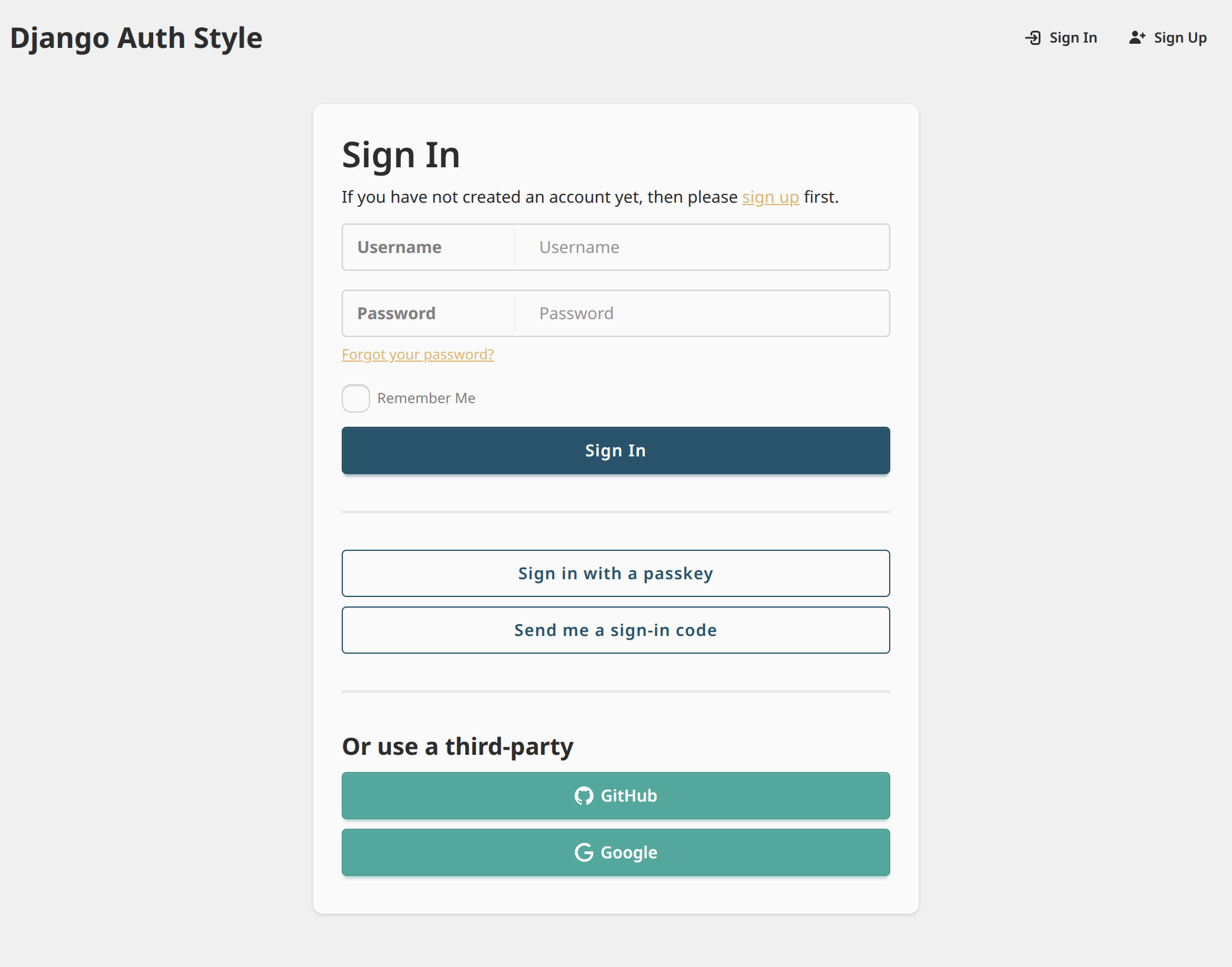
django-auth-style provides Django template styling for
django-allauth
and django-oauth-toolkit.
Features
- All
django-allauthanddjango-oauth-toolkitviews are automatically augmented with styling - Built-in support for dark color schemes ("dark mode")
- Django site name branding on all pages
- Branding can be further customized with a single template override
- Theme colors can be further customized via CSS variables
Installation
django-allauth Support
To enable support for django-allauth, install with:
pip install django-auth-style[allauth]
Then enable the Django app:
# settings.py
INSTALLED_APPS = [
    # Any project-local apps should come before "auth_style",
    # so templates can be overridden as needed
    'my_django_app.apps.MyDjangoAppConfig',
    ...,
    'auth_style',
    ...,
    # "allauth" must come after "auth_style"
    'allauth',
    'allauth.account',
    'allauth.socialaccount',
]
MIDDLEWARE = [
    ...,
    # CurrentSiteMiddleware is optional, but recommended to show site branding
    'django.contrib.sites.middleware.CurrentSiteMiddleware',
    ...
]
django-oauth-toolkit Support
To enable support for django-oauth-toolkit, install with:
pip install django-auth-style[oauth-toolkit]
Then enable the Django app:
# settings.py
INSTALLED_APPS = [
    # Any project-local apps should come before "auth_style",
    # so templates can be overridden as needed
    'my_django_app.apps.MyDjangoAppConfig',
    ...,
    'auth_style',
    ...,
    # "oauth2_provider" must come after "auth_style"
    'oauth2_provider',
]
Customization
Customize the Site Name Branding
To customize the site name (in the upper-left corner),
create auth_style/site_name.html within your project's templates directory,
then insert any desired HTML. You will be responsible for applying appropriate styling.
For example:
<span style="font-size: 1.5rem; font-weight: bold; color: #2563eb;">
  🚀 My Custom App
</span>
Customize the Theme
To override the overall style theme of all pages,
create auth_style/extra_head.html within your project's templates directory.
Then, within a <style> tag,
define new DaisyUI theme CSS variables,
which will override the defaults. You may override some or all theme variables.
For example:
<style>
  :root {
    color-scheme: light;  /* Optional. Hints to browser which color scheme to use based on user's system settings */
    --color-base-100: #ffffff;
    /* ...rest of CSS variables */
  }
  /* If you would like to support dark mode */
  @media (prefers-color-scheme: dark) {
    :root {
      color-scheme: "dark";  /* Optional. Hints to browser which color scheme to use based on user's system settings */
      --color-base-100: #000000;
      /* ...rest of CSS variables */
    }
  }
</style>
Project details
Verified details
These details have been verified by PyPIProject links
GitHub Statistics
Maintainers
Release history Release notifications | RSS feed


Download files
Download the file for your platform. If you're not sure which to choose, learn more about installing packages.
Source Distribution
Built Distribution
Filter files by name, interpreter, ABI, and platform.
If you're not sure about the file name format, learn more about wheel file names.
Copy a direct link to the current filters
File details
Details for the file django_auth_style-0.15.0.tar.gz.
File metadata
- Download URL: django_auth_style-0.15.0.tar.gz
- Upload date:
- Size: 43.2 kB
- Tags: Source
- Uploaded using Trusted Publishing? Yes
- Uploaded via: uv/0.10.9 {"installer":{"name":"uv","version":"0.10.9","subcommand":["publish"]},"python":null,"implementation":{"name":null,"version":null},"distro":{"name":"Ubuntu","version":"24.04","id":"noble","libc":null},"system":{"name":null,"release":null},"cpu":null,"openssl_version":null,"setuptools_version":null,"rustc_version":null,"ci":true}
File hashes
| Algorithm | Hash digest | |
|---|---|---|
| SHA256 |
3d07c7670bbc51f6cb90f095d82d7f52ee3d0e3fcd922e59c1e6035f0b94ddb2
|
|
| MD5 |
884fe0c540c78fc4ade3b3551b5b7655
|
|
| BLAKE2b-256 |
3139330be84b5cb5d9b304f54acb04e4b872ac61e778d46f6ab2fca8fd4c75a1
|
File details
Details for the file django_auth_style-0.15.0-py3-none-any.whl.
File metadata
- Download URL: django_auth_style-0.15.0-py3-none-any.whl
- Upload date:
- Size: 47.7 kB
- Tags: Python 3
- Uploaded using Trusted Publishing? Yes
- Uploaded via: uv/0.10.9 {"installer":{"name":"uv","version":"0.10.9","subcommand":["publish"]},"python":null,"implementation":{"name":null,"version":null},"distro":{"name":"Ubuntu","version":"24.04","id":"noble","libc":null},"system":{"name":null,"release":null},"cpu":null,"openssl_version":null,"setuptools_version":null,"rustc_version":null,"ci":true}
File hashes
| Algorithm | Hash digest | |
|---|---|---|
| SHA256 |
705f18a23717af533a087d5c0619b1cb7fbb0f8d80413b2bd0c50fe7e0530609
|
|
| MD5 |
63e8ae45e1aa5cf9ac9da96c7a7a6bba
|
|
| BLAKE2b-256 |
8086764c29dcf0bc3dbb4ef2b213a501b57df55b83a0833a1a3a36b0eb279e41
|






