
Django storage backend for storing files in your database.
Verified details
These details have been verified by PyPIProject links
GitHub Statistics
Maintainers

Project description
django-dbfiles
A fork of django-db-storage, updated for modern versions of Django (and renamed for inclusion in PyPI).
Overview
Warning: In many cases, storing files in the database is a BAD idea. Your database will easily become bloated and performance can degrade rapidly. See this StackExchange post for more information.
This is a custom storage backend for storing files in the database instead of the file system and is a drop-in replacement for Django's FileSystemStorage. Some benefits of this application:
- no changes needed to existing models, it just works (and if it doesn't, open a ticket!)
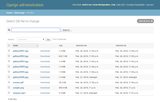
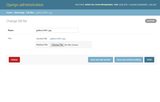
- django-admin is implemented and can be used to search, upload, download and manage files
- 100% code coverage with unit tests
Requirements
- Python 3.10 or above
- Django 4.2 or above
Installation
Installation using pip:
pip install django-dbfiles
Update settings.py:
# Add 'dbfiles' to INSTALLED_APPS
INSTALLED_APPS = [
    'dbfiles',
]

# Optionally set DEFAULT_FILE_STORAGE
DEFAULT_FILE_STORAGE = 'dbfiles.storage.DBStorage'

# Choose a root url for uploaded files
MEDIA_URL = '/media/'
Update urls.py:
urlpatterns = [
    ...
    dbfiles_url(),
]
Run database migrations:
python manage.py migrate
How to Use
No modification are needed for models to work properly.
def user_directory_path(instance, filename):
    return 'user_{0}/{1}'.format(instance.user.id, filename)

class MyModel(models.Model):
    file_field1 = models.FileField()
    file_field2 = models.FileField(upload_to='uploads/%Y/%m/%d/')
    file_field3 = models.FileField(upload_to=user_directory_path)
Moving from django-db-storage?
If you are switching to this package from django-db-storage and want to keep your existing db_file table, let Django know about the app name change by running the following SQL:
UPDATE django_migrations SET app = 'dbfiles' WHERE app = 'dbstorage';
Bugs?
Create an issue at https://github.com/imsweb/django-dbfiles/issues
Project details
Verified details
These details have been verified by PyPIProject links
GitHub Statistics
Maintainers


Download files
Download the file for your platform. If you're not sure which to choose, learn more about installing packages.
Source Distribution
Built Distribution
Filter files by name, interpreter, ABI, and platform.
If you're not sure about the file name format, learn more about wheel file names.
Copy a direct link to the current filters
File details
Details for the file django_dbfiles-3.2.0.tar.gz.
File metadata
- Download URL: django_dbfiles-3.2.0.tar.gz
- Upload date:
- Size: 5.9 kB
- Tags: Source
- Uploaded using Trusted Publishing? Yes
- Uploaded via: uv/0.9.22 {"installer":{"name":"uv","version":"0.9.22","subcommand":["publish"]},"python":null,"implementation":{"name":null,"version":null},"distro":{"name":"Ubuntu","version":"24.04","id":"noble","libc":null},"system":{"name":null,"release":null},"cpu":null,"openssl_version":null,"setuptools_version":null,"rustc_version":null,"ci":true}
File hashes
| Algorithm | Hash digest | |
|---|---|---|
| SHA256 |
cb7edec9725f84c2891c2d60b04455c3b8db3152b9c9f20598b53f8ae72f4ca6
|
|
| MD5 |
6e6a3aac6ff3569c9e69555345add9b9
|
|
| BLAKE2b-256 |
e85cf859e9330fa64dc3f3b0e242c9067ba2452c805e94a8cda792b7a2416c62
|
File details
Details for the file django_dbfiles-3.2.0-py3-none-any.whl.
File metadata
- Download URL: django_dbfiles-3.2.0-py3-none-any.whl
- Upload date:
- Size: 9.9 kB
- Tags: Python 3
- Uploaded using Trusted Publishing? Yes
- Uploaded via: uv/0.9.22 {"installer":{"name":"uv","version":"0.9.22","subcommand":["publish"]},"python":null,"implementation":{"name":null,"version":null},"distro":{"name":"Ubuntu","version":"24.04","id":"noble","libc":null},"system":{"name":null,"release":null},"cpu":null,"openssl_version":null,"setuptools_version":null,"rustc_version":null,"ci":true}
File hashes
| Algorithm | Hash digest | |
|---|---|---|
| SHA256 |
0151f65173a3eb36b04245c87e437b9f561e3a6307edad4ca807c3afe9e127aa
|
|
| MD5 |
aaf991b325f7f4f5174bea657dfd49a1
|
|
| BLAKE2b-256 |
24eeebdca79adcd07320ae022bb99cf80817af6762b0747821e4c47aca884ce2
|






