
Flatpickr based DatePickerInput, TimePickerInput and DateTimePickerInput with date-range-picker functionality for django >= 2.0

Project description
This django widget contains Date-Picker, Time-Picker, DateTime-Picker input widgets with date-range-picker functionality for django version >= 2.0. The widget implements flatpickr to display date-pickers in django model forms and custom forms which can be configured easily for date-range selection. For Bootstrap date-picker see django-bootstrap-datepicker-plus.







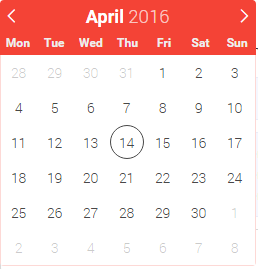
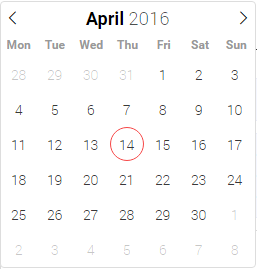
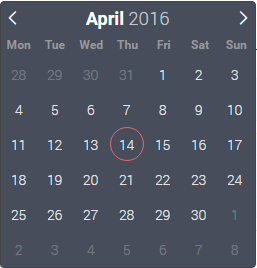
Demo
Getting Started
Prerequisites
Python >= 3.4
Django >= 2.0
Installing
Install the PyPI package via pip.
pip install django-flatpickr
Add flatpickr to INSTALLED_APPS in your settings.py file.
INSTALLED_APPS = [
    # Add the following
    'flatpickr',
]
Usage
The HTML template must have the following to render the flatpickr widget. A better example is here.
<!-- File: todo.html -->
{{ form.media }}  {# Adds all flatpickr JS/CSS files from CDN #}
{{ form.as_p }}   {# Renders the form #}
You can use it with generic views without a model form. It can also be used with custom forms and model forms as below.
Usage in Custom Form
# File: forms.py
from flatpickr import DatePickerInput, TimePickerInput, DateTimePickerInput
from .models import Event
from django import forms

class ToDoForm(forms.Form):
    todo = forms.CharField(widget=forms.TextInput())
    date = forms.DateField(widget=DatePickerInput())
    time = forms.TimeField(widget=TimePickerInput())
    datetime = forms.DateTimeField(widget=DateTimePickerInput())


# File: views.py
class CustomFormView(generic.FormView):
    template_name = 'myapp/custom-form.html'
    form_class = ToDoForm
See models.py, forms.py, views.py, custom-form.html for more details.
Usage in Model Form
# File: forms.py
from flatpickr import DatePickerInput, TimePickerInput, DateTimePickerInput
from .models import Event
from django import forms

class EventForm(forms.ModelForm):
    class Meta:
        model = Event
        fields = ['name', 'start_date', 'start_time', 'start_datetime']
        widgets = {
            'start_date': DatePickerInput(),
            'start_time': TimePickerInput(),
            'start_datetime': DateTimePickerInput(),
        }


# File: views.py
class UpdateView(generic.edit.UpdateView):
    model = Event
    form_class = EventForm
See models.py, forms.py, views.py, event_form.html for more details.
Implement date-range-picker
DatePickers can be linked together to select a date-range, time-range or date-time-range without writing a single line of JavaScript.
# File: forms.py
from flatpickr import DatePickerInput, TimePickerInput
from django import forms

class EventForm(forms.ModelForm):
    class Meta:
        model = Event
        fields = ['name', 'start_date', 'end_date', 'start_time', 'end_time']
        widgets = {
            'start_date':DatePickerInput().start_of('event days'),
            'end_date':DatePickerInput().end_of('event days'),
            'start_time':TimePickerInput().start_of('party time'),
            'end_time':TimePickerInput().end_of('party time'),
        }
Customization
To customize the look and features of flatpickr widget copy the settings block to your settings.py file and customize it. Settings applies globally to all flatpickr widgets used in your site.
If you need to customize a single flatpickr widget you can do it as follows:
class ToDoForm(forms.Form):
    todo = forms.CharField(widget=forms.TextInput())
    date = forms.DateField(widget=DatePickerInput(
        attrs = {    # input element attributes
            "class": "my-custom-class",
        },
        options = {  # flatpickr options
            "dateFormat": "m/d/Y",
        }
    ))
License
Release history Release notifications | RSS feed


Download files
Download the file for your platform. If you're not sure which to choose, learn more about installing packages.
Source Distribution
Built Distribution
Filter files by name, interpreter, ABI, and platform.
If you're not sure about the file name format, learn more about wheel file names.
Copy a direct link to the current filters
File details
Details for the file django-flatpickr-1.0.1.tar.gz.
File metadata
- Download URL: django-flatpickr-1.0.1.tar.gz
- Upload date:
- Size: 7.3 kB
- Tags: Source
- Uploaded using Trusted Publishing? No
- Uploaded via: twine/1.11.0 pkginfo/1.4.2 requests/2.19.1 setuptools/39.0.1 requests-toolbelt/0.8.0 tqdm/4.25.0 CPython/3.7.0
File hashes
| Algorithm | Hash digest | |
|---|---|---|
| SHA256 |
a38cce4bfc4638e75bb079271dc7c99f399fc98893164174b234a9c4507bf974
|
|
| MD5 |
76d4dbe3e79af725ffbfc27dd3d76858
|
|
| BLAKE2b-256 |
6e624d25c17f8b917f75373ba367565c1d9a1ed24e5728336368f4e7a99d7a5a
|
File details
Details for the file django_flatpickr-1.0.1-py3-none-any.whl.
File metadata
- Download URL: django_flatpickr-1.0.1-py3-none-any.whl
- Upload date:
- Size: 7.6 kB
- Tags: Python 3
- Uploaded using Trusted Publishing? No
- Uploaded via: twine/1.11.0 pkginfo/1.4.2 requests/2.19.1 setuptools/39.0.1 requests-toolbelt/0.8.0 tqdm/4.25.0 CPython/3.7.0
File hashes
| Algorithm | Hash digest | |
|---|---|---|
| SHA256 |
097b45d283ed405879efa3e98a80720ff3a75f7ce1e454d6003c9dd0f1f484e9
|
|
| MD5 |
d07a110ecce1ebac61b734a9f7f5ab03
|
|
| BLAKE2b-256 |
b9ff93ce91c73be0e6bfbf2e774b90ef3130e13ba84179ec849693cfa9886ecb
|






