
A pluggable notification system written for the Django framework.


Project description



Concept
django-nyt is a notification framework for Django. It does this:
from django_nyt.utils import notify

EVENT_KEY = "my_key"
notify(_("OMG! Something happened"), EVENT_KEY)
All users subscribing to "my_key" will have a notification created when notify() is called. How the notification is handled depends on the user’s settings.
If you have emails enabled, subscribers receive a summary of notifications immediately or at an interval of their choice.
Data can be accessed easily from Django models or from the included JSON views.
By using generic object relations, custom URLs, and custom email templates, you can expand your notification logic to create email messages that both marks the notification as read when clicking a link and at the same time redirects users to a final destination:
from django_nyt.utils import notify

product = product
EVENT_KEY = "product_is_in_stock"
notify(
    _(f"{product.name} is in stock"),
    EVENT_KEY,
    url=f"/products/{product.id}/",
    target_object=product
)
Roadmap
This project makes sense if people start using it and maturing it to their use-cases.
Here are some aspects that aren’t covered but are most welcome:
Support for async
Support for notifications through django-channels 4+
Support for HTML emails (and user setting)
Docs
Why should you do this?
Users need a cleverly sifted stream of events that’s highly customizable as well. By using django-nyt, your users can subscribe to global events or specific events pertaining specific objects.
Instead of inventing your own notification system, use this and you won’t have to design your own models, and you will have a nice guide that goes through the various steps of implementing notifications for your project.
Let’s try to summarize the reasons you want to be using django-nyt:
Simple API: call notify() where-ever you want.
CLI for sending emails (as cron job, daemon or Celery task)
Support for django-channels and Web Sockets (optional, fallback for JSON-based polling)
Basic JavaScript / HTML example code
Multi-lingual
Individual subscription settings for each type of event, for instance: - Event type A spawns instant email notifications, but Event B only gets emailed weekly.
Customizable intervals for which users can receive notifications
Optional URL for action target for each notification
Avoid clutter: Notifications don’t get repeated, instead a counter is incremented.
This project exists with django.contrib.messages in mind, to serve a simple, best-practice, scalable solution for notifications. There are loads of other notification apps for Django, some focus on integration of specific communication protocols
What do you need to do?
django-nyt does everything it can to meet as many needs as possible and have sane defaults.
But you need to do a lot! Firstly, you need to write some JavaScript that will fetch the latest notifications and display them in some area of the screen. Upon clicking that icon, the latest notifications are displayed, and clicking an individual notification will redirect the user through a page that marks the notification as read.
Something like this:
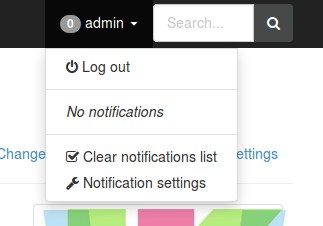
JavaScript drop-down: Some examples are provided in the docs, but there is no real easy way to place this nifty little thing at the top of your site, you’re going to have to work it out on your own.
Other items for your TODO list:
Provide your users with options to customize their subscriptions and notification preferences. Create your own Form inheriting from django_nyt.forms.SettingsForm.
Customize contents of notification emails by overwriting templates in django_nyt/emails/notification_email_message.txt and django_nyt/emails/notification_email_subject.txt.
You can also have separate email templates per notification key. This includes using glob patterns. For instance, you can add this in your settings:
NYT_EMAIL_TEMPLATE_NAMES = OrderedDict({
   "ADMIN_*": "myapp/notifications/email/admins.txt"
   "*": "myapp/notifications/email/default.txt"
})
NYT_EMAIL_TEMPLATE_SUBJECT_NAMES = OrderedDict({
   "ADMIN_*": "myapp/notifications/email/admins_subject.txt"
   "*": "myapp/notifications/email/default_subject.txt"
})
Make the mail notification daemon script run either constantly python manage.py notifymail --daemon or with some interval by invoking python manage.py notifymail --cron as a cronjob. You can also call it from a Celery task or similar with call_command('notifymail', cron=True).
Development / demo project
In your Git fork, run pip install -r requirements.txt to install the requirements.
Install pre-commit hooks to verify your commits:
pip install pre-commit
pre-commit install
The folder test-project/ contains a pre-configured django project and an SQlite database. Login for django admin is admin:admin:
cd test-project
python manage.py runserver
After this, navigate to http://localhost:8000
Community
As many django-wiki users are also familiar with Django, please visit the channel #django-wiki on Libera. Click here for a web client <https://web.libera.chat/?channel=#django-wiki>`__).
Otherwise, use the Discussions tab on GitHub.
Release history Release notifications | RSS feed


Download files
Download the file for your platform. If you're not sure which to choose, learn more about installing packages.
Source Distribution
Built Distribution
Filter files by name, interpreter, ABI, and platform.
If you're not sure about the file name format, learn more about wheel file names.
Copy a direct link to the current filters
File details
Details for the file django_nyt-1.5.0.tar.gz.
File metadata
- Download URL: django_nyt-1.5.0.tar.gz
- Upload date:
- Size: 29.0 kB
- Tags: Source
- Uploaded using Trusted Publishing? No
- Uploaded via: python-httpx/0.27.2
File hashes
| Algorithm | Hash digest | |
|---|---|---|
| SHA256 |
4b35117b65219dafa849b0b994118f65590b3f6340ede573cdbf51dcd6a59f74
|
|
| MD5 |
51694c5ab651452f8c752f4a85d640b0
|
|
| BLAKE2b-256 |
0b418d7cc669edb3e2a2b6a0b7ccb7dd781beee32a592a59f5517001066ca21b
|
File details
Details for the file django_nyt-1.5.0-py3-none-any.whl.
File metadata
- Download URL: django_nyt-1.5.0-py3-none-any.whl
- Upload date:
- Size: 41.1 kB
- Tags: Python 3
- Uploaded using Trusted Publishing? No
- Uploaded via: python-httpx/0.27.2
File hashes
| Algorithm | Hash digest | |
|---|---|---|
| SHA256 |
5d88d8ca8ef79856811113e166bb8a0cdcf963f751203c7b2932651faa21ebf6
|
|
| MD5 |
999f3998d0bc09ebdb6eaf0e6e07e024
|
|
| BLAKE2b-256 |
0b78cffb77c29409d007af839cf6f3f6ebc1fc61a1c9416a19a354fb936fb81a
|






