
wow very terminal doge

Project description
doge





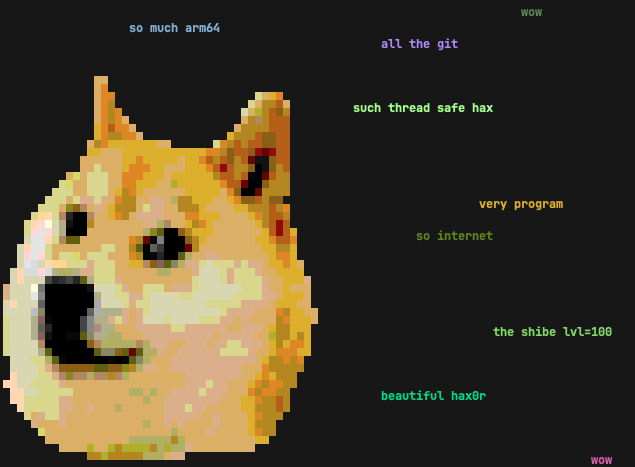
doge is a simple motd script based on the slightly stupid but very funny doge meme. It prints random grammatically incorrect statements that are sometimes based on things from your computer.
If you have uv or pipx (you should!), you can try out doge without installing
it permanently.
Just type uvx doge or pipx run doge in your terminal to see if you enjoy it. 🐶
If you do, uv tool install doge or pipx install doge to keep it around! 👍
Features
- Randomly placed and colored random strings, complete with broken english.
- Awesome Shibe 😎 in the terminal.
- Fetching of system data, such as hostname, running processes, current user
and
$EDITOR. - If you have 🌈 lolcat, you can do this gem:
while true; do doge | lolcat -a -d 100 -s 100 -p 1; done(thx hom3chuk) - stdin support:
ls /usr/bin | dogewill doge-print some of the executables found in /usr/bin. wow. There are also multiple command line switches that control filtering and statistical frequency of words. Seedoge -h, wow.- To use all dictionary words that start or end with "dog", try:
egrep '(^dog|dog$)' /usr/share/dict/words | fgrep -v "'s" | doge
- To use all dictionary words that start or end with "dog", try:
Notes
You need a terminal that supports 256 colors running on a system that supports unicode.
The terminal Shibe was created with hax0r Gimp skills and img2xterm.
Installation
There are several options for installing and running a Python CLI application such as doge.
Python-Based Install (Recommended)
The best way is to install doge directly from PyPI with either uv or pipx:
uv tool install doge-- this is the recommended method, but you need uv installed and configured.- uv is usually the best way to install and run Python-based applications from PyPI, so if you don't yet have it, you should! 👍
- To install newer versions, run
uv tool upgrade dogeoruv tool upgrade --all.
- The other option is to use pipx:
pipx install doge
Alternatively, you could also:
- Make a self-contained Python zipapp with pex or shiv, and put it
in your
$PATH, for example:shiv doge -c doge -o ~/bin/dogepex doge -c doge -o ~/bin/doge
- Install with pip, see Brett Cannon's
quick-and-dirty guide on how to install packages for Python
for more information. TLDR; basically use your preferred Python and run:
python3 -m pip install doge
Then, just add a call to doge at the bottom of your shell rc file.
If you don't want to install doge with the options above for whatever reason,
there is a proper pyproject.toml included, so inside a virtual
environment, python -m pip install -e . should work just fine.
Package Managers And Linux Distributions
Your package manager or Linux distribution might carry a downstream doge package.
If you choose this option, and experience any installation problems, then please report them to your downstream package maintainer.
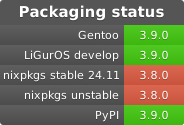
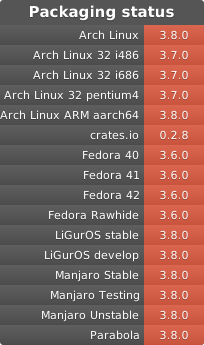
Please note that it might take some time for downstream packages to catch up with PyPI. The recommended installation with uv or pipx will always give you the latest version.
Release history Release notifications | RSS feed


Download files
Download the file for your platform. If you're not sure which to choose, learn more about installing packages.
Source Distribution
Built Distribution
Filter files by name, interpreter, ABI, and platform.
If you're not sure about the file name format, learn more about wheel file names.
Copy a direct link to the current filters
File details
Details for the file doge-3.9.1.tar.gz.
File metadata
- Download URL: doge-3.9.1.tar.gz
- Upload date:
- Size: 91.1 kB
- Tags: Source
- Uploaded using Trusted Publishing? No
- Uploaded via: uv/0.9.26 {"installer":{"name":"uv","version":"0.9.26","subcommand":["publish"]},"python":null,"implementation":{"name":null,"version":null},"distro":null,"system":{"name":null,"release":null},"cpu":null,"openssl_version":null,"setuptools_version":null,"rustc_version":null,"ci":null}
File hashes
| Algorithm | Hash digest | |
|---|---|---|
| SHA256 |
7436f07d6c933fd76a562740c8d9539146400232b29de020a17e43173c831571
|
|
| MD5 |
f9be22d2dbab34a1a2f17b6ee1380eee
|
|
| BLAKE2b-256 |
bc660d1a606b8723d3d33eaf529568c91d6d7a9989a9ddda79af76bee51a3036
|
File details
Details for the file doge-3.9.1-py3-none-any.whl.
File metadata
- Download URL: doge-3.9.1-py3-none-any.whl
- Upload date:
- Size: 34.5 kB
- Tags: Python 3
- Uploaded using Trusted Publishing? No
- Uploaded via: uv/0.9.26 {"installer":{"name":"uv","version":"0.9.26","subcommand":["publish"]},"python":null,"implementation":{"name":null,"version":null},"distro":null,"system":{"name":null,"release":null},"cpu":null,"openssl_version":null,"setuptools_version":null,"rustc_version":null,"ci":null}
File hashes
| Algorithm | Hash digest | |
|---|---|---|
| SHA256 |
c076689ae994fdc0ccf2c21e64245591a525999a3a627e765afec431c176cab5
|
|
| MD5 |
4d598ba9006568f9b842041f4a362429
|
|
| BLAKE2b-256 |
c6247370a40d3f3517e91b0eaee91ef8220638e34aae94051a7b0c45d3a7e6af
|






