
A dashboard for Dramatiq (Redis-only!).

Project description
dramatiq_dashboard
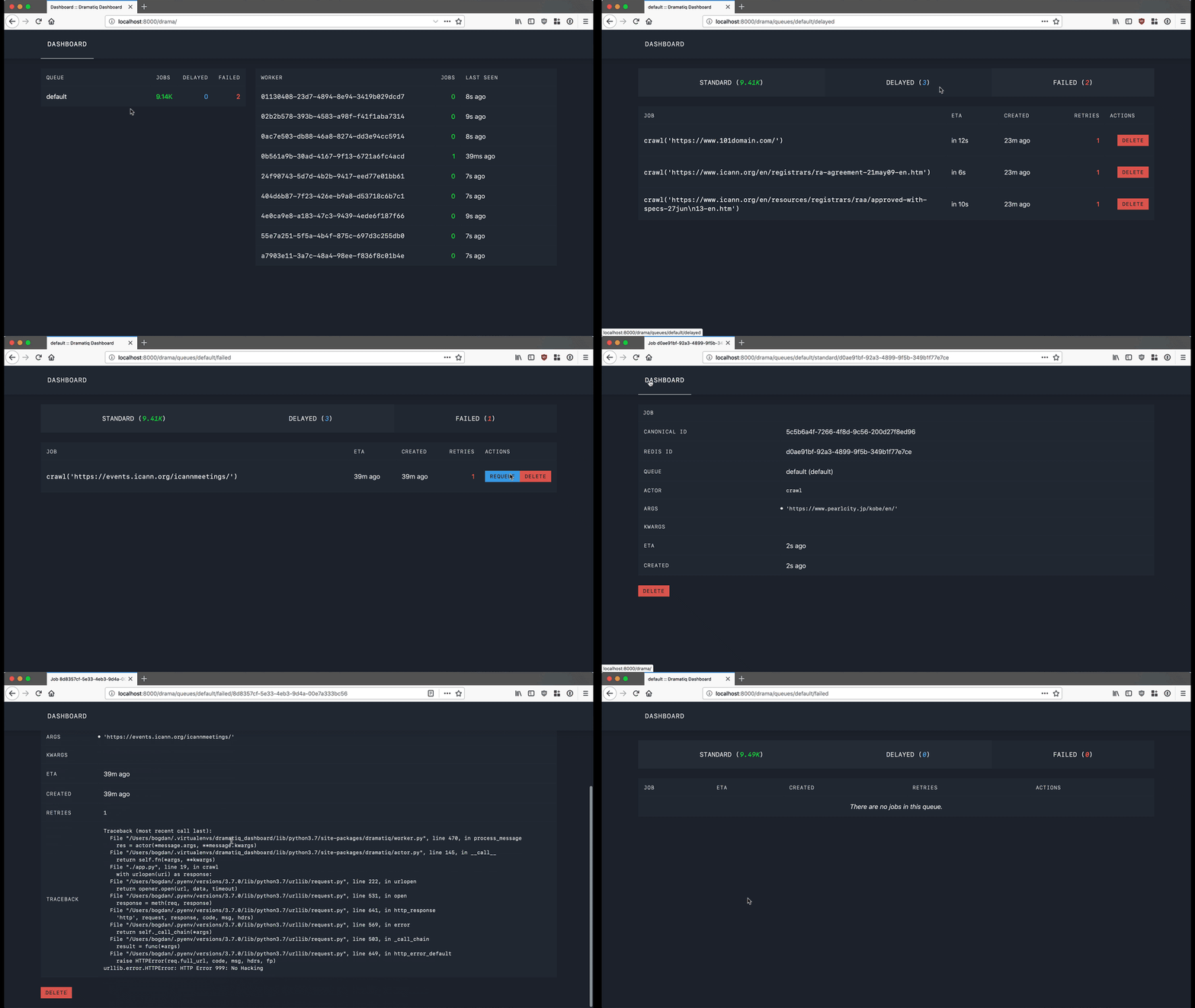
A dashboard for dramatiq, specific to its Redis broker (sorry RabbitMQ users!). Very alpha stuff.
It comes in the form of a WSGI middleware, with as few dependencies as
possible (dramatiq, jinja2 and redis) so it's super easy to plug
into whatever web application you have.
Installation
pip install dramatiq_dashboard
Quickstart
Run the dashboard on top of an existing WSGI app
# Assuming at some point you instantiate your app.
app = create_wsgi_application()

# Import the library, create the middleware and wrap your app with it.
import dramatiq_dashboard

dashboard_middleware = dramatiq_dashboard.make_wsgi_middleware("/drama")
app = dashboard_middleware(app)
Run your app, visit /drama and you should see the dashboard.
Run the dashboard as a standalone webserver
If you don't want to wrap an existing WSGI app, you can also run the
dashboard as a standalone server. Install the WSGI server of your
choice (e.g. uWSGi, gunicorn, bjoern, etc), setup the Redis broker,
and then start DashboardApp directly.
For example, to serve the dashboard on http://127.0.0.1:8080 using
the bjoern WSGI server and a redis server on 17.0.0.1:6379, run
the following:
import bjoern
import dramatiq
from dramatiq.brokers.redis import RedisBroker
from dramatiq_dashboard import DashboardApp

broker = RedisBroker(host="127.0.0.1", port=6379)
broker.declare_queue("default")
dramatiq.set_broker(broker)
app = DashboardApp(broker=broker, prefix="")
bjoern.run(app, "127.0.0.1", 8080)
Then visit http://127.0.0.1:8080/ to see the running dashboard.
Note that if you use custom queues in your application, they won't be
discovered using this approach. You'll have to either add each one of
them manually to your broker or import and pass your application's
broker to DashboardApp.
License
dramatiq_dashboard is licensed under the LGPL. Please see COPYING and COPYING.LESSER for licensing details.


Download files
Download the file for your platform. If you're not sure which to choose, learn more about installing packages.
Source Distribution
Built Distribution
Filter files by name, interpreter, ABI, and platform.
If you're not sure about the file name format, learn more about wheel file names.
Copy a direct link to the current filters
File details
Details for the file dramatiq_dashboard-0.2.3.tar.gz.
File metadata
- Download URL: dramatiq_dashboard-0.2.3.tar.gz
- Upload date:
- Size: 28.0 kB
- Tags: Source
- Uploaded using Trusted Publishing? No
- Uploaded via: twine/3.4.2 importlib_metadata/4.8.1 pkginfo/1.7.1 requests/2.26.0 requests-toolbelt/0.9.1 tqdm/4.62.2 CPython/3.8.2
File hashes
| Algorithm | Hash digest | |
|---|---|---|
| SHA256 |
f9c3146ac3470720f901c0e059b153c43dce3e2480711bb94972da8076f3ca86
|
|
| MD5 |
c5431c9a4624c1bb311f8a80cad288bc
|
|
| BLAKE2b-256 |
9e83fe1a6360e278658ef87492177d30c57d36dcdbe9594c125fd0c6ecdf70a0
|
File details
Details for the file dramatiq_dashboard-0.2.3-py3-none-any.whl.
File metadata
- Download URL: dramatiq_dashboard-0.2.3-py3-none-any.whl
- Upload date:
- Size: 31.3 kB
- Tags: Python 3
- Uploaded using Trusted Publishing? No
- Uploaded via: twine/3.4.2 importlib_metadata/4.8.1 pkginfo/1.7.1 requests/2.26.0 requests-toolbelt/0.9.1 tqdm/4.62.2 CPython/3.8.2
File hashes
| Algorithm | Hash digest | |
|---|---|---|
| SHA256 |
b8914704179aad9f8a117785ea8bed6cd742f11218790c3677dddb68ccbbe09d
|
|
| MD5 |
a6ca238298832002263e93d5efae964f
|
|
| BLAKE2b-256 |
57a211b48861fead92c02b999982263f3912d12648a4407737bd252c8626dcc2
|






