
Interactive features (cursor, draggable lines & rectangles, graphical input, clik-to-make-axes active, etc.) for Matplotlib

Project description
About
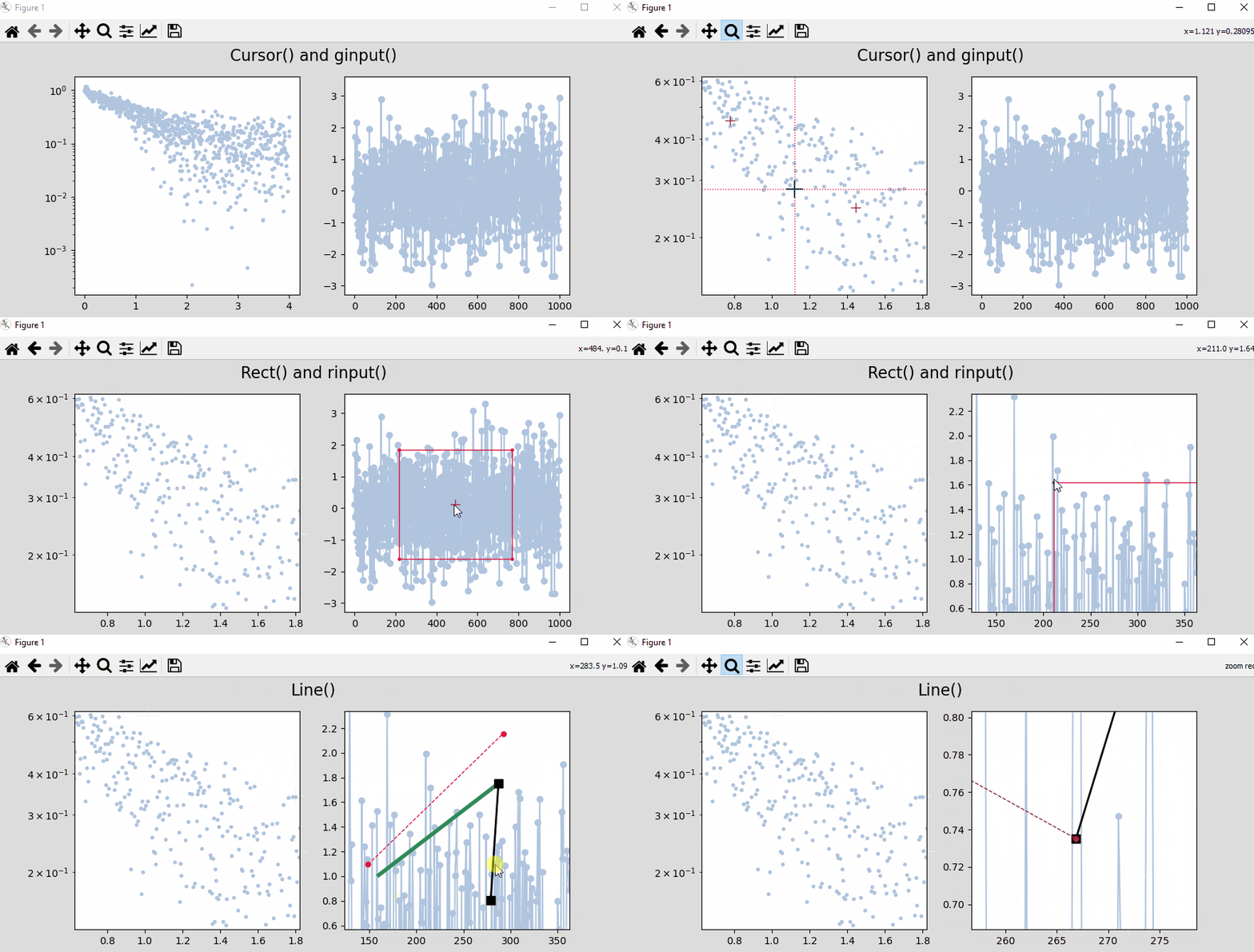
drapo (draggable plot objects) is a Python 3 package that provides a set of interactive graphical objects on Matplotlib figures: draggable line, draggable rectangle, moving cursor, and interactive click to define active figure/axes.
Based on these tools, the package also provides graphical input functions for measuring/extracting data interactively from a figure, such as ginput (get location of clicks) and rinput (get region of interest from interactive rectangle).
Matplotlib must be using an interactive backend such as Qt or Tk. In Jupyter, use %matplotlib qt or %matplotlib tk (or simply %matplotlib). The MacOSX backend can cause problems (see below).
Draggable shapes
- Line is a class that creates a draggable line.
- Rect is a class that creates a draggable rectangle.
Moving cursor
- Cursor is a class that creates a cursor that follows the mouse
Graphical input functions
- ginput is a function based on the Cursor class that returns position data from clicks/keystrokes.
- rinput is a function based on the Rect class that returns position data delimited by an interactive rectangle.
Other
- ClickFig is a class that activates figures and axes (makes them the current ones) by mouse hovering and clicking.
Install
pip install drapo
Quick start
Below is a brief overview on how to use the package contents with the most basic features. For full documentation, see DOCUMENTATION.md. For background code and development info, see DEVELOPMENT.md.
For a brief demo of various objects:
python -m drapo.demo
To use individual objects and functions:
from drapo import Line, Cursor, Rect, ClickFig, ginput, rinput
Draggable objects
Line() creates a line in the current axes of the current figure (creates new figure if none existing) that is draggable by left-clicking on it. Motion is different whether click is done on the line ends or on the line itself. To remove the line, right-click on it.
Rect() creates a draggable rectangle in the current or specified figure. Motion is triggered by left-clicking on the edges (lines), vertices (corner points), or in the center (marked by a cross). Right-click to delete.
See documentation for options to change the appearance of these objects. See ClickFig below to activate axes interactively to be able to create the objects in specific axes as needed.
Moving cursor
Cursor() creates a cursor in the current figure, but contrary to the draggable objects, the cursor is not bound to specific axes. It is however bound to a figure, and will appear on whatever axes the mouse is currently on; it will switch axes if the mouse goes over other axes. No cursor is visible if the mouse is not currently on axes.
- Use ⇧ Shift + left/right arrow keys to change color.
- Use ⇧ Shift + up/down keys to change thickness.
- Use the space bar to toggle visibility on/off.
Graphical input functions
ginput() will return the data coordinates (x, y) of one click on any axes of the current figure.
- Use
ginput(n)to record exactly n data points (returns list of tuples). - Use
ginput(-1)for an undefined amount of points. - Left click or press a to add point.
- Right click or press z to remove point.
- Middle click or press enter to finish input.
rinput() will instantiate an interactive rectangle and return its position as a tuple (xmin, ymin, width, height) when the enter key is pressed.
Activate specific figure/axes (ClickFig)
Sometimes the current figure/axes are not the ones where one wants to create the objects. To solve this problem, it is possible to use the ClickFig class.
ClickFig() will make all existing figures and axes clickable (hovering the mouse should highlight the fig/ax under it with a light blue color). Simply left-click in the ones you would like to activate. By default, activation stops after one click.
ClickFig(-1) will keep all fig/ax active for an undefined amount of clicks. Since ClickFig is non-blocking, this is a way to be able to be able to keep activating axes during a work session, without having to instantiate a ClickFig every time. In this situation, deactivation of the ClickFig is done by right-click.
ClickFig(highlight=False) allows not using color highlighting of the fig/ax if it is bothersome.
Tips and Troubleshooting
If the package does not work, try the following hacks:
- If instantiating from the command line, Matplotlib figures need to not block the console. For this, use
plt.show(block=False)when creating the figure. - Try another interactive action on the figure such as zooming/panning to see if it makes the objects miraculously appear.
- Use a different matplotlib backend. In particular, MacOSX seem to cause problems where nothing is drawn or where the figure crashes. Try e.g.
matplotlib.use('Qt5Agg'),matplotlib.use('Qt4Agg')ormatplotlib.use('TkAgg'). - Similarly, in Jupyter, an interactive backend needs to be used, with the command
%matplotlib qtor%matplotlib tk(or simply%matplotlib). - Pass
blit=Falsein the argument of any class or function (except ClickFig) to see if the problem comes from the blitting strategy used for fast rendering.
Requirements
Packages
- matplotlib
- importlib-metadata
- numpy (optional, only needed to run demos and examples)
Python
Python : >= 3.6
Author
Olivier Vincent
License
3-Clause BSD (see LICENSE file).
BSD 3-Clause License
Copyright (c) 2020, Olivier VINCENT All rights reserved.
Redistribution and use in source and binary forms, with or without modification, are permitted provided that the following conditions are met:
-
Redistributions of source code must retain the above copyright notice, this list of conditions and the following disclaimer.
-
Redistributions in binary form must reproduce the above copyright notice, this list of conditions and the following disclaimer in the documentation and/or other materials provided with the distribution.
-
Neither the name of the copyright holder nor the names of its contributors may be used to endorse or promote products derived from this software without specific prior written permission.
THIS SOFTWARE IS PROVIDED BY THE COPYRIGHT HOLDERS AND CONTRIBUTORS "AS IS" AND ANY EXPRESS OR IMPLIED WARRANTIES, INCLUDING, BUT NOT LIMITED TO, THE IMPLIED WARRANTIES OF MERCHANTABILITY AND FITNESS FOR A PARTICULAR PURPOSE ARE DISCLAIMED. IN NO EVENT SHALL THE COPYRIGHT HOLDER OR CONTRIBUTORS BE LIABLE FOR ANY DIRECT, INDIRECT, INCIDENTAL, SPECIAL, EXEMPLARY, OR CONSEQUENTIAL DAMAGES (INCLUDING, BUT NOT LIMITED TO, PROCUREMENT OF SUBSTITUTE GOODS OR SERVICES; LOSS OF USE, DATA, OR PROFITS; OR BUSINESS INTERRUPTION) HOWEVER CAUSED AND ON ANY THEORY OF LIABILITY, WHETHER IN CONTRACT, STRICT LIABILITY, OR TORT (INCLUDING NEGLIGENCE OR OTHERWISE) ARISING IN ANY WAY OUT OF THE USE OF THIS SOFTWARE, EVEN IF ADVISED OF THE POSSIBILITY OF SUCH DAMAGE.
Release history Release notifications | RSS feed


Download files
Download the file for your platform. If you're not sure which to choose, learn more about installing packages.
Source Distribution
Built Distribution
Filter files by name, interpreter, ABI, and platform.
If you're not sure about the file name format, learn more about wheel file names.
Copy a direct link to the current filters
File details
Details for the file drapo-1.0.3.tar.gz.
File metadata
- Download URL: drapo-1.0.3.tar.gz
- Upload date:
- Size: 902.2 kB
- Tags: Source
- Uploaded using Trusted Publishing? No
- Uploaded via: twine/3.3.0 pkginfo/1.6.1 requests/2.24.0 setuptools/50.3.1.post20201107 requests-toolbelt/0.9.1 tqdm/4.50.2 CPython/3.8.5
File hashes
| Algorithm | Hash digest | |
|---|---|---|
| SHA256 |
0d07df0a12a4455765cf69f62dbe7aebde7bd4c1818516f05af5adc7fb18ecf2
|
|
| MD5 |
f52359b94f66ed962dccca5bcf678701
|
|
| BLAKE2b-256 |
f50562ee89c65aa0eed0144123179da6465bd6625d38c56edffe07d15bf4e29d
|
File details
Details for the file drapo-1.0.3-py3-none-any.whl.
File metadata
- Download URL: drapo-1.0.3-py3-none-any.whl
- Upload date:
- Size: 45.0 kB
- Tags: Python 3
- Uploaded using Trusted Publishing? No
- Uploaded via: twine/3.3.0 pkginfo/1.6.1 requests/2.24.0 setuptools/50.3.1.post20201107 requests-toolbelt/0.9.1 tqdm/4.50.2 CPython/3.8.5
File hashes
| Algorithm | Hash digest | |
|---|---|---|
| SHA256 |
8fe8841a3011f40f63c8a21e935f8276995d25c3e1f694e30e8e703632b6250d
|
|
| MD5 |
870bc4dd2c9d46c20ec6e5f4f596e80a
|
|
| BLAKE2b-256 |
d13e1f20f13fa0d865ce727071e126441072ddc76bc28c40b7a582fc96522507
|






