
DREiMac: Dimensionality reduction with Eilenberg-MacLane coordinates


Project description




DREiMac: Dimensionality Reduction with Eilenberg-MacLane Coordinates
DREiMac is a library for topological data coordinatization, visualization, and dimensionality reduction. Currently, DREiMac is able to find topology-preserving representations of point clouds taking values in the circle, in higher dimensional tori, in the real and complex projective space, and in lens spaces.
In a few words, DREiMac takes as input a point cloud together with a topological feature of the point cloud (in the form of a persistent cohomology class), and returns a map from the point cloud to a well-understood topological space (a circle, a product of circles, a projective space, or a lens space), which preserves the given topological feature in a precise sense. For more information, please check the theory and examples in the documentation.
Basic usage
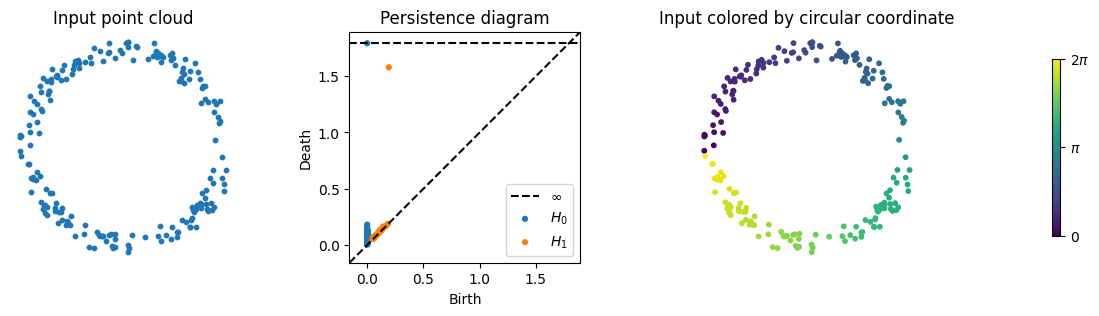
Here is a simple example; please check the Jupyter notebooks in the notebooks directory for further examples.
# basic imports
from dreimac import CircularCoords
from persim import plot_diagrams
import matplotlib.pyplot as plt
import numpy as np

# prepare plot with 4 subplots
f, (a0, a1, a2, a3) = plt.subplots(1, 4, width_ratios=[1, 1, 1, 0.2], figsize=(14,3))

# 200 samples from a noisy circle
n_samples = 200
np.random.seed(0)
Z = np.random.random((n_samples, 2)) - 0.5
X = Z / np.linalg.norm(Z, axis=1).reshape((n_samples, 1)) + (np.random.random((n_samples, 2)) - 0.5) * 0.2

# plot point cloud
a0.scatter(X[:,0], X[:,1], s=10)
a0.set_title("Input point cloud") ; a0.axis("off") ; a0.set_aspect("equal")

# plot the persistence diagram, showing a single prominent class
cc = CircularCoords(X, n_landmarks=200)
plot_diagrams(cc.dgms_, title="Persistence diagram", ax=a1)

# plot the data colored by the circle-valued map constructed by DREiMac
circular_coordinates = cc.get_coordinates()
a2.scatter(X[:,0], X[:,1], c=circular_coordinates, s=10, cmap="viridis")
a2.set_title("Input colored by circular coordinate") ; a2.axis("off") ; a2.set_aspect("equal")

# plot colorbar
img = a3.imshow([[0,1]], cmap="viridis"); a3.set_visible(False)
cb = plt.colorbar(mappable=img,ticks=[0,0.5,1]) ; _ = cb.ax.set_yticklabels(["0","$\pi$","2$\pi$"])
More examples
For Jupyter notebooks with more examples, please check the documentation or this repository's docs/notebooks directory.
Installing
Make sure you are using Python 3.8 or newer.
DREiMac depends on the following python packages, which will be installed automatically when you install with pip:
matplotlib,
numba,
numpy,
persim,
ripser, and
scipy.
To install the latest release:
pip install dreimac
To install directly from GitHub:
pip install git+https://github.com/scikit-tda/DREiMac.git
Documentation and support
You can find the documentation here, including the API reference. If you have further questions, please open an issue and we will do our best to help you. Please include as much information as possible, including your system's information, warnings, logs, screenshots, and anything else you think may be of use.
Running the tests
If you want to check that your machine is running DREiMac properly, you may run the tests by running the following commands from the root directory of a clone of this repository.
pip install pytest
pip install -r requirements.txt
pytest .
Contributing
To contribute, you can fork the project, make your changes, and submit a pull request. If you're looking for a way to contribute, you could consider:
- adding documentation to existing functionality;
- adding missing tests to improve coverage;
- adding a Jupyter notebook with a tutorial or demo;
- adding functionality and the corresponding documentation and tests;
- responding to a bug or feature request in the Github issues.
Authors
Jose A. Perea, Luis Scoccola, Chris Tralie
Acknowledgements
We thank Tom Mease for contributions and discussions.
License
This software is published under Apache License Version 2.0.


Download files
Download the file for your platform. If you're not sure which to choose, learn more about installing packages.
Source Distribution
Built Distribution
Filter files by name, interpreter, ABI, and platform.
If you're not sure about the file name format, learn more about wheel file names.
Copy a direct link to the current filters
File details
Details for the file dreimac-0.3.0.tar.gz.
File metadata
- Download URL: dreimac-0.3.0.tar.gz
- Upload date:
- Size: 34.2 kB
- Tags: Source
- Uploaded using Trusted Publishing? No
- Uploaded via: twine/4.0.2 CPython/3.9.17
File hashes
| Algorithm | Hash digest | |
|---|---|---|
| SHA256 |
23ab578a71dc47158babf9a632986875387e7118464684b3ae05952ecaffb011
|
|
| MD5 |
d142c578fcadf49288afbad8f951f337
|
|
| BLAKE2b-256 |
01b59fafe7ca4c9a740f46be8d950e62afb02b1886c4c5560cc1657bbb97e287
|
File details
Details for the file dreimac-0.3.0-py3-none-any.whl.
File metadata
- Download URL: dreimac-0.3.0-py3-none-any.whl
- Upload date:
- Size: 36.8 kB
- Tags: Python 3
- Uploaded using Trusted Publishing? No
- Uploaded via: twine/4.0.2 CPython/3.10.11
File hashes
| Algorithm | Hash digest | |
|---|---|---|
| SHA256 |
85cbb2edba61ae4d233131f2951187b77ba86e334d416b31dc01606f336f9700
|
|
| MD5 |
6470412508b3f5a42cac6523bb10a1ed
|
|
| BLAKE2b-256 |
65aae89e63be22c452a3a36de4fa944cc809192d7a0662db4cedf63958197fbe
|






