
Django TimeScale DB App

Project description
TimeScaleDB App
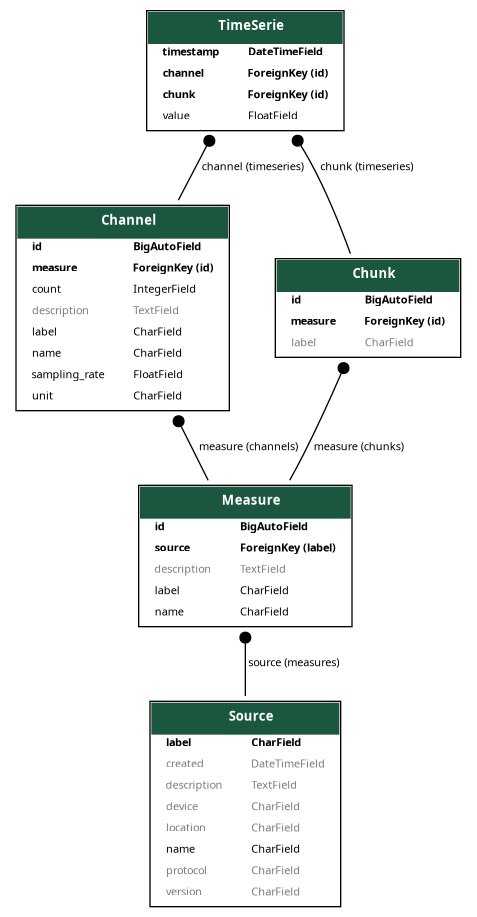
TimeScaleDB App is a Django-based web application that provides an API for managing and querying time-series data. This application utilizes RealTimeDB, a time-series database built atop PostgreSQL, for efficient storage and analysis of time-series data. With custom pagination classes and viewsets, the TimeScaleDB App delivers a powerful and flexible way to interact with Source, Measure, Channel, and TimeSerie models.
Features
- API endpoints for managing and querying time-series data
- Custom pagination classes for more efficient data retrieval
- Custom viewset mixin enabling creation of multiple objects
- Grouping and aggregation of TimeSerie objects by channel
- Computation of various statistics for aggregated time-series data
Getting Started
Installation
- Clone the repository:
git clone https://github.com/dunderlab/python-django-timescaledbapp.git
cd python-django-timescaledbapp
- Install the required dependencies:
pip install -r requirements.txt
Configuration
- Configure your database settings in the
settings.pyfile:
DATABASES = {
    'default': {
        'ENGINE': 'django.db.backends.postgresql',
        'NAME': 'your_database_name',
        'USER': 'your_database_user',
        'PASSWORD': 'your_database_password',
        'HOST': 'your_database_host',
        'PORT': 'your_database_port',
    }
}
- Add the required apps to
INSTALLED_APPSin thesettings.pyfile:
INSTALLED_APPS = [
    'django_extensions',
    'rest_framework',
    'dunderlab.django.timescaledbapp.apps.TimeScaleDBConfig',
]
- Include the TimeScaleDB App URLs in your project's
urls.pyfile:
urlpatterns = [
    path("timescaledbapp/", include('dunderlab.django.timescaledbapp.urls')),
]
Execution
- Apply the migrations:
python manage.py migrate
- Start the development server:
python manage.py runserver
You can now access the TimeScaleDB App API at http://localhost:8000/.
API Endpoints
/sources/: View or edit sources/measures/: View or edit measures/channels/: View or edit channels/timeseries/: View or edit time series with custom behavior for listing and paginating time series data/chunk/: Handle chunks
Contributing
If you'd like to contribute to TimeScaleDB App, please follow these steps:
- Fork the repository
- Create a new branch for your feature or bugfix
- Commit your changes to your branch
- Push your branch to your fork
- Submit a pull request with a detailed description of your changes
We appreciate your contributions and will review them as soon as possible.
License
TimeScaleDB App is released under the MIT License.
Release history Release notifications | RSS feed


Download files
Download the file for your platform. If you're not sure which to choose, learn more about installing packages.
Source Distribution
Built Distribution
Filter files by name, interpreter, ABI, and platform.
If you're not sure about the file name format, learn more about wheel file names.
Copy a direct link to the current filters
File details
Details for the file dunderlab-timescaledbapp-0.1.8.tar.gz.
File metadata
- Download URL: dunderlab-timescaledbapp-0.1.8.tar.gz
- Upload date:
- Size: 23.6 kB
- Tags: Source
- Uploaded using Trusted Publishing? No
- Uploaded via: twine/4.0.2 CPython/3.11.3
File hashes
| Algorithm | Hash digest | |
|---|---|---|
| SHA256 |
3a10a30eb5be482df9aceb80e92022574bba13d989aae8f340f97eabc55db99b
|
|
| MD5 |
d3e64b878ec79d2c8f4880f3b10aed5c
|
|
| BLAKE2b-256 |
3846100f3fadc4b9b7555547ea62d8b614cc28cea440b48183e43637a75c8122
|
File details
Details for the file dunderlab_timescaledbapp-0.1.8-py3-none-any.whl.
File metadata
- Download URL: dunderlab_timescaledbapp-0.1.8-py3-none-any.whl
- Upload date:
- Size: 28.4 kB
- Tags: Python 3
- Uploaded using Trusted Publishing? No
- Uploaded via: twine/4.0.2 CPython/3.11.3
File hashes
| Algorithm | Hash digest | |
|---|---|---|
| SHA256 |
245caebeed41632bb4eb8a0ac970d17440ecd6b85d52e1aee4516c30753421db
|
|
| MD5 |
0ba17712b97a7c8291ca4a76272b1f6a
|
|
| BLAKE2b-256 |
b08ff423eae2df2c00f6827506728ebf0d2ddc76ac56053ebb1eb71405627a6d
|






