
Foliage: a tool to do bulk changes in FOLIO using the OKAPI API

Project description
Foliage
Foliage is the FOLIo chAnGe Editor, a tool to do bulk changes and other operations in FOLIO using the network API.




Table of contents
Introduction
Foliage (Folio change Editor) is a desktop computer application that can perform operations in FOLIO, a library services platform (LSP) used by Caltech and other institutions. Foliage allows a user to look up records of various kinds, perform bulk changes in the values of record fields, delete records, and more. It communicates with a FOLIO server using the OKAPI network API. The program is cross-platform compatible and currently in use on Windows and macOS computers at the Caltech Library.
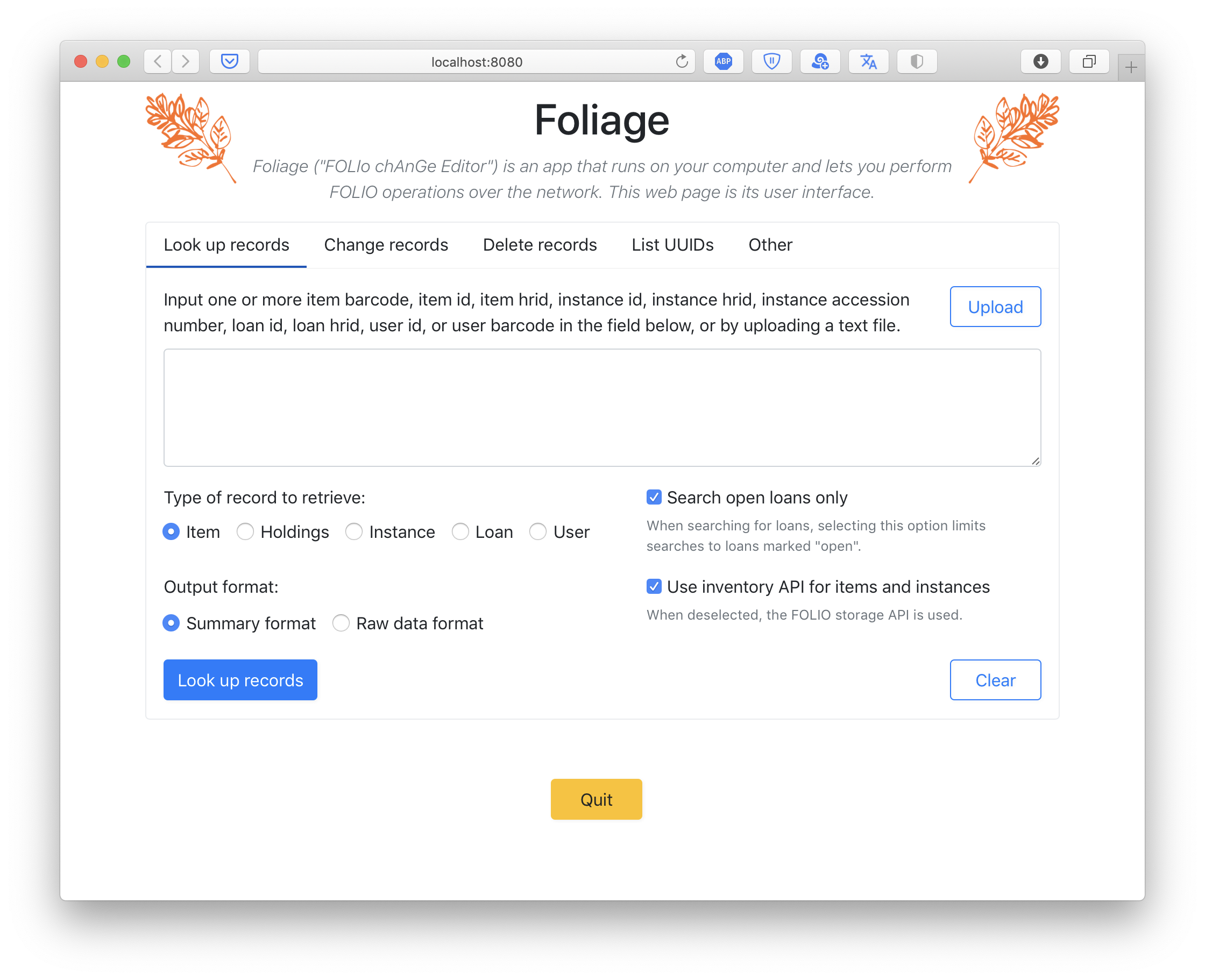
Although Foliage is a desktop application and not a web service, it uses a web page as its user interface – it opens a page in a browser on the user's computer, letting the user interact with the program through the familiar elements of a web page. This lets Foliage present an identical user interface no matter whether it is running on Window, macOS, or Linux.

Installation
There are multiple ways of installing Foliage, ranging from downloading a self-contained, single-file, ready-to-run program, to installing it as a typical Python program using pip. Please choose the alternative that suits you.
Alternative 1: installing the ready-to-run executable programs
For the Caltech Library, we provide Foliage in a ready-to-run form for Windows computers. This is the easiest and preferred way of getting a copy of Foliage. Please contact the author for more information.
Alternative 2: installing Foliage using pip
The instructions below assume you have a Python 3 interpreter installed on your computer. Note that the default on macOS at least through 10.14 (Mojave) is Python 2 – please first install Python version 3 and familiarize yourself with running Python programs on your system before proceeding further.
You should be able to install foliage with pip for Python 3. To install foliage from the Python package repository (PyPI), run the following two commands:
python3 -m pip install git+https://github.com/mhucka/PyWebIO.git@2af53fc
python3 -m pip install foliage
If you already installed Foliage once before, and want to update to the latest version, add --upgrade to the ends the commands above.
Alternative 3: installing Foliage from sources
If you prefer to install Foliage directly from the source code, you can do that too. To get a copy of the files, you can clone the GitHub repository:
git clone https://github.com/caltechlibrary/foliage
Alternatively, you can download the files as a ZIP archive using this link directly from your browser using this link: https://github.com/caltechlibrary/foliage/archive/refs/heads/main.zip
Next, after getting a copy of the files, run setup.py inside the code directory:
cd foliage
python3 -m pip install git+https://github.com/mhucka/PyWebIO.git@2af53fc
python3 setup.py install
Usage
Documentation for Foliage is available online at https://caltechlibrary.github.io/foliage/.
Getting help
If you find an issue, please submit it in the GitHub issue tracker for this repository.
Contributing
Your help and participation in enhancing Foliage is welcome! Please visit the guidelines for contributing for some tips on getting started. Developer documentation is available in the repository at dev/dev-docs.
License
Software produced by the Caltech Library is Copyright © 2021–2022 California Institute of Technology. This software is freely distributed under a BSD type license. Please see the LICENSE file for more information.
Acknowledgments
This work was funded by the California Institute of Technology Library.
The vector artwork used as a starting point for the logo for this repository was created by Alice Noir for the Noun Project. It is licensed under the Creative Commons Attribution 3.0 Unported license. The vector graphics was modified by Mike Hucka to change the color.

Project details
Release history Release notifications | RSS feed


Download files
Download the file for your platform. If you're not sure which to choose, learn more about installing packages.
Source Distribution
Built Distribution
Filter files by name, interpreter, ABI, and platform.
If you're not sure about the file name format, learn more about wheel file names.
Copy a direct link to the current filters
File details
Details for the file foliage-1.4.1.tar.gz.
File metadata
- Download URL: foliage-1.4.1.tar.gz
- Upload date:
- Size: 63.4 kB
- Tags: Source
- Uploaded using Trusted Publishing? No
- Uploaded via: twine/4.0.1 CPython/3.9.13
File hashes
| Algorithm | Hash digest | |
|---|---|---|
| SHA256 |
ba200052cf3126524c61a52f949b457f4f48c527f6a03451a41b800527e94b98
|
|
| MD5 |
eb6fe441235e289674bdef730c4f89c6
|
|
| BLAKE2b-256 |
3770793050fdeef6f26505bf29e165787338f5507dbd55733c71eddbf61e58fb
|
File details
Details for the file foliage-1.4.1-py3-none-any.whl.
File metadata
- Download URL: foliage-1.4.1-py3-none-any.whl
- Upload date:
- Size: 73.4 kB
- Tags: Python 3
- Uploaded using Trusted Publishing? No
- Uploaded via: twine/4.0.1 CPython/3.9.13
File hashes
| Algorithm | Hash digest | |
|---|---|---|
| SHA256 |
516342f90a56f247f0db1355204d0ec5db3f74658a8c879aefe68b5d441928e8
|
|
| MD5 |
431d314a2a3fa526de1e0c05cd912cca
|
|
| BLAKE2b-256 |
cde160697ed29e6c286fff3e6d84c08d85c716b076ad3635621c21c58d82de54
|






