
Elasticsearch integration extension for Foliant.


Project description
Elasticsearch Preprocessor
This extension allows to integrate Foliant-managed documentation projects with Elasticsearch search engine.
The main part of this extension is a preprocessor that prepares data for a search index.
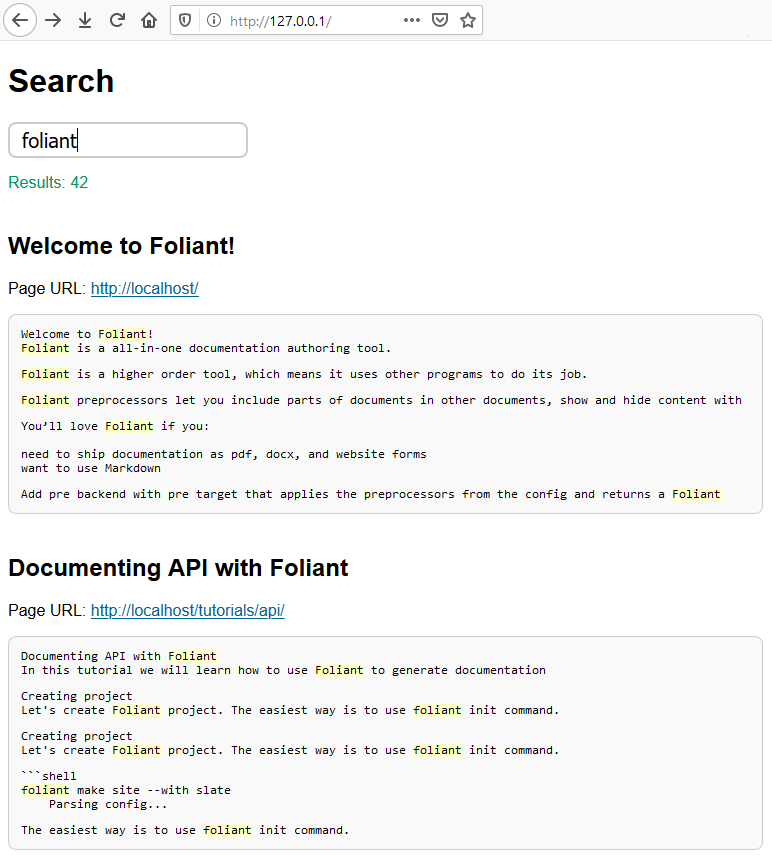
Also this extension provides a simple working example of a client-side Web application that may be used to perform searching. By editing HTML, CSS and JS code you may customize it according to your needs.
Installation
To install the preprocessor, run the command:
$ pip install foliantcontrib.elasticsearch
To use an example of a client-side Web application for searching, download these HTML, CSS, and JS files and open the file index.html in your Web browser.
Config
To enable the preprocessor, add elasticsearch to preprocessors section in the project config:
preprocessors:
    - elasticsearch
The preprocessor has a number of options with the following default values:
preprocessors:
    - elasticsearch:
        es_url: 'http://127.0.0.1:9200/'
        index_name: ''
        index_properties: {}
        actions:
            - delete
            - create
        use_chapters: true
        escape_html: true
        url_transform:
            - '\/?index\.md$': '/'
            - '\.md$': '/'
            - '^([^\/]+)': '/\g<1>'
        targets: []
es_url
: Elasticsearch API URL.
index_name
: Name of the index. Your index must have an explicitly specified name, otherwise (by default) API URL will be invalid.
index_properties
: Settings and other properties that should be used when creating an index. If not specified (by default), the default Elasticsearch settings will be used. More details are described below.
actions
: List of actions that the preprocessor should to perform. Available item values are: delete, create. By default, both of them are used since in most cases it’s needed to remove and then fully rebuild the index.
use_chapters
: If set to true (by default), the preprocessor applies only to the files that are mentioned in the chapters section of the project config. Otherwise, the preprocessor applies to all of the files of the project.
escape_html
: If set to true (by default), HTML syntax constructions in the text will be escaped by converting & to &, < to <, > to >, and " to ".
url_transform
: Sequence of rules to transform local paths of source Markdown files into URLs of target pages. Each rule should be a dictionary. Its data is passed to the re.sub() method: key as the pattern argument, and value as the repl argument. The local path (possibly previously transformed) to the source Markdown file relative to the temporary working directory is passed as the string argument. The default value of the url_transform option is designed to be used to build static websites with MkDocs backend.
targets
: Allowed targets for the preprocessor. If not specified (by default), the preprocessor applies to all targets.
Usage
The preprocessor reads each source Markdown file and generates three fields for indexing:
url—target page URL;title—document title, it’s taken from the first heading of source Markdown content;text—source Markdown content converted into plain text.
When all the files are processed, the preprocessor calls Elasticsearch API to create the index.
Optionally the preprocessor may call Elasticsearch API to delete previously created index.
By using the index_properties option, you may override the default Elasticsearch settings when creating an index. Below is an example of JSON-formatted value of the index_properties option to create an index with Russian morphology analysis:
{
    "settings": {
        "analysis": {
            "filter": {
                "ru_stop": {
                    "type": "stop",
                    "stopwords": "_russian_"
                },
                "ru_stemmer": {
                    "type": "stemmer",
                    "language": "russian"
                }
            },
            "analyzer": {
                "default": {
                    "tokenizer": "standard",
                    "filter": [
                        "lowercase",
                        "ru_stop",
                        "ru_stemmer"
                    ]
                }
            }
        }
    }
}
You may perform custom search requests to Elasticsearch API.
The simple client-side Web application example that is provided as a part of this extension, performs requests like this:
{
    "query": {
        "multi_match": {
            "query": "foliant",
            "type": "phrase_prefix",
            "fields": [ "title^3", "text" ]
        }
    },
    "highlight": {
        "fields": {
            "text": {}
        }
    },
    "size": 50
}
Search results may look like that:
If you use self-hosted instance of Elasticsearch, you may need to configure it to append CORS headers to HTTP API responses.


Download files
Download the file for your platform. If you're not sure which to choose, learn more about installing packages.
Source Distribution
Built Distribution
Filter files by name, interpreter, ABI, and platform.
If you're not sure about the file name format, learn more about wheel file names.
Copy a direct link to the current filters
File details
Details for the file foliantcontrib.elasticsearch-1.0.1.tar.gz.
File metadata
- Download URL: foliantcontrib.elasticsearch-1.0.1.tar.gz
- Upload date:
- Size: 6.3 kB
- Tags: Source
- Uploaded using Trusted Publishing? No
- Uploaded via: twine/1.13.0 pkginfo/1.5.0.1 requests/2.11.1 setuptools/41.0.1 requests-toolbelt/0.9.1 tqdm/4.32.2 CPython/3.6.8
File hashes
| Algorithm | Hash digest | |
|---|---|---|
| SHA256 |
1ed9393718802c0bbb177e6ccceb61aa7d94dea36cfd754b8df8a3a63791a0ac
|
|
| MD5 |
4d61dad431bc31ca3a0e87c3bfc2af5d
|
|
| BLAKE2b-256 |
0eeabdc3d943ce708e539d5fe454212e9cecd793e35a7db434ffea8666f10e20
|
File details
Details for the file foliantcontrib.elasticsearch-1.0.1-py3-none-any.whl.
File metadata
- Download URL: foliantcontrib.elasticsearch-1.0.1-py3-none-any.whl
- Upload date:
- Size: 7.3 kB
- Tags: Python 3
- Uploaded using Trusted Publishing? No
- Uploaded via: twine/1.13.0 pkginfo/1.5.0.1 requests/2.11.1 setuptools/41.0.1 requests-toolbelt/0.9.1 tqdm/4.32.2 CPython/3.6.8
File hashes
| Algorithm | Hash digest | |
|---|---|---|
| SHA256 |
c270c8f275e1471528fe82c7811f7596e71726664504e0873a7d42d78400cdc9
|
|
| MD5 |
1fafc71806cf21ae1a388b1d991a64f6
|
|
| BLAKE2b-256 |
c65d575a0692b99fd38d62664822647a917dcc4b9f28111f0f3fe7edbf665be5
|






