
No project description provided

Project description
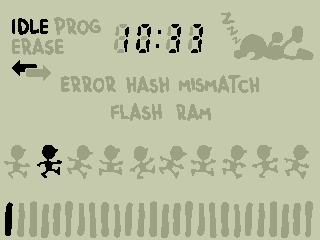


GnWManager
GnWManager is THE game-and-watch device manager. GnWManager is a command line tool who's responsible for getting firmware onto your device, managing the filesystem, and other device administrative tasks.
GnWManager accomplishes this via a small bundled pre-compiled firmware that gets executed from the STM32's RAM.
Features
- Standalone and simple to install.
- No more installing many different tools with various patches!
- Fast internal and external flash firmware flashing.
- Hardware-accelerated hashing for rapid duplicate discovery.
- Only syncs changed data.
- Minimizes flash erases and writes, extending flash lifespan.
- Double buffered, asynchronous, LZMA-compressed transfers for maximum speed.
- Hardware-accelerated hashing for rapid duplicate discovery.
- Complete filesystem management.
- Backup and restore files.
- Interactive filesystem explorer.
- Automatic Real-Time-Clock (RTC) configuration.
- Developer tools:
- Easily monitor device
printfstatements and launch GDB sessions. - Capture screenshots, regardless of the running firmware.
- Easily monitor device
Installation
It is highly recommended to use pipx to install GnWManager.
pipx install gnwmanager
That's it!
Updating
Update GnWManager as you would any python command line tool installed by pipx:
pipx upgrade gnwmanager
Compatibility
GnWManager works with all major operating systems: Windows, Mac, and Linux. GnWManager is also compatible with the following probes:
- Raspberry Pi Pico (Recommended)
- STLink
- JLink
- DAPLink (~10x slower than other probes)
Unfortunately, GnWManager is not compatible with raspberry pi gpio. There is currently an effort to add support in pyocd, the underlying library that GnWManager uses for hardware interactions.
STLink
Hook up your STLink to your game and watch as follows:

Raspberry Pi Pico
All Raspberry Pi Picos can be transformed into programmers via the picoprobe project.
- Download
picoprobe.uf2from picoprobe releases. - Hold BOOT button on the pico and plug it into the computer. It should show up as a USB drive. Drag and drop
picoprobe.uf2to it. - Hook up the 3 wires (GND, GP2, GP3) to (GND, SDCLK, SWDIO), respectively.

Usage
To see available commands, run gnwmanager --help.
$ gnwmanager --help

 Usage: gnwmanager [OPTIONS] COMMAND [ARGS]...

 Game And Watch Device Manager.
 Manages device flashing, filesystem management, peripheral configuration, and more.

╭─ Options ──────────────────────────────────────────────────────────────────────────╮
│ --version    -v                  Print gnwmanager version.                         │
│ --frequency  -f      INT_PARSER  Probe frequency. [default: None]                  │
│ --backend    -b      [pyocd]     OCD Backend. [default: pyocd]                     │
│ --help                           Show this message and exit.                       │
╰────────────────────────────────────────────────────────────────────────────────────╯
╭─ Commands ─────────────────────────────────────────────────────────────────────────╮
│ debug             GnWManager internal debugging tools                              │
│ disable-debug     Disable the microcontroller's debug block.                       │
│ erase             Erase a section of flash.                                        │
│ flash             Flash firmware to device.                                        │
│ format            Format device's filesystem.                                      │
│ gdb               Launch a gdbserver and connect to it with gdb.                   │
│ gdbserver         Launch a gdbserver.                                              │
│ ls                List contents of device directory.                               │
│ mkdir             Create a directory on device.                                    │
│ monitor           Monitor the device's stdout logging buffer.                      │
│ mv                Move/Rename a file or directory.                                 │
│ pull              Pull a file or folder from device.                               │
│ push              Push file(s) and folder(s) to device.                            │
│ screenshot        Capture and transfer screenshots from device.                    │
│ shell             Launch an interactive shell to browse device filesystem.         │
│ start             Start firmware at location.                                      │
│ tree              List contents of device directory and its descendants.           │
╰────────────────────────────────────────────────────────────────────────────────────╯
Need Help?
If you need any help, either open up a github issue here, or join the stacksmashing discord for live help.
Release history Release notifications | RSS feed


Download files
Download the file for your platform. If you're not sure which to choose, learn more about installing packages.
Source Distribution
Built Distribution
Filter files by name, interpreter, ABI, and platform.
If you're not sure about the file name format, learn more about wheel file names.
Copy a direct link to the current filters
File details
Details for the file gnwmanager-0.1.1.tar.gz.
File metadata
- Download URL: gnwmanager-0.1.1.tar.gz
- Upload date:
- Size: 54.8 kB
- Tags: Source
- Uploaded using Trusted Publishing? No
- Uploaded via: poetry/1.6.1 CPython/3.10.12 Linux/6.2.0-1012-azure
File hashes
| Algorithm | Hash digest | |
|---|---|---|
| SHA256 |
5f54aa35e2867275d3df8e2fac359386d8e1d7cba97b5f50fbd2d3cd09bd02f6
|
|
| MD5 |
f79e98d7c558ca8bb4ce1373a1f13a48
|
|
| BLAKE2b-256 |
45ca775c74dcbdff3462d2017d88df9b839c54bcdcd9ae669f3beb188a9d7b12
|
File details
Details for the file gnwmanager-0.1.1-cp310-cp310-manylinux_2_35_x86_64.whl.
File metadata
- Download URL: gnwmanager-0.1.1-cp310-cp310-manylinux_2_35_x86_64.whl
- Upload date:
- Size: 62.6 kB
- Tags: CPython 3.10, manylinux: glibc 2.35+ x86-64
- Uploaded using Trusted Publishing? No
- Uploaded via: poetry/1.6.1 CPython/3.10.12 Linux/6.2.0-1012-azure
File hashes
| Algorithm | Hash digest | |
|---|---|---|
| SHA256 |
2293a660b16c4aea62d02d33aa61ae59ae51739c7cccdf6050e97555907c3953
|
|
| MD5 |
8d0fc46c8c94a49fbe7ec3d091f4cdbe
|
|
| BLAKE2b-256 |
cc435579f5b1cd59a431155b0dc1be75a32b3916b760fb34a992b763f91f3344
|






