
Grep through all Grafana entities in the spirit of git-wtf

Project description



grafana-wtf
About
grafana-wtf - grep through all Grafana entities in the spirit of git-wtf.
Synopsis
Search Grafana API for string “weatherbase”.
grafana-wtf find weatherbase
Screenshots
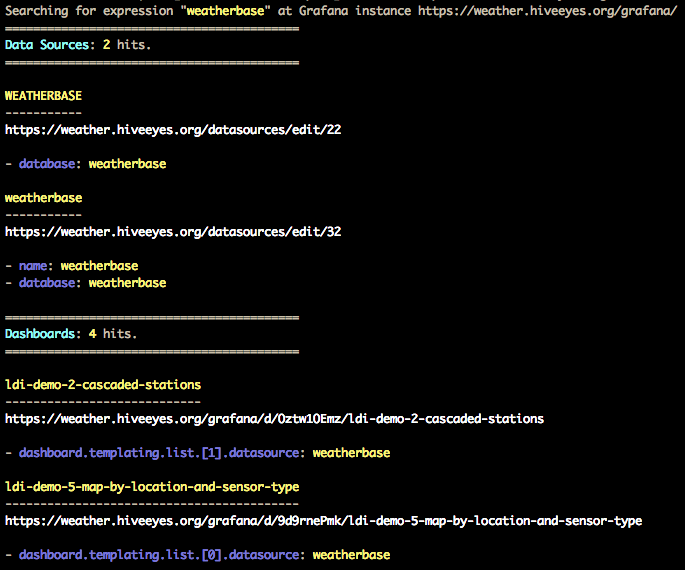
Setup
Install grafana-wtf
pip install grafana-wtf
Configure Grafana
Please take these steps to create an API key with your Grafana instance:
Go to https://daq.example.org/grafana/org/apikeys.
Choose “New API Key”.
Key name: grafana-wtf
Role: Admin
From the output curl -H "Authorization: Bearer eyJrIjoiWHg...dGJpZCI6MX0=" ..., please take note of the Bearer token. This is your Grafana API key.
Running
Before running grafana-wtf, define URL and access token of your Grafana instance:
export GRAFANA_URL=https://daq.example.org/grafana/
export GRAFANA_TOKEN=eyJrIjoiWHg...dGJpZCI6MX0=
Then:
grafana-wtf find weatherbase
Examples
See grafana-wtf examples.
Release history Release notifications | RSS feed


Download files
Download the file for your platform. If you're not sure which to choose, learn more about installing packages.
Source Distribution
File details
Details for the file grafana-wtf-0.2.0.tar.gz.
File metadata
- Download URL: grafana-wtf-0.2.0.tar.gz
- Upload date:
- Size: 18.6 kB
- Tags: Source
- Uploaded using Trusted Publishing? No
- Uploaded via: twine/1.13.0 pkginfo/1.5.0.1 requests/2.21.0 setuptools/40.8.0 requests-toolbelt/0.9.1 tqdm/4.31.1 CPython/3.7.3
File hashes
| Algorithm | Hash digest | |
|---|---|---|
| SHA256 |
6c3866cc7aaaa66a2bb5a5ea729494c90c612e849bf059fdcb58f0d6035550bf
|
|
| MD5 |
dc7e253cd6b027bd951f5623d604247f
|
|
| BLAKE2b-256 |
92ad35034884d19af3818a25b755eb06e73e76d13535d8c1c7a71d6ba4387235
|






