
Filters for Graphene SQLAlchemy integration

Project description
Graphene-SQLAlchemy-Filter



Filters for Graphene SQLAlchemy integration
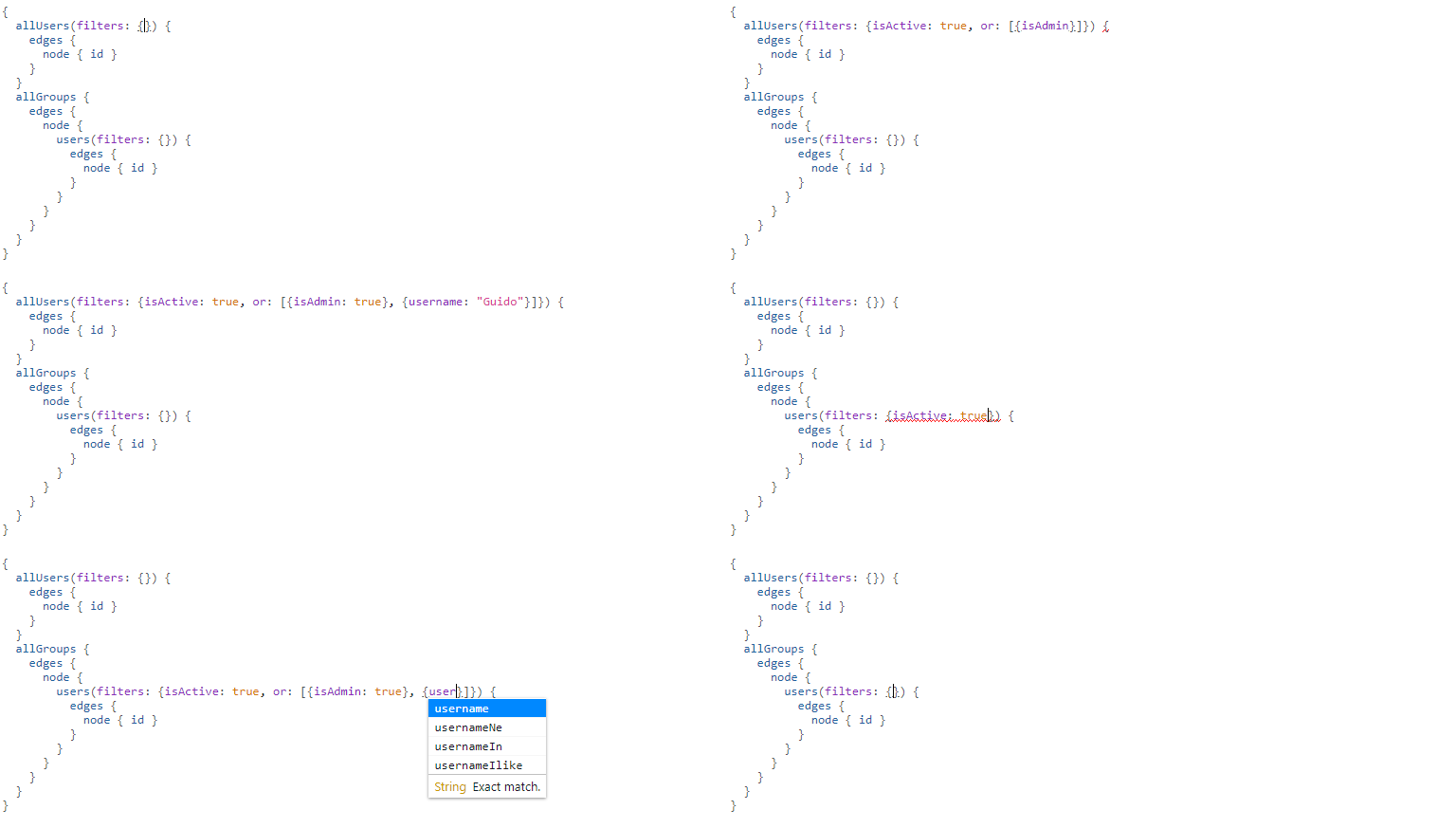
Quick start
Create a filter and add it to the graphene field.
from graphene_sqlalchemy_filter import FilterableConnectionField, FilterSet


class UserFilter(FilterSet):
    is_admin = graphene.Boolean()

    class Meta:
        model = User
        fields = {
            'username': ['eq', 'ne', 'in', 'ilike'],
            'is_active': [...],  # shortcut!
        }

    @staticmethod
    def is_admin_filter(info, query, value):
        if value:
            return User.username == 'admin'
        else:
            return User.username != 'admin'


class Query(ObjectType):
    all_users = FilterableConnectionField(UserConnection, filters=UserFilter())
Now, we’re going to create query.
{
  allUsers (
    filters: {
      isActive: true,
      or: [
        {isAdmin: true},
        {usernameIn: ["moderator", "cool guy"]}
      ]
    }
  ){
    edges {
      node {
        id
        username
      }
    }
  }
}
🔥 Let’s rock! 🔥
Filters
FilterSet class must inherit graphene_sqlalchemy_filter.FilterSet or your subclass of this class.
Metaclass must contain the sqlalchemy model and fields.
There are three types of filters:
Automatically generated filters
class UserFilter(FilterSet):
   class Meta:
       model = User
       fields = {
           'username': ['eq', 'ne', 'in', 'ilike'],
           'is_active': [...],  # shortcut!
       }
Metaclass must contain the sqlalchemy model and fields.
Automatically generated filters must be specified by fields variable. Key - field name of sqlalchemy model, value - list of expressions (or shortcut).
Allowed filter values: 'eq', 'ne', 'like', 'ilike', 'regexp', 'is_null', 'in', 'not_in', 'lt', 'lte', 'gt', 'gte', 'range'.
Shortcut (default: [...]) will add all the allowed filters for this type of sqlalchemy field.
Simple filters
class UserFilter(FilterSet):
    is_admin = graphene.Boolean()

    @staticmethod
    def is_admin_filter(info, query, value):
        if value:
            return User.username == 'admin'
        else:
            return User.username != 'admin'
Each simple filter has a class variable that passes to GraphQL schema as an input type and function <field_name>_filter that makes filtration.
The filtration function takes the following arguments:
info - ResolveInfo graphene object
query - sqlalchemy query (not used in that filters type)
value - the value of a filter
The return value can be any type of sqlalchemy clause. This means that you can return not_(and_(or_(...), ...)).
Metaclass is not required if you do not need automatically generated filters.
Filters that require join
This type of filter is the same as simple filters but has a different return type.
The filtration function should return a new sqlalchemy query and clause (like simple filters).
class UserFilter(FilterSet):
    is_moderator = graphene.Boolean()

    @classmethod
    def is_admin_filter(cls, info, query, value):
        membership = cls.aliased(info, Membership, name='is_moderator')

        query = query.join(
            membership,
            and_(
                User.id == membership.user_id,
                membership.is_moderator.is_(True),
            ),
        )

        if value:
            filter_ = membership.id.isnot(None)
        else:
            filter_ = membership.id.is_(None)

        return query, filter_
Model aliases
The function cls.aliased(info, model, name='...') caches sqlalchemy aliases in the query filtration scope by a given model class and name. It has one differing parameter - info (graphene ResolveInfo object). Other arguments are the same as sqlalchemy.orm.aliased.
Identical joins will be skipped by sqlalchemy.
Features
Rename GraphQL filter field
class CustomField(FilterableConnectionField):
    filter_arg = 'where'


class Query(ObjectType):
    all_users = CustomField(UserConnection, where=UserFilter())
    all_groups = FilterableConnectionField(GroupConnection, filters=GroupFilter())
{
allUsers (where: {isActive: true}){
edges { node { id } }
}
allGroups (filters: {nameIn: ["python", "development"]}){
edges { node { id } }
}
}Rename expression
class BaseFilter(FilterSet):
    GRAPHQL_EXPRESSION_NAMES = dict(
        FilterSet.GRAPHQL_EXPRESSION_NAMES,
        **{'eq': 'equal', 'not': 'i_never_asked_for_this'}
    )

    class Meta:
        abstract = True


class UserFilter(BaseFilter):
    class Meta:
        model = User
        fields = {'first_name': ['eq'], 'last_name': ['eq']}
{
allUsers (filters: {iNeverAskedForThis: {firstNameEqual: "Adam", lastNameEqual: "Jensen"}}){
edges { node { id } }
}
}Custom shortcut value
class BaseFilter(FilterSet):
    ALL = '__all__'

    class Meta:
        abstract = True


class UserFilter(BaseFilter):
    class Meta:
        model = User
        fields = {'username': '__all__'}
Localization of documentation
class BaseFilter(FilterSet):
    DESCRIPTIONS = {
        'eq': 'Полностью совпадает.',
        'ne': 'Не совпадает.',
        'like': 'Регистрозависимая проверка строки по шлабону.',
        'ilike': 'Регистронезависимая проверка строки по шлабону.',
        'regexp': 'Регистрозависимая проверка строки по регулярному выражению.',
        'is_null': 'Равно ли значение `null`. Принемает `true` или `false`.',
        'in': 'Проверка вхождения в список.',
        'not_in': 'Проверка не вхождения в список.',
        'lt': 'Меньше, чем указанное значение.',
        'lte': 'Меньше или равно указанному значению.',
        'gt': 'Больше, чем указанное значение.',
        'gte': 'Больше или равно указанному значению.',
        'range': 'Значение входит в диапазон значений.',
        'and': 'Объединение фильтров с помощью ``AND``.',
        'or': 'Объединение фильтров с помощью ``OR``.',
        'not': 'Отрицание указанных фильтров.',
    }

    class Meta:
        abstract = True
Custom expression
def today_filter(field, value: bool):
    today = func.date(field) == date.today()
    return today if value else not_(today)


class BaseFilter(FilterSet):
    # Add expression.
    TODAY = 'today'

    EXTRA_EXPRESSIONS = {
        'today': {
            # Add the name of the expression in GraphQL.
            'graphql_name': 'today',
            # Update allowed filters (used by shortcut).
            'for_types': [types.Date, types.DateTime],
            # Add a filtering function (takes the sqlalchemy field and value).
            'filter': today_filter,
            # Add the GraphQL input type. Column type by default.
            'input_type': (
                lambda type_, nullable, doc: graphene.Boolean(nullable=False)
            ),
            # Description for the GraphQL schema.
            'description': 'It is today.',
        }
    }

    class Meta:
        abstract = True


class PostFilter(BaseFilter):
    class Meta:
        model = Post
        fields = {'created': ['today'], 'updated': [...]}
{
allPosts (filters: {createdToday: false, updatedToday: true}){
edges { node { id } }
}
}Custom column types
ALLOWED_FILTERS and EXTRA_ALLOWED_FILTERS only affect shortcut.
If you do not use the shortcut, you can skip the next steps described in the section.
class MyString(types.String):
    pass


class BaseFilter(FilterSet):
    # You can override all allowed filters
    # ALLOWED_FILTERS = {types.Integer: ['eq']}

    # Or add new column type
    EXTRA_ALLOWED_FILTERS = {MyString: ['eq']}

    class Meta:
abstract = TrueRelease history Release notifications | RSS feed


Download files
Download the file for your platform. If you're not sure which to choose, learn more about installing packages.
Source Distribution
Built Distribution
Filter files by name, interpreter, ABI, and platform.
If you're not sure about the file name format, learn more about wheel file names.
Copy a direct link to the current filters
File details
Details for the file graphene-sqlalchemy-filter-1.5.0.tar.gz.
File metadata
- Download URL: graphene-sqlalchemy-filter-1.5.0.tar.gz
- Upload date:
- Size: 13.0 kB
- Tags: Source
- Uploaded using Trusted Publishing? No
- Uploaded via: twine/1.13.0 pkginfo/1.5.0.1 requests/2.22.0 setuptools/40.8.0 requests-toolbelt/0.9.1 tqdm/4.33.0 CPython/3.7.4
File hashes
| Algorithm | Hash digest | |
|---|---|---|
| SHA256 |
35d86592f4b9825a72a924d9feb74164b1a03852c9846f0c8b512e503bd801f8
|
|
| MD5 |
908bcdfbdae48e453e102f34b66ab0a1
|
|
| BLAKE2b-256 |
f88abf256c6c8e8c5b94d7b3a093bcf6412cab23ef6e6ed8cd793921c5e162b2
|
File details
Details for the file graphene_sqlalchemy_filter-1.5.0-py3-none-any.whl.
File metadata
- Download URL: graphene_sqlalchemy_filter-1.5.0-py3-none-any.whl
- Upload date:
- Size: 11.0 kB
- Tags: Python 3
- Uploaded using Trusted Publishing? No
- Uploaded via: twine/1.13.0 pkginfo/1.5.0.1 requests/2.22.0 setuptools/40.8.0 requests-toolbelt/0.9.1 tqdm/4.33.0 CPython/3.7.4
File hashes
| Algorithm | Hash digest | |
|---|---|---|
| SHA256 |
52b72e1135013b0d0b4016014fc019b35c5fab520a553333f640fd37369ccff6
|
|
| MD5 |
2d733c3924cf851a17a032cafc83a2e5
|
|
| BLAKE2b-256 |
e5286c61e4951373dee4945f6b4f8f1bd6d80603babaaa9000df2f9c92af70d8
|






