
Simple Python interface for Graphviz


Project description










This package facilitates the creation and rendering of graph descriptions in the DOT language of the Graphviz graph drawing software (upstream repo) from Python.
Create a graph object, assemble the graph by adding nodes and edges, and retrieve its DOT source code string. Save the source code to a file and render it with the Graphviz installation of your system.
Use the view option/method to directly inspect the resulting (PDF, PNG, SVG, etc.) file with its default application. Graphs can also be rendered and displayed within Jupyter notebooks (formerly known as IPython notebooks, example, nbviewer) as well as the Jupyter QtConsole.
Links
Documentation: https://graphviz.readthedocs.io
Changelog: https://graphviz.readthedocs.io/en/latest/changelog.html
Issue Tracker: https://github.com/xflr6/graphviz/issues
Download: https://pypi.org/project/graphviz/#files
Installation
This package runs under Python 3.7+, use pip to install:
$ pip install graphvizTo render the generated DOT source code, you also need to install Graphviz (download page, archived versions, installation procedure for Windows).
Make sure that the directory containing the dot executable is on your systems’ PATH (sometimes done by the installer; setting PATH on Linux, Mac, and Windows).
Anaconda: see the conda-forge package conda-forge/python-graphviz (feedstock), which should automatically conda install conda-forge/graphviz (feedstock) as dependency.
Quickstart
Create a graph object:
>>> import graphviz  # doctest: +NO_EXE
>>> dot = graphviz.Digraph(comment='The Round Table')
>>> dot  #doctest: +ELLIPSIS
<graphviz.graphs.Digraph object at 0x...>
Add nodes and edges:
>>> dot.node('A', 'King Arthur')  # doctest: +NO_EXE
>>> dot.node('B', 'Sir Bedevere the Wise')
>>> dot.node('L', 'Sir Lancelot the Brave')

>>> dot.edges(['AB', 'AL'])
>>> dot.edge('B', 'L', constraint='false')
Check the generated source code:
>>> print(dot.source)  # doctest: +NORMALIZE_WHITESPACE +NO_EXE
// The Round Table
digraph {
    A [label="King Arthur"]
    B [label="Sir Bedevere the Wise"]
    L [label="Sir Lancelot the Brave"]
    A -> B
    A -> L
    B -> L [constraint=false]
}
Save and render the source code:
>>> doctest_mark_exe()

>>> dot.render('doctest-output/round-table.gv').replace('\\', '/')
'doctest-output/round-table.gv.pdf'
Save and render and view the result:
>>> doctest_mark_exe()

>>> dot.render('doctest-output/round-table.gv', view=True)  # doctest: +SKIP
'doctest-output/round-table.gv.pdf'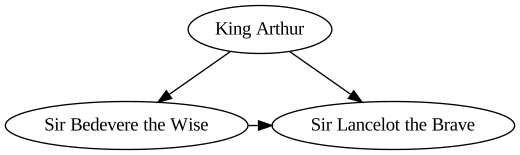
See also
pygraphviz – full-blown interface wrapping the Graphviz C library with SWIG
graphviz-python – official Python bindings (documentation)
pydot – stable pure-Python approach, requires pyparsing
License
This package is distributed under the MIT license.
Development
Development documentation: https://graphviz.readthedocs.io/en/latest/development.html
Release process: https://graphviz.readthedocs.io/en/latest/release_process.html
Release history Release notifications | RSS feed


Download files
Download the file for your platform. If you're not sure which to choose, learn more about installing packages.
Source Distribution
Built Distribution
Hashes for graphviz-0.19.2-py3-none-any.whl
| Algorithm | Hash digest | |
|---|---|---|
| SHA256 | c0a6ac9fadaa308c4ab0d526749c6e127425ec5a76644bbb03e2e04b19a9da9f |
|
| MD5 | ee259b7f204ea2d6c4e9796fdad65792 |
|
| BLAKE2b-256 | f85fb8cf4337122a0ec9478e85ae7190ccaa3f99960136674b68af41e4d80835 |







