
Project to generate recipes for conda packages.

Project description
Grayskull












"Skeletonr's main goal is to conquer the mysterious fortress of Castle Grayskull, from which He-Man draws his powers. If he succeeds, Skeletor would be able to conquer not only Eternia, but the whole universe."
Adapted from Wikipedia. Image credits: https://he-man.fandom.com
Introduction
Grayskull is an automatic conda recipe generator.
The main goal of this project is to generate concise recipes
for conda-forge.
The Grayskull project was created with the intention to eventually replace conda skeleton.
Presently Grayskull can generate recipes for Python packages available on PyPI and also those not published on PyPI but available as GitHub repositories.
Future versions of Grayskull will support recipe generation for packages of other repositories such as CRAN and Conan etc..
Installation
It is possible to install this project using pip:
pip install grayskull
or conda, using the conda-forge channel:
conda install -c conda-forge grayskull
It is also possible to clone this repo and install it using pip:
git clone https://github.com/conda-incubator/grayskull.git
cd grayskull
pip install -e .
Usage
It is pretty simple to use grayskull. Just call it, pass the repository
(just pypi for now) and the package name.
- Example:
grayskull pypi pytest
After that grayskull will create a folder with the same name as the package
and inside this folder the generated recipe will be present (meta.yaml).
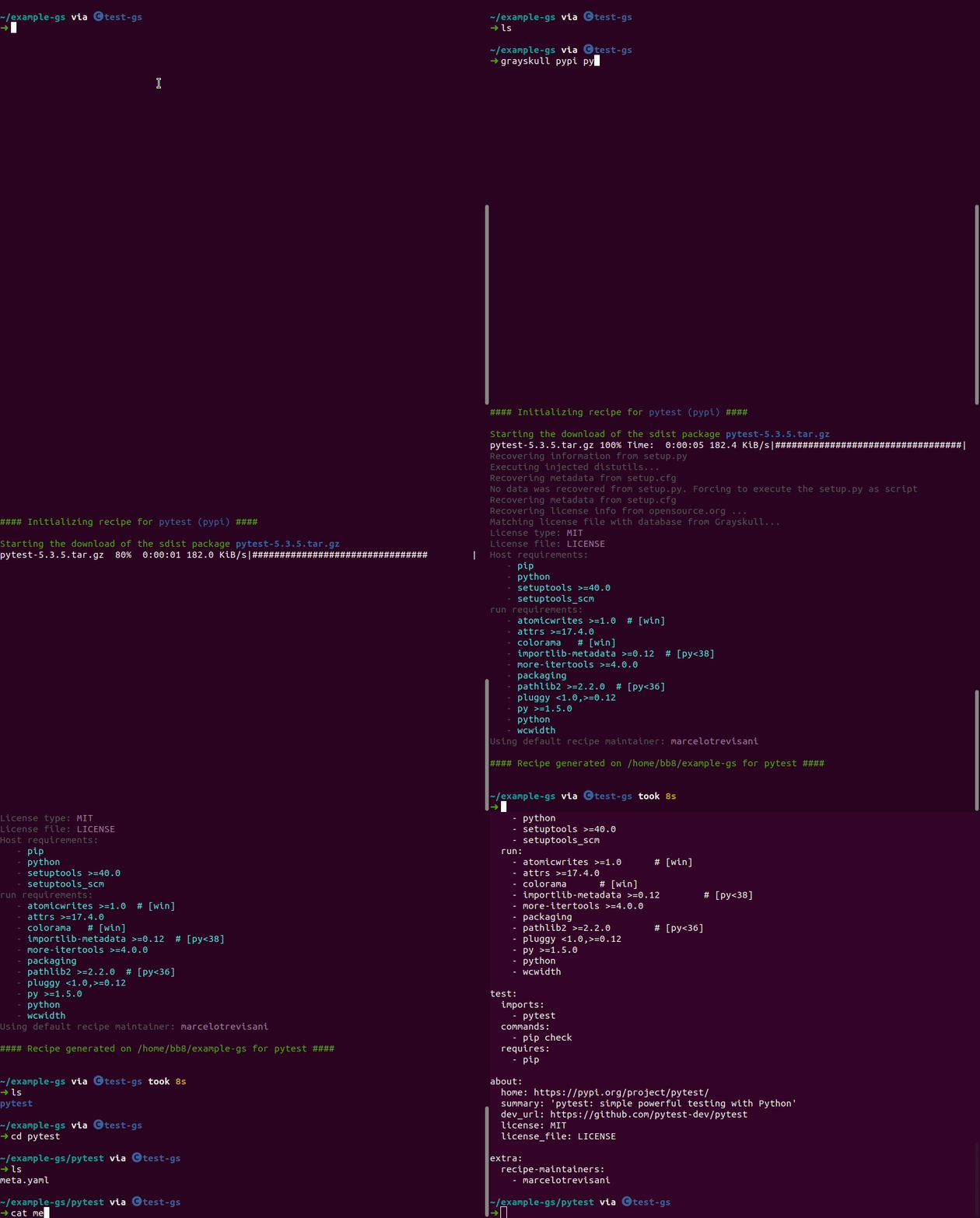
- Example with
pytest(grayskull pypi pytest):
If your package is a GitHub repository just replace the package name with the GitHub repository URL.
For example:
grayskull pypi https://github.com/confluentinc/confluent-kafka-python
You can also generate a recipe from a local sdist archive:
grayskull pypi ./pytest-5.3.5.tar.gz
Note that such a recipe isn't really portable as it will depend on the local path of the sdist file. It can be useful if you want to automatically generate a conda package.
Online Grayskull
It is also possible to use Grayskull without any installation. You can go to this website marcelotrevisani.com/grayskull and inform the name and the version (optional) of the package and it will create the recipe for you.
License
Copyright Marcelo Duarte Trevisani and contributors, 2020-2022.
Distributed under the terms of the Apache 2.0 license, grayskull is free and open source software.
Release history Release notifications | RSS feed


Download files
Download the file for your platform. If you're not sure which to choose, learn more about installing packages.
Source Distribution
Built Distribution
Filter files by name, interpreter, ABI, and platform.
If you're not sure about the file name format, learn more about wheel file names.
Copy a direct link to the current filters
File details
Details for the file grayskull-1.8.2.tar.gz.
File metadata
- Download URL: grayskull-1.8.2.tar.gz
- Upload date:
- Size: 2.0 MB
- Tags: Source
- Uploaded using Trusted Publishing? No
- Uploaded via: twine/4.0.1 CPython/3.7.13
File hashes
| Algorithm | Hash digest | |
|---|---|---|
| SHA256 |
67a49852b2743031442fedfb65617609046933273dbb096888909b282f9503cb
|
|
| MD5 |
8356f6827588976a6d04dad2aa0aca36
|
|
| BLAKE2b-256 |
76796481eb663f6ac1d9dff06015b2ceeb255f67f779c5c6be34baa81a637f2c
|
File details
Details for the file grayskull-1.8.2-py3-none-any.whl.
File metadata
- Download URL: grayskull-1.8.2-py3-none-any.whl
- Upload date:
- Size: 170.9 kB
- Tags: Python 3
- Uploaded using Trusted Publishing? No
- Uploaded via: twine/4.0.1 CPython/3.7.13
File hashes
| Algorithm | Hash digest | |
|---|---|---|
| SHA256 |
755e86a6f4d0a651de41044ae9e97bd6657345f11083233b313bd79ff3c2caca
|
|
| MD5 |
942eaad187aaae9c8dc87b56f59a504a
|
|
| BLAKE2b-256 |
eb1f0aff93f9f08e3c2a6454c44eb8dbde7dffbfde26f4516f112a1ad8e9e0aa
|






