
An image processing utility which provides options for generating thumbnails for various social media platforms.

Project description
Image Titler

The Image Titler is a tool which provides options for generating thumbnails for various social media platforms. Currently, the tool has a predefined style which looks roughly like the following image:
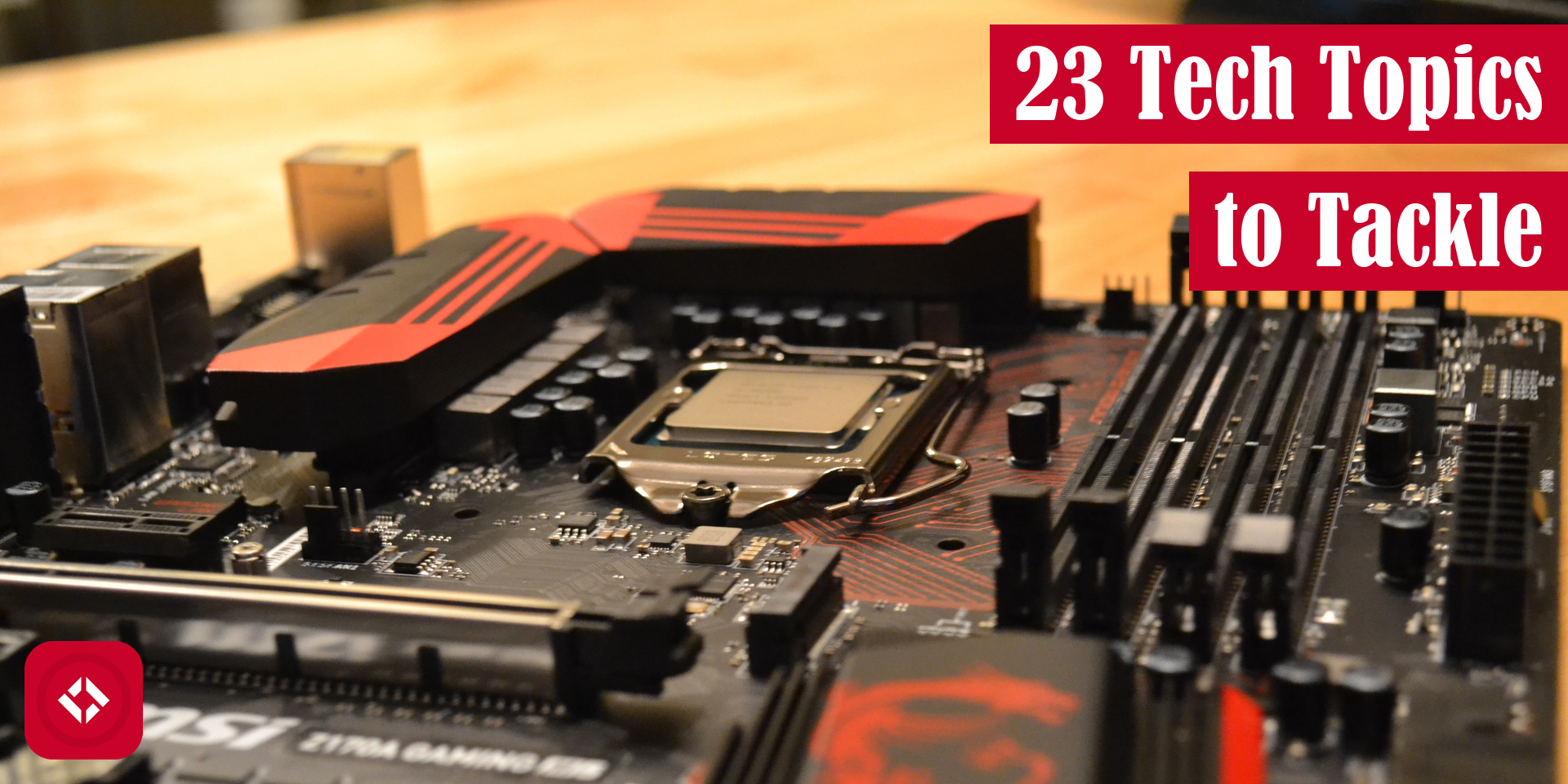
To see more examples, check out our list of samples.
How to Run
The following code snippet demonstrates a few ways you might use the script:
pip install image-titler # Installs the script

image-titler # Runs as default
image-titler --title "Hello, World!"  # Adds a custom title
image-titler --output_path "path/to/output"  # Sets the output path
image-titler --path "path/to/image"  # Sets the image path
image-titler --tier "free"  # Sets the membership tier which changes the rectangle borders
image-titler --logo_path "path/to/logo"  # Adds a 145x145 logo to the lower left corner of the image
image-titler --batch  # Runs the program in batch mode on a directory
image-titler --font "path/to/font"  # Changes the default title font
image-titler --size YouTube  # Changes the aspect ratio of the output file
image-titler --no_title  # Do not add title
Alternatively, you can spin up the GUI version of the software as of 2.0.0 as follows:
image-titler-gui

# Options can be used to preload GUI as of 2.2.0
image-titler-gui --title "Hello, World!"  # Adds a custom title
image-titler-gui --output_path "path/to/output"  # Sets the output path
image-titler-gui --path "path/to/image"  # Sets the image path
image-titler-gui --tier "free"  # Sets the membership tier which changes the rectangle borders
image-titler-gui --logo_path "path/to/logo"  # Adds a 145x145 logo to the lower left corner of the image
image-titler-gui --batch  # Runs the program in batch mode on a directory
image-titler-gui --font "path/to/font"  # Changes the default title font
image-titler-gui --size YouTube  # Changes the aspect ratio of the output file
image-titler-gui --no_title  # Do not add title
Default Behavior
Currently, the image-titler script makes a few assumptions about the images it processes automatically:
- This tool scrapes file names for image titles. To do this, it assumes file names are written in kebab-case where each word is separated by a hyphen. Then, words are extracted and title cased before being printed on the image.
- The color of the title bars defaults to The Renegade Coder Red (201, 2, 41, 255). If you'd like a different color, the script automatically extracts the most dominant color from logos. At this time, there is no way to customize bar color.
- Added elements have fixed position. Logos will always appear in the bottom left. Titles will always appear in the top right.
There are likely other default behaviors not documented here. Feel free to experiment with the tool and share any issues you find.
Full List of Options
Here's a description of all the option used in the samples above.
| Option | Domain | Description |
|---|---|---|
| --batch, -b | True/False | Turns on batch processing |
| --font, -f | Any valid font file | Overrides the default title font |
| --logo_path, -l | Any valid image file | Loads a logo onto the input image |
| --output_path, -o | Any valid directory | Determines where files will be saved (has no effect in GUI) |
| --path, -p | Any valid file or directory | Loads the input image (or directory when in batch mode) |
| --size, -s | Choose between "Twitter", "WordPress", and "YouTube" | Sets the aspect ratio of the output image |
| --tier, -r | Choose between "free" (silver) or "premium" (gold) | Adds a border color to the title |
| --title, -t | Any string | Overrides the automatic title feature |
| --no_title, -n | Do not add title |
Python Version Compatibility
As this utility has grown and changed, it has also changed its support for different versions of Python.
| Python | 3.12 | 3.11 | 3.10 | 3.9 | 3.8 |
|---|---|---|---|---|---|
| image-titler >= 2.5 | yes | yes | |||
| image-titler 1.8 - 2.4 | yes | yes | yes | ||
| image-titler <= 1.8 |
Release history Release notifications | RSS feed


Download files
Download the file for your platform. If you're not sure which to choose, learn more about installing packages.
Source Distribution
Built Distribution
Filter files by name, interpreter, ABI, and platform.
If you're not sure about the file name format, learn more about wheel file names.
Copy a direct link to the current filters
File details
Details for the file image_titler-2.5.0.tar.gz.
File metadata
- Download URL: image_titler-2.5.0.tar.gz
- Upload date:
- Size: 8.3 MB
- Tags: Source
- Uploaded using Trusted Publishing? No
- Uploaded via: poetry/1.7.0 CPython/3.11.7 Linux/6.2.0-1018-azure
File hashes
| Algorithm | Hash digest | |
|---|---|---|
| SHA256 |
e8bcd76cb42adcba14f2089ecab5625c000d38abf4315a0c585ceda00b8f1716
|
|
| MD5 |
ff258efdd199539070036416a7bbb59f
|
|
| BLAKE2b-256 |
6c2c4f84b7d5ac51b1407ee553979e57ee24941045ce1b4b579a48a068e97ea3
|
File details
Details for the file image_titler-2.5.0-py3-none-any.whl.
File metadata
- Download URL: image_titler-2.5.0-py3-none-any.whl
- Upload date:
- Size: 8.3 MB
- Tags: Python 3
- Uploaded using Trusted Publishing? No
- Uploaded via: poetry/1.7.0 CPython/3.11.7 Linux/6.2.0-1018-azure
File hashes
| Algorithm | Hash digest | |
|---|---|---|
| SHA256 |
ea6dc18375cedfa3da581a38f0c750148a2b00673ce954fa06afc80870d694a2
|
|
| MD5 |
d22f7f9685fa9a61fa3a93291d60b143
|
|
| BLAKE2b-256 |
b7cb1942b782c007da9b3f26d683a56d9feafb390b873d1fb3e846a6250abbf6
|






