
RDBMS access via IPython

Project description
Introduces a %sql (or %%sql) magic.
Connect to a database, using SQLAlchemy connect strings, then issue SQL commands within IPython or IPython Notebook.
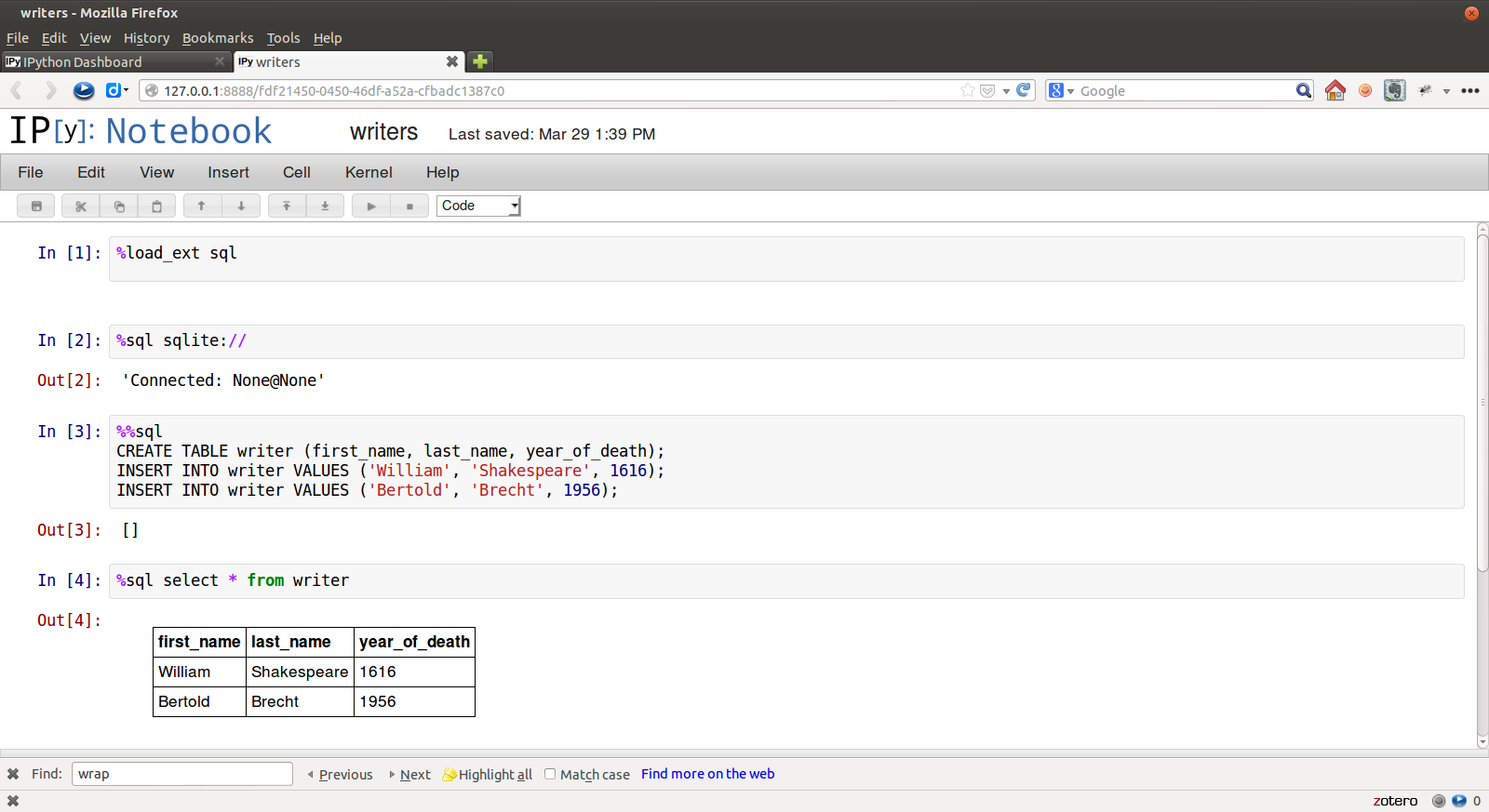
Examples:
In [1]: %load_ext sql

In [2]: %%sql postgres://will:longliveliz@localhost/shakes
   ...: select * from character
   ...: where abbrev = 'ALICE'
   ...:
Out[2]: [(u'Alice', u'Alice', u'ALICE', u'a lady attending on Princess Katherine', 22)]

In [3]: result = _

In [4]: print(result)
charid   charname   abbrev                description                 speechcount
=================================================================================
Alice    Alice      ALICE    a lady attending on Princess Katherine   22

In [4]: result.keys
Out[5]: [u'charid', u'charname', u'abbrev', u'description', u'speechcount']

In [6]: result[0][0]
Out[6]: u'Alice'

In [7]: result[0].description
Out[7]: u'a lady attending on Princess Katherine'
After the first connection, connect info can be omitted:
In [8]: %sql select count(*) from work
Out[8]: [(43L,)]
Connections to multiple databases can be maintained. You can refer to an existing connection by username@database:
In [9]: %%sql will@shakes
   ...: select charname, speechcount from character
   ...: where  speechcount = (select max(speechcount)
   ...:                       from character);
   ...:
Out[9]: [(u'Poet', 733)]

In [10]: print(_)
charname   speechcount
======================
Poet       733
You may use multiple SQL statements inside a single cell, but you will only see any query results from the last of them, so this really only makes sense for statements with no output:
In [11]: %%sql sqlite://
   ....: CREATE TABLE writer (first_name, last_name, year_of_death);
   ....: INSERT INTO writer VALUES ('William', 'Shakespeare', 1616);
   ....: INSERT INTO writer VALUES ('Bertold', 'Brecht', 1956);
   ....:
Out[11]: []
Connecting
Connection strings are SQLAlchemy standard.
Some example connection strings:
mysql+pymysql://scott:tiger@localhost/foo
oracle://scott:tiger@127.0.0.1:1521/sidname
sqlite://
sqlite:///foo.db
Configuration
Query results are loaded as lists, so very large result sets may use up your system’s memory. There is no autolimit by default.
You can set an autolimit by adding this to your ipython_config.py file:
c.SqlMagic.autolimit = 1000
You can similarly change the table printing style to any of prettytable’s defined styles (currently DEFAULT, MSWORD_FRIENDLY, PLAIN_COLUMNS, RANDOM):
c.SqlMagic.style = 'PLAIN_COLUMNS'
You can create and find your ipython_config.py file from the command line:
ipython profile create
ipython locate profile
See http://ipython.org/ipython-doc/stable/config/overview.html#configuration-objects-and-files for more details on IPython configuration.
Pandas
Once your data is in IPython, you may want to manipulate it with Pandas:
In [3]: import pandas as pd

In [4]: result = %sql SELECT * FROM character WHERE speechcount > 25

In [5]: dataframe = pd.DataFrame(result, columns=result.keys)
Development
Credits
Matthias Bussonnier for help with configuration
News
0.1
Release date: 21-Mar-2013
Initial release
0.1.1
Release date: 29-Mar-2013
Release to PyPI
Results returned as lists
print(_) to get table form in text console
set autolimit and text wrap in configuration
0.1.2
Release date: 29-Mar-2013
Python 3 compatibility
use prettyprint package
allow multiple SQL per cell
Release history Release notifications | RSS feed


Download files
Download the file for your platform. If you're not sure which to choose, learn more about installing packages.
Source Distribution
Built Distributions
Filter files by name, interpreter, ABI, and platform.
If you're not sure about the file name format, learn more about wheel file names.
Copy a direct link to the current filters
File details
Details for the file ipython-sql-0.1.2.2.tar.gz.
File metadata
- Download URL: ipython-sql-0.1.2.2.tar.gz
- Upload date:
- Size: 5.6 kB
- Tags: Source
- Uploaded using Trusted Publishing? No
File hashes
| Algorithm | Hash digest | |
|---|---|---|
| SHA256 |
25e5681185fea439e8fb7829c78d08c7ca8b0af5157bf74b2a497c9144d24d01
|
|
| MD5 |
1c9735093197a7bd05824692a9171c1b
|
|
| BLAKE2b-256 |
9e697f5d210cb3957bcc14598dfe190fa54a8b40560bcb12d7c01586f61c3c08
|
File details
Details for the file ipython_sql-0.1.2.2-py3.2.egg.
File metadata
- Download URL: ipython_sql-0.1.2.2-py3.2.egg
- Upload date:
- Size: 10.3 kB
- Tags: Egg
- Uploaded using Trusted Publishing? No
File hashes
| Algorithm | Hash digest | |
|---|---|---|
| SHA256 |
2aac3235d09a36b244f40d5c9eb8b4a9ffa2ab6bafd4ae2c3e470bf6d811954f
|
|
| MD5 |
f7010b37be22d809cc5204cdcf154d0e
|
|
| BLAKE2b-256 |
29e9a5736811dc942f99a61e10b21cb36388c8bbc13c0f5369ce88ecd89a4cf4
|
File details
Details for the file ipython_sql-0.1.2.2-py2.7.egg.
File metadata
- Download URL: ipython_sql-0.1.2.2-py2.7.egg
- Upload date:
- Size: 10.0 kB
- Tags: Egg
- Uploaded using Trusted Publishing? No
File hashes
| Algorithm | Hash digest | |
|---|---|---|
| SHA256 |
2ba51bc2a654f9fc4413924cee8e7e70a96a0d399541e9f8a295d2bf52919a9e
|
|
| MD5 |
d226913c3f41c7194bccb600657553f8
|
|
| BLAKE2b-256 |
01bf49a11dad4f607c08295daf5cf69d4a6938fc86c83bc6154f2429ab4107a1
|
File details
Details for the file ipython_sql-0.1.2.2-py2.6.egg.
File metadata
- Download URL: ipython_sql-0.1.2.2-py2.6.egg
- Upload date:
- Size: 10.1 kB
- Tags: Egg
- Uploaded using Trusted Publishing? No
File hashes
| Algorithm | Hash digest | |
|---|---|---|
| SHA256 |
435de8861aa7e9beba1c7bea4ae73836484e29fe4187114b7a3e67bd21abe6b2
|
|
| MD5 |
0e086bdd98a9b03539392de2856aa18a
|
|
| BLAKE2b-256 |
9849d8e4f68058f00d2030bc7c7b181fa59bf05c540f147b4b680bbd310046e0
|






