
jobflow is a library for writing computational workflows

Project description
jobflow



Documentation | PyPI | GitHub
Jobflow is a free, open-source library for writing and executing workflows. Complex workflows can be defined using simple python functions and executed locally or on arbitrary computing resources using the FireWorks workflow manager.
Some features that distinguish jobflow are dynamic workflows, easy compositing and connecting of workflows, and the ability to store workflow outputs across multiple databases.
Is jobflow for me
jobflow is intended to be a friendly workflow software that is easy to get started with, but flexible enough to handle complicated use cases.
Some of its features include:
- A clean and flexible Python API.
- A powerful approach to compositing and connecting workflows — information passing between jobs is a key goal of jobflow. Workflows can be nested allowing for a natural way to build complex workflows.
- Integration with multiple databases (MongoDB, S3, GridFS, and more) through the Maggma package.
- Support for the FireWorks workflow management system, allowing workflow execution on multicore machines or through a queue, on a single machine or multiple machines.
- Support for dynamic workflows — workflows that modify themselves or create new ones based on what happens during execution.
Workflow model
Workflows in jobflows are made up of two main components:
- A
Jobis an atomic computing job. Essentially any python function can beJob, provided its input and return values can be serialized to json. Anything returned by the job is considered an "output" and is stored in the jobflow database. - A
Flowis a collection ofJobobjects or otherFlowobjects. The connectivity between jobs is determined automatically from the job inputs. The execution order of jobs is automatically determined based on their connectivity.
Python functions can be easily converted in to Job objects using the @job decorator.
In the example below, we define a job to add two numbers.
from jobflow import job, Flow

@job
def add(a, b):
    return a + b

add_first = add(1, 5)
add_second = add(add_first.output, 5)

flow = Flow([add_first, add_second])
flow.draw_graph().show()
The output of the job is accessed using the output attribute. As the job has not
yet been run, output contains be a reference to a future output. Outputs can be used
as inputs to other jobs and will be automatically "resolved" before the job is
executed.
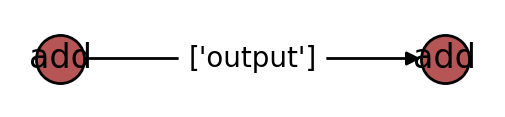
Finally, we created a flow using the two Job objects. The connectivity between
the jobs is determined automatically and can be visualised using the flow graph.
Installation
The jobflow is a Python 3.8+ library and can be installed using pip.
pip install jobflow
Quickstart and tutorials
To get a first glimpse of jobflow, we suggest that you follow our quickstart tutorial. Later tutorials delve into the advanced features of jobflow.
Need help?
Ask questions about jobflow on the jobflow support forum. If you've found an issue with jobflow, please submit a bug report on GitHub Issues.
What’s new?
Track changes to jobflow through the changelog.
Contributing
We greatly appreciate any contributions in the form of a pull request. Additional information on contributing to jobflow can be found here. We maintain a list of all contributors here.
License
jobflow is released under a modified BSD license; the full text can be found here.
Acknowledgements
Jobflow was designed by Alex Ganose, Anubhav Jain, Gian-Marco Rignanese, David Waroquiers, and Guido Petretto. Alex Ganose implemented the first version of the package. Later versions have benefited from the contributions of several research groups. A full list of contributors is available here.
Release history Release notifications | RSS feed


Download files
Download the file for your platform. If you're not sure which to choose, learn more about installing packages.
Source Distribution
Built Distribution
Filter files by name, interpreter, ABI, and platform.
If you're not sure about the file name format, learn more about wheel file names.
Copy a direct link to the current filters
File details
Details for the file jobflow-0.1.14.tar.gz.
File metadata
- Download URL: jobflow-0.1.14.tar.gz
- Upload date:
- Size: 51.3 kB
- Tags: Source
- Uploaded using Trusted Publishing? No
- Uploaded via: twine/4.0.2 CPython/3.11.5
File hashes
| Algorithm | Hash digest | |
|---|---|---|
| SHA256 |
f414600d9bb76b910d13952bf61a31d0151648ecd647067dafe6e19d9127d577
|
|
| MD5 |
af657529c36ea978204e4a80364f5610
|
|
| BLAKE2b-256 |
6e19927056bbdfebb2d32528499a3dca1705eca854f4ae0c81f43af736302af9
|
File details
Details for the file jobflow-0.1.14-py3-none-any.whl.
File metadata
- Download URL: jobflow-0.1.14-py3-none-any.whl
- Upload date:
- Size: 54.6 kB
- Tags: Python 3
- Uploaded using Trusted Publishing? No
- Uploaded via: twine/4.0.2 CPython/3.11.5
File hashes
| Algorithm | Hash digest | |
|---|---|---|
| SHA256 |
18e7d96fe9b6d09d8cabe590a9d78b1d6d12fe335aaeaaaeb30a966161244836
|
|
| MD5 |
7102e40c3d7fde1d3fc83be2e3a9831d
|
|
| BLAKE2b-256 |
14311c248b24ea12993bcc324741a3057279060015282f4ca642fa63445062f5
|






