
A Command-Line tool to download manga from MangaDex, written in Python

Project description



mangadex-downloader
A command-line tool to download manga from MangaDex, written in Python.
Key Features
- Download manga, chapter, or list directly from MangaDex
- Old MangaDex url support
- Scanlation groups filter support
- Authentication support
- Control how many chapters and pages you want to download
- Compressed images support
- HTTP / SOCKS proxy support
- Multi languages support
- Save as raw images, PDF, Comic Book Archive (.cbz) or Tachiyomi local manga
And ability to not download oneshot chapter
Supported formats
mangadex-downloader can download in different formats, here a list of supported formats.
- raw
- raw-volume
- raw-single
- tachiyomi
- tachiyomi-zip
- pdf-volume
- pdf-single
- cbz
- cbz-volume
- cbz-single
For more info about supported formats, you can read here
Installation
What will you need:
- Python 3.8.x or up with Pip (if you are in Windows, you can download bundled executable here)
That's it.
How to (PyPI)
Installing mangadex-downloader is easy, as long as you have requirements above.
# For Windows
py -3 -m install mangadex-downloader

# For Linux / Mac OS
python3 -m pip install mangadex-downloader
You can also install optional dependencies
- Pillow, for PDF support
There you go, easy ain't it ?.
How to (bundled executable)
NOTE: This installation only apply to Windows.
Because this is bundled executable, Python are not required to install.
Steps:
- Download latest version here -> https://github.com/mansuf/mangadex-downloader/releases
- Extract it.
- And, run it !.
How to (Development version)
NOTE: You must have git installed. If you don't have it, install it from here https://git-scm.com/.
git clone https://github.com/mansuf/mangadex-downloader.git
cd mangadex-downloader
Usage
Command-Line Interface (PyPI version)
mangadex-dl "insert MangaDex URL here"
# or
mangadex-downloader "insert MangaDex URL here"

# Use this if "mangadex-dl" or "mangadex-downloader" didn't work

# For Windows
py -3 -m mangadex_downloader "insert MangaDex URL here"

# For Linux / Mac OS
python3 -m mangadex_downloader "insert MangaDex URL here"
Command-Line Interface (bundled executable version)
- Navigate to folder where you downloaded mangadex-downloader
- Open "start cmd.bat" (don't worry it's not a virus, it will open a command prompt)
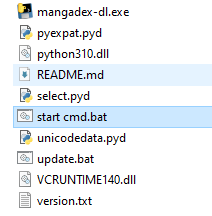
- And then start using mangadex-downloader, see example below:
mangadex-dl.exe "insert MangaDex URL here"
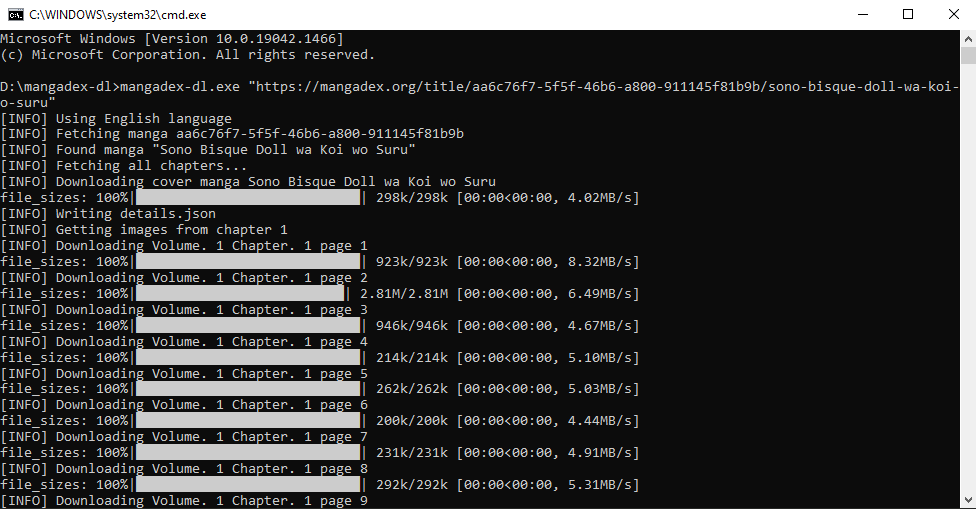
For more example usage, you can read here
For more info about CLI options, you can read here
Embedding (API)
from mangadex_downloader import download

download("insert MangaDex URL here")
For more information, you can read here
Release history Release notifications | RSS feed


Download files
Download the file for your platform. If you're not sure which to choose, learn more about installing packages.
Source Distribution
Built Distribution
Filter files by name, interpreter, ABI, and platform.
If you're not sure about the file name format, learn more about wheel file names.
Copy a direct link to the current filters
File details
Details for the file mangadex-downloader-1.0.0.tar.gz.
File metadata
- Download URL: mangadex-downloader-1.0.0.tar.gz
- Upload date:
- Size: 45.2 kB
- Tags: Source
- Uploaded using Trusted Publishing? No
- Uploaded via: twine/4.0.0 CPython/3.9.12
File hashes
| Algorithm | Hash digest | |
|---|---|---|
| SHA256 |
21f7a0f1136a1338c596dcd343b326fca16fe6f10ff6147ce0ab2b9b8860dedc
|
|
| MD5 |
83434bb82574c346cea076ad27435f8d
|
|
| BLAKE2b-256 |
4b8f1ca2043ffb019819009cadf7fd279a6d0b3e3fae2c2cadcff9f09b6c317d
|
File details
Details for the file mangadex_downloader-1.0.0-py3-none-any.whl.
File metadata
- Download URL: mangadex_downloader-1.0.0-py3-none-any.whl
- Upload date:
- Size: 56.2 kB
- Tags: Python 3
- Uploaded using Trusted Publishing? No
- Uploaded via: twine/4.0.0 CPython/3.9.12
File hashes
| Algorithm | Hash digest | |
|---|---|---|
| SHA256 |
cdb9e00b201eb7ee01917cb22f4fbbeadb3963f4913a01b6c03f63e8d844a2d8
|
|
| MD5 |
c2b8ae844359d9f646b94a0eec0bdb9a
|
|
| BLAKE2b-256 |
a9a0be9fc9c363dc5c9ff4d91d25218303f6d7f058b58310795282b6246ab234
|






