
A pure Python MapFile parser for working with MapServer

Project description






A pure Python parser for working with MapServer MapFiles, built using Lark. mappyfile is an official OSGeo Community Project.

mappyfile is used for formatting and validation in https://app.mapserverstudio.net/, and can be tested for free on any of your Mapfiles. If you find mappyfile useful please consider signing up for a professional account at https://mapserverstudio.net/. This will help to fund maintenance and further development of both mappyfile and MapServer.
Requirements
Python 3.8 or higher
Installation
mappyfile is available on PyPI (the Python Package Index), and can be installed using pip:
pip install mappyfileThis will also install its required dependencies - Lark, and jsonschema.
To install the optional lark-cython library for better performance on CPython you can run the following command:
pip install mappyfile[lark_cython]mappyfile is also available on conda. Install as follows:
conda install -c conda-forge mappyfileDocumentation
Full documentation is available at http://mappyfile.readthedocs.io/en/latest/
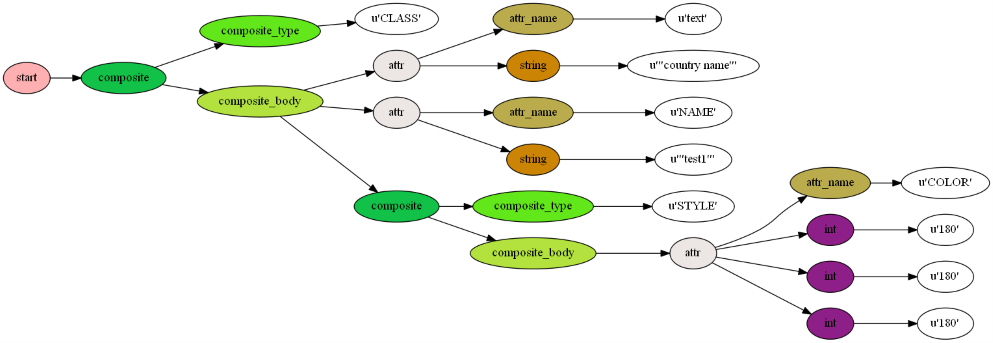
Usage
From within Python scripts:
import mappyfile

mapfile = mappyfile.open("./docs/examples/raster.map")

# update the map name
mapfile["name"] = "MyNewMap"

new_layer_string = """
LAYER
    NAME 'land'
    TYPE POLYGON
    DATA '../data/vector/naturalearth/ne_110m_land'
    CLASS
        STYLE
            COLOR 107 208 107
            OUTLINECOLOR 2 2 2
            WIDTH 1
        END
    END
END
"""

layers = mapfile["layers"]

new_layer = mappyfile.loads(new_layer_string)

layers.insert(0, new_layer) # insert the new layer at any index in the Mapfile

for l in layers:
    print("{} {}".format(l["name"], l["type"]))

print(mappyfile.dumps(mapfile, indent=1, spacer="\t"))
Three command line tools are available - format, validate, and schema:
mappyfile format raster.map formatted_raster.map
mappyfile validate D:\ms-ogc-workshop\ms4w\apps\ms-ogc-workshop\**\*.map
mappyfile schema mapfile-schema-8-0.json --version=8.0Contributors
Julien Enselme @jenselme
Loïc Gasser @loicgasser
Ian Turton @ianturton
TC Haddad @tchaddad (Conda support)
Release history Release notifications | RSS feed


Download files
Download the file for your platform. If you're not sure which to choose, learn more about installing packages.
Source Distribution
Built Distribution
Filter files by name, interpreter, ABI, and platform.
If you're not sure about the file name format, learn more about wheel file names.
Copy a direct link to the current filters
File details
Details for the file mappyfile-1.0.1.tar.gz.
File metadata
- Download URL: mappyfile-1.0.1.tar.gz
- Upload date:
- Size: 108.1 kB
- Tags: Source
- Uploaded using Trusted Publishing? No
- Uploaded via: twine/5.0.0 CPython/3.10.11
File hashes
| Algorithm | Hash digest | |
|---|---|---|
| SHA256 |
9a846d04ded66a792138767a6a1f7bbf0807396a61550d18d1977a40aba6519c
|
|
| MD5 |
79e45f355586a1ffc32e9c067424e56a
|
|
| BLAKE2b-256 |
e7662ef1b8e44f029b7fbecb771ecb8371a9ae4e0197af783ad758b0e01e6fba
|
File details
Details for the file mappyfile-1.0.1-py2.py3-none-any.whl.
File metadata
- Download URL: mappyfile-1.0.1-py2.py3-none-any.whl
- Upload date:
- Size: 59.4 kB
- Tags: Python 2, Python 3
- Uploaded using Trusted Publishing? No
- Uploaded via: twine/5.0.0 CPython/3.10.11
File hashes
| Algorithm | Hash digest | |
|---|---|---|
| SHA256 |
fcb97bc1b32050cce217d113fffe72f817f0bdbfbc3cd7d11cf67e487a5be649
|
|
| MD5 |
70990657d31002fabac9e20f9c37d9b0
|
|
| BLAKE2b-256 |
df8a5aa4636bc344541d278fc999fe5dc1437f3c8ef7b601ed0c67fc05c74fe6
|






